Need help? Reach us at 

 +1 (855) 418-2323
Need help? Reach us at
+1 (855) 418-2323

 File Converters TIFF and PDF apps Forensic Freeware
Download Total CSV Converter and start creating PDF reports from CSV data today.
(includes 30 day FREE trial)
(only $49.90)
CSV (Comma-Separated Values) is a plain-text format where each line represents a row and values are separated by a delimiter. CSV files carry no formatting, no page layout, and no visual structure. They are the standard export format for databases, spreadsheets, and business applications — designed for data exchange, not presentation or printing.
PDF (Portable Document Format) is a fixed-layout format that looks identical on every screen and printer. PDFs have proper page dimensions, margins, fonts, and can include headers, footers, and page numbers. A PDF is the standard format for sharing finished reports, invoices, and printable documents.
When you convert CSV to PDF, the raw data is rendered into a paginated table with column headers, cell borders, and consistent formatting. The result is a professional-looking document that you can print, email, or archive — no spreadsheet software required to view it.

Each CSV file becomes a separate PDF document. Original CSV files remain untouched. You can also merge multiple CSV files into a single PDF — useful for combining monthly data exports into one consolidated report.
Total CSV Converter includes a command-line interface for converting CSV files without the GUI. Example:
CSVConverter.exe C:\Data\report.csv C:\Output\report.pdf -c PDF -SepChar ; -PageSize A4
You can wrap this command in a .bat file or a scheduled task to automate recurring conversions. This is ideal for generating nightly PDF reports from database exports — no manual intervention required.
 Professional PDF layout. Total CSV Converter renders CSV data into paginated tables with column headers, borders, and consistent formatting. The output looks like a proper report — not a raw data dump.
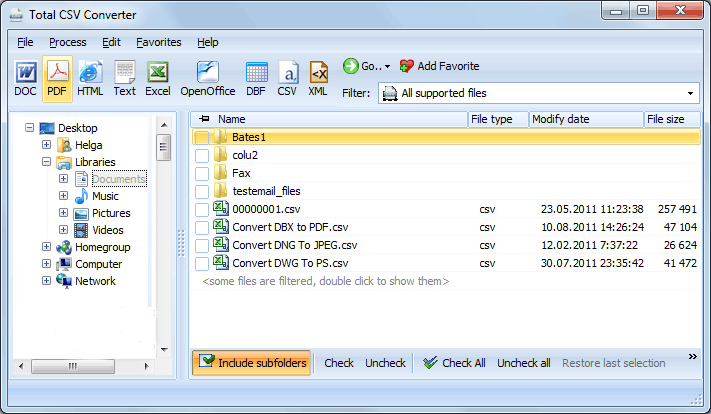
Batch processing. Select hundreds of CSV files and convert them all to PDF in a single run. Each file becomes a separate PDF, or merge them into one. No need to open files in Excel and print to PDF one by one.
Headers, footers, and page numbers. Add page numbers, dates, company name, or any custom text to every page of the output PDF. Control font, size, and position (left/center/right).
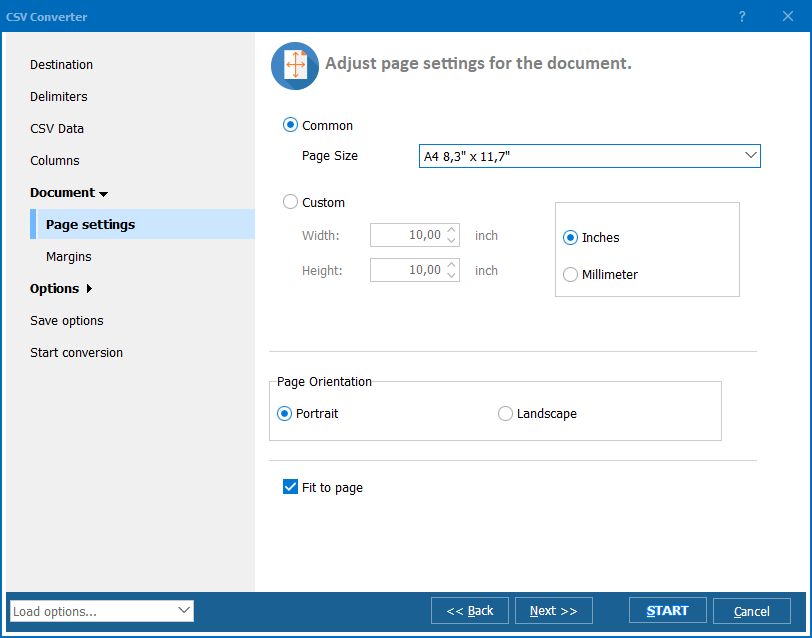
Page layout control. Set page size (A4, Letter, Legal, custom), orientation (portrait/landscape), and margins. Wide data sets can use landscape mode to fit more columns per page.
Smart delimiter detection. The converter auto-detects commas, semicolons, tabs, and pipes. You can also set the delimiter manually for non-standard files — ensuring every value lands in the correct column.
10+ output formats. Besides PDF, convert CSV files to XLS, XLSX, HTML, TXT, DBF, XML, JSON, and more — all from the same program.
| Feature | Online Tools | Total CSV Converter |
|---|---|---|
| File size limit | 5–50 MB typical | No limit |
| Batch conversion | One file at a time | Unlimited |
| Privacy | Files uploaded to cloud | 100% offline |
| Page layout | No control | Size, orientation, margins |
| Headers/footers | No | Custom text, page numbers, dates |
| Automation | Manual only | Built-in command line |
| Pricing | Subscription or per-file | One-time $49.90 |

(includes 30 day FREE trial)
(only $49.90)
"Every week I export shipping logs as CSV and convert them to PDF reports for management. Total CSV Converter handles thousands of rows without breaking the layout. Headers, page numbers, and formatting are all automatic."
 James Patterson Operations Manager
"Our invoicing system exports CSV files that I need to archive as PDF. The batch mode converts an entire month of invoices in under a minute. The PDFs look clean and are fully searchable."
Maria Gonzalez Accountant
"Reliable converter for turning raw CSV data into presentable PDFs. I use the command line version in a nightly script. Page orientation and font size options are useful. Would love custom column width control."
 Kevin Brooks Data Analyst
Download free trial and convert your files in minutes.
No credit card or email required.