Need help? Reach us at 

 +1 (855) 418-2323
Need help? Reach us at
+1 (855) 418-2323

 File Converters TIFF and PDF apps Forensic Freeware
Download Total HTML Converter and start extracting web data into Excel.
(includes 30 day FREE trial)
(only $49.90)
HTM/HTML (HyperText Markup Language) is the standard format for web pages. It structures content with tags for text, images, links, and tables. HTML tables display data in rows and columns inside a browser, but the data is embedded in markup — you cannot sort, filter, or calculate values directly. Extracting numbers from an HTML table into a usable format requires either manual copying or a conversion tool.
XLS (Excel Binary Workbook) is the classic spreadsheet format used by Microsoft Excel. Each cell stores a value, formula, or formatted text. XLS files support sorting, filtering, pivot tables, charts, and formulas — everything needed for data analysis. XLS is compatible with Excel 97–2003 and remains widely used for data exchange in business environments.
The key difference is purpose. HTML presents data visually in a browser. XLS stores data in a structured grid for calculation and analysis. Converting HTM to XLS moves tabular data from a display-only format into a format designed for working with numbers.
| Feature | HTM/HTML | XLS |
|---|---|---|
| Primary use | Display in browser | Data analysis in Excel |
| Formulas | Not supported | Full formula support |
| Sorting & filtering | Not possible | Built-in |
| Charts | Requires JavaScript | Native chart support |
| Data editing | Requires HTML editor | Direct cell editing |
| File structure | Plain text with tags | Binary workbook |

The resulting XLS files contain the table data from the source HTML pages, structured into Excel cells that you can immediately sort, filter, and use in formulas.
Total HTML Converter includes a command-line interface for scripted and automated workflows. Convert a single HTM file to XLS:
HTMLConverter.exe C:\Pages\report.htm C:\Output\report.xls -c XLS
Convert an entire folder of HTML files:
HTMLConverter.exe C:\Pages\*.htm C:\Output\ -c XLS
Schedule this in a .bat script or Windows Task Scheduler to extract web data into Excel automatically — useful for regular report imports, price list updates, and data pipeline automation.
The converter reads HTML table markup and maps it directly to Excel cells. Row and column structure is preserved. Multi-row and multi-column spans translate to merged cells in the spreadsheet. You get editable data, not a static image.
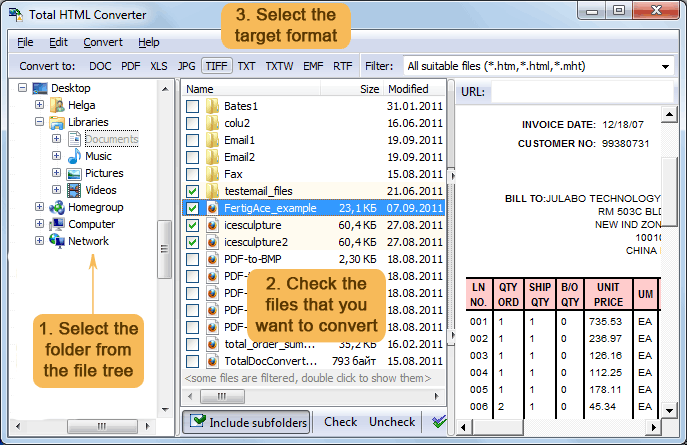
Select an entire folder of HTM files and convert them all to XLS in one run. The program handles hundreds of web pages without slowing down, producing one spreadsheet per source file.
Total HTML Converter parses CSS styles from the source pages. Fonts, colors, and cell backgrounds carry over to the XLS output where possible, keeping the data visually recognizable.
Beyond plain HTM files, the converter handles HTML, MHT (web archives), and XHTML. Select any combination and convert them all to XLS in one batch.
Besides XLS, Total HTML Converter exports HTML to PDF, DOC, TXT, TIFF, JPEG, ODT, RTF, XHTML, and more — all from the same tool.
All conversion runs locally on your PC. Internal reports, financial pages, client data — nothing is uploaded to external servers. No internet connection required.
| Feature | Online Tools | Total HTML Converter |
|---|---|---|
| File size limit | 5–25 MB | No limit |
| Batch conversion | One file at a time | Unlimited |
| Privacy | Files uploaded to cloud | 100% offline |
| Table extraction | Basic or broken | Full structure preserved |
| MHT/XHTML support | Rarely supported | All HTML variants |
| Automation | Manual only | Built-in command line |
| Pricing | Subscription or ads | One-time $49.90 |

(includes 30 day FREE trial)
(only $49.90)
"We scrape competitor pricing pages and save them as HTM files. This tool converts the entire batch to XLS in seconds. The HTML tables land in Excel cells perfectly, ready for pivot tables and charts. Replaced a fragile Python script that broke every time the page structure changed."
 Daniel Kovacs Business Intelligence Analyst
"Our ERP system exports reports as HTML files. Converting them to XLS with this tool saves my team from copying and pasting tables manually every week. The command-line mode runs on a schedule so the spreadsheets are ready every Monday morning."
Laura Pennington Operations Manager
"Solid tool for extracting data tables from archived web pages into Excel. Handles large files with dozens of tables without crashing. The only thing I would improve is an option to select which tables to extract when a page has many. Otherwise it does exactly what I need."
 Greg Tanaka Research Assistant
Download free trial and convert your files in minutes.
No credit card or email required.