|
Coolutils ConverterTotal HTML ConverterTotal PDF ConverterTotal Doc ConverterTotal Excel ConverterTotal CAD ConverterTotal CSV ConverterTotal XML ConverterTotal Mail ConverterTotal Outlook ConverterTotal Thunderbird ConverterOST to PST ConverterTotal Image ConverterTotal Audio ConverterTotal Movie Converter
|
 As long as old-time Microsoft Office versions are taking the backseat to new and seemingly user-friendlier versions, particularly Office 2007, the compatibility issue seems to be getting a little more acute. Not infrequently, older versions fail to open files created in new versions. For instance, XSLX will not open in XLS, although both are created in Microsoft Excel. This causes a lot of inconveniences when, for example, you have to send your files to your partner who is using an older pack. As long as old-time Microsoft Office versions are taking the backseat to new and seemingly user-friendlier versions, particularly Office 2007, the compatibility issue seems to be getting a little more acute. Not infrequently, older versions fail to open files created in new versions. For instance, XSLX will not open in XLS, although both are created in Microsoft Excel. This causes a lot of inconveniences when, for example, you have to send your files to your partner who is using an older pack.
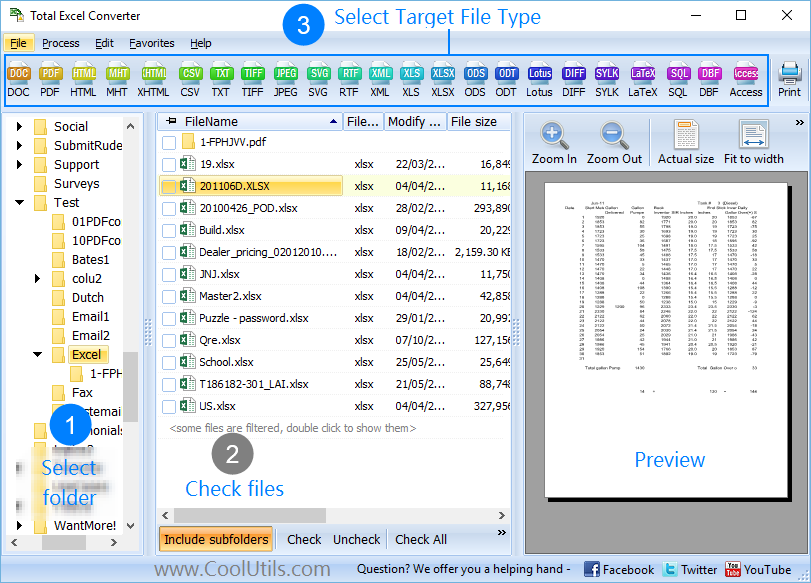
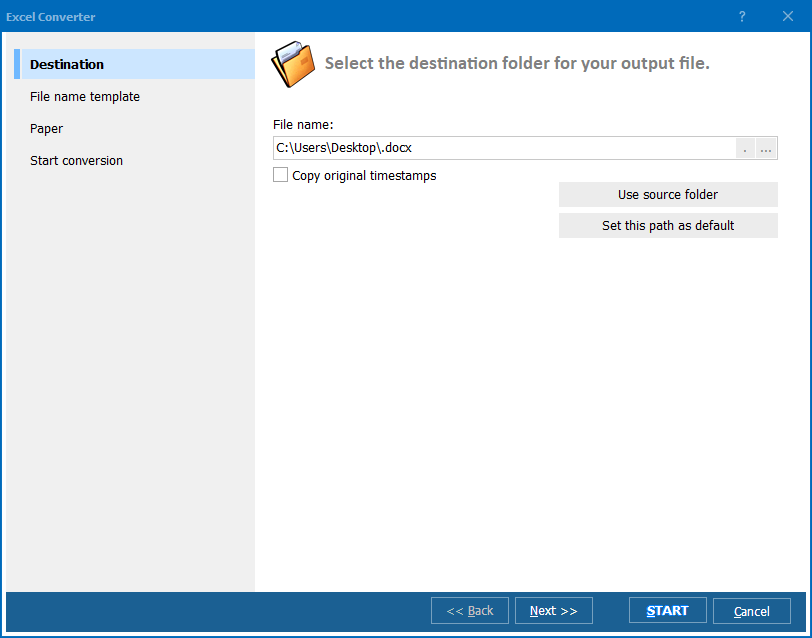
Luckily, software developers have come up with a unique utility that permits you to convert XLSX to XLS without Office Excel 2007. Total Excel Converter converts all kinds of tables, including those created in Excel, Excel 2007 and OpenOffice. It comes to help you when the choice of the right format makes all the difference in the world. Total Excel Converter has an intuitive user interface. You do not have to be a software connoisseur to learn how to handle it. All options are readily seen on the interface, and the wizard will guide you through the whole conversion process. This is the fastest XLSX converter you have ever worked with. All you have to do is run the program and select the folder with XLSX files. Then check one or more files you would like to convert and select XLS. With the help of batch function, you can convert hundreds of files with just one click of a button. To convert all the files contained in the folder, click Select All and specify the target format. With Total Excel Converter, you can manage files via command line or right from the desktop. Once installed, the program, integrates into Windows, and the Convert to option appears in the right-button popup menu. All you have to do is right-click on an XLSX file and select Convert to and choose XLS. You can purchase Total Excel Converter online right now. If you are not sure yet, download the free version and check it out. It is valid for 30 days, but indeed, it will take you less than 5 minutes to understand it! Related topicsTotal Excel ConverterXLSX to PDF Converter. Save time, it's easy. Convert XLSX to TIFF with Coolutils. Convert XLSX files to HTML for free Convert files XLSX to CSV in batches Convert XLSX to SQL automatically. Convert Excel file XLSX to XML Convert XLSX to DBF in batches professionally. Convert XLSX to JPEG with comfort How to convert XLSX files to Text? Convert XLSX to PDF Command Line
|
   |