¿Necesita ayuda? Contáctenos en 

 +1 (855) 418-2323
¿Necesita ayuda? Contáctenos en
+1 (855) 418-2323

 File Converters TIFF and PDF apps Forensic Freeware
¿Tienes un archivo PDF que necesitas convertir a texto? ¡Si es así, tienes suerte! En esta guía, te mostraremos cómo convertir PDF a texto usando el convertidor de CoolUtils. También discutiremos algunos de los beneficios de convertir tus archivos PDF a texto. Así que sin más preámbulos, ¡comencemos!
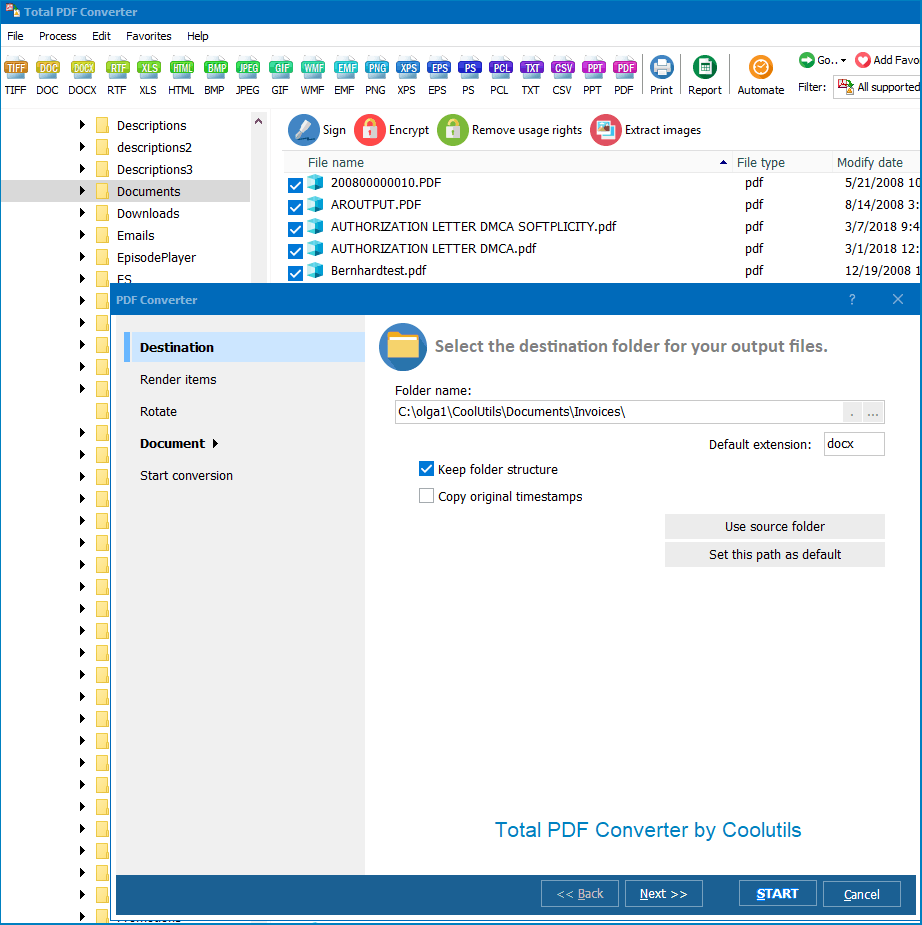

Hay muchos beneficios de convertir PDF a texto. Uno de ellos es que te permite editar tus archivos PDF mucho más fácilmente. También puedes buscar en tu documento palabras clave o frases específicas mucho más rápido cuando está en formato de texto. Además, convertir tus archivos PDF a texto puede ayudar a ahorrar espacio en tu computadora u otros dispositivos.
¡Esperamos que esta guía haya sido útil para mostrarte cómo convertir PDF a texto usando el convertidor de CoolUtils! Si tienes más preguntas, no dudes en comunicarte con nuestro equipo de soporte para obtener asistencia. ¡Gracias por elegir CoolUtils!
string src  = @"C:\test\Source.pdf";
string dest = @"C:\test\Dest.docx";

var cnv = new PDFConverterX();
cnv.Convert(src, dest, "-cDOC -log c:\\test\\PDF.log");

if (!string.IsNullOrEmpty(cnv.ErrorMessage))
    throw new Exception(cnv.ErrorMessage);
public static class Function1
    {
        [FunctionName("Function1")]
        public static async Task Run(
            [HttpTrigger(AuthorizationLevel.Anonymous, "get", "post", Route = null)] HttpRequest req,
            ILogger log)
        {
            StringBuilder sbLogs = new StringBuilder();
            sbLogs.AppendLine("started...");
            try
            {
                ProcessStartInfo startInfo = new ProcessStartInfo();
                startInfo.CreateNoWindow = true;
                startInfo.UseShellExecute = false;
                var assemblyDirectoryPath = Path.GetDirectoryName(Assembly.GetExecutingAssembly().Location);
                assemblyDirectoryPath = assemblyDirectoryPath.Substring(0, assemblyDirectoryPath.Length - 4);

                var executablePath = $@"{assemblyDirectoryPath}\Converter\PDFConverterX.exe";
                sbLogs.AppendLine(executablePath + "...");
                var srcPath = $@"{assemblyDirectoryPath}\src\sample.pdf";
                var outPath = Path.GetTempFileName() + ".docx";
                startInfo.FileName = executablePath;

                if (File.Exists(outPath))
                {
                    File.Delete(outPath);
                }

                if (File.Exists(executablePath) && File.Exists(srcPath))
                {
                    sbLogs.AppendLine("files exists...");
                }
                else
                    sbLogs.AppendLine("EXE & source files NOT exists...");
                startInfo.WindowStyle = ProcessWindowStyle.Hidden;
                startInfo.Arguments = $"\"{srcPath}\" \"{outPath}\" -cDOC";
                using (Process exeProcess = Process.Start(startInfo))
                {
                    sbLogs.AppendLine($"wait...{DateTime.Now.ToString()}");
                    exeProcess.WaitForExit();
                    sbLogs.AppendLine($"complete...{DateTime.Now.ToString()}");
                }
                sbLogs.AppendLine("Conversion complete.");
            }
            catch (Exception ex)
            {
                sbLogs.AppendLine(ex.ToString());
            }

            return new OkObjectResult(sbLogs);
        }
    }
dim C
Set C=CreateObject("PDFConverter.PDFConverterX")
C.Convert "c:\test\source.pdf", "c:\test\dest.docx", "-cDOC -log c:\test\PDF.log"
Response.Write C.ErrorMessage
set C = nothing
dim C
Set C=CreateObject("PDFConverter.PDFConverterX")
Response.Clear
Response.AddHeader "Content-Type", "binary/octet-stream"
Response.AddHeader "Content-Disposition", "attachment; filename=test.docx"
Response.BinaryWrite C.ConvertToStream("C:\www\ASP\Source.pdf", "C:\www\ASP", "-cDOC -log c:\html.log")
set C = nothing
$src="C:\\test\\test.pdf";
$dest="C:\\test\\test.docx";
if (file_exists($dest)) unlink($dest);
$c= new COM("PDFConverter.PDFConverterX");
$c->convert($src,$dest, "-cDOC -log c:\\test\\PDF.log");
if (file_exists($dest)) echo "OK"; else echo "fail:".$c->ErrorMessage;
require 'win32ole'
c = WIN32OLE.new('PDFConverter.PDFConverterX')

src = "C:\\test\\test.pdf"
dest = "C:\\test\\test.docx"

c.convert(src, dest, "-cDOC -log c:\\test\\PDF.log")

if not File.exist?(dest)
  puts c.ErrorMessage
end
import win32com.client
import os.path

c = win32com.client.Dispatch("PDFConverter.PDFConverterX")

src  = "C:\\test\\test.pdf"
dest = "C:\\test\\test.docx"

c.convert(src, dest, "-cDOC -log c:\\test\\PDF.log")

if not os.path.exists(dest):
    print(c.ErrorMessage)
uses Dialogs, Vcl.OleAuto;

var
  c: OleVariant;
begin
  c := CreateOleObject('PDFConverter.PDFConverterX');
  c.Convert('c:\test\source.pdf', 'c:\test\dest.docx', '-cDOC -log c:\test\PDF.log');
  if c.ErrorMessage <> '' then
    ShowMessage(c.ErrorMessage);
end;
var c = new ActiveXObject("PDFConverter.PDFConverterX");
c.Convert("C:\\test\\source.pdf", "C:\\test\\dest.docx", "-cDOC");
if (c.ErrorMessage != "")
  alert(c.ErrorMessage)
use Win32::OLE;

my $src  = "C:\\test\\test.pdf";
my $dest = "C:\\test\\test.docx";

my $c = CreateObject Win32::OLE 'PDFConverter.PDFConverterX';
$c->convert($src, $dest, "-cDOC -log c:\\test\\PDF.log");
print $c->ErrorMessage if -e $dest;
Descargue la versión de prueba y convierta sus archivos en minutos.
No se requiere tarjeta de crédito ni email.