助けが必要ですか?こちらからお問い合わせください 

 +1 (855) 418-2323
助けが必要ですか?こちらからお問い合わせください
+1 (855) 418-2323

 File Converters TIFF and PDF apps Forensic Freeware
コマンドライン経由でCADファイルをバッチで印刷します。
Windows
2000/2003/Vista/7/8/10/11/Citrix
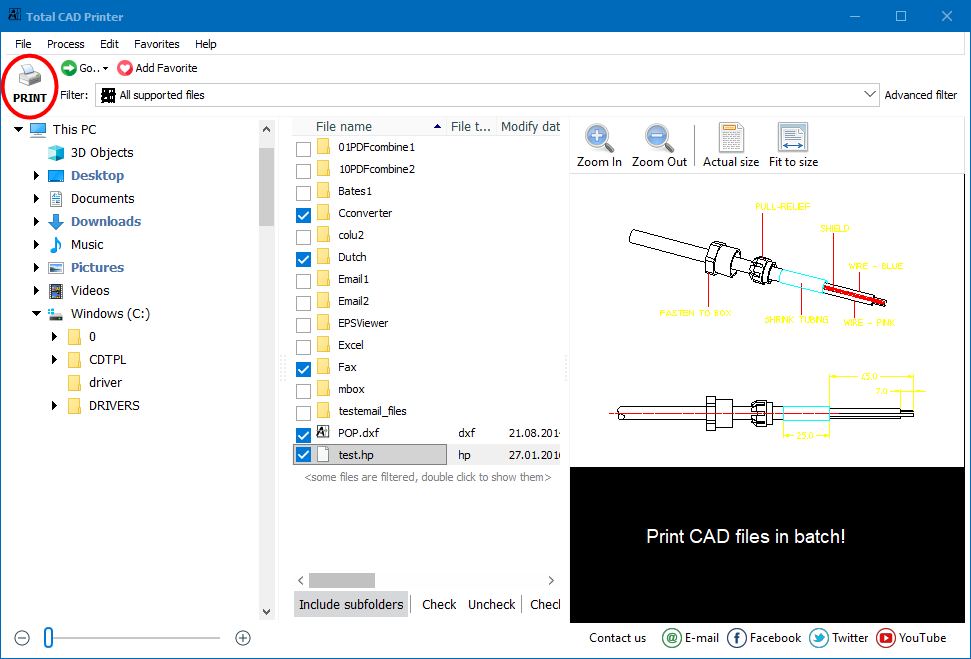
CADファイルを扱うすべての人々は、印刷タスクを自動的に最適化することを夢見ています。Total CAD Printerを使用すれば、DWGまたはDXFファイルのフォルダを数回のクリックで印刷できます。しかも、AutoCADは必要ありません。
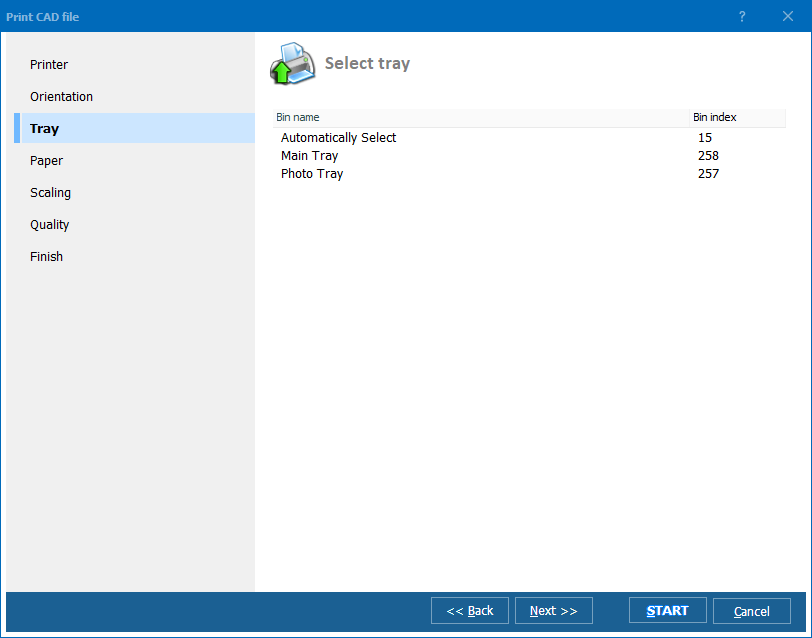
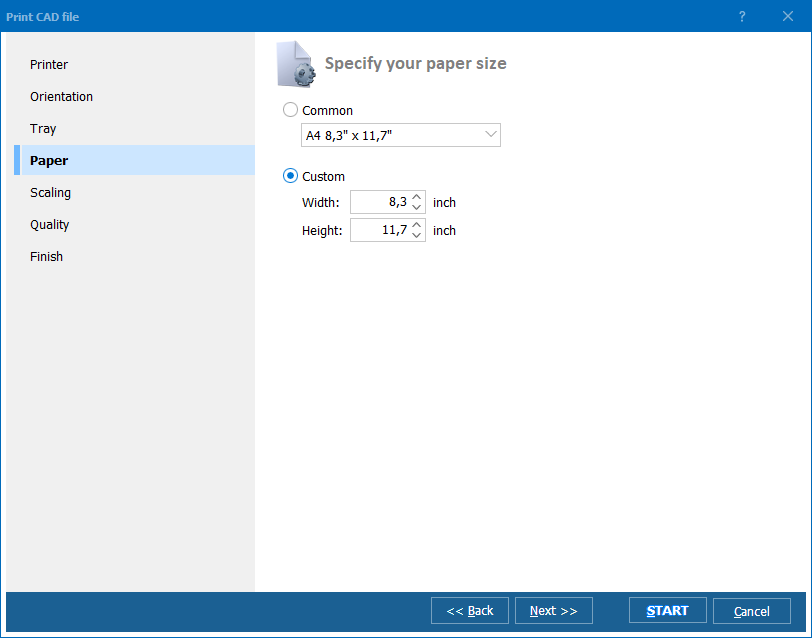
複数のプリンターがある場合、Total CAD Printerは指定されたプリンターまたはポートに任意のCADファイルを送信します。自動回転オプションを選択するか、すべてのファイルに対して1つの向きを設定できます(縦または横)。トレーを選択し、用紙サイズを指定することもできます。Total CAD Printerは、印刷する前に図面をスケーリングすることが可能で、ページに合わせるオプションを確認してください。CAD図面はA4サイズを超えることがよくあります。CADファイルが異なるサイズで、異なるプロッターがある場合、Total CAD Printerは自動的に正しい方法で印刷します。
このプリンターのユニークなオプションは部分ごとの印刷です。A1ファイルを印刷する必要があるものの、A4プロッターしか利用できない場合、Total CAD PrinterはA4セグメントで印刷します。
Total CAD Printerは時間を節約します。それに加えて、インクを節約します。CADファイルの印刷品質のレベルを高からドラフトまでの4段階で提案します。
Total CAD Printerは分かりやすく、透明なインターフェースを持っています。さらに、コマンドラインを通じて実行することもできます。今日、大規模な印刷ジョブを自動化しましょう - Total CAD Printerの評価版をダウンロードし、数回のクリックでCADファイルのフォルダを印刷できます。
(30日間の無料試用を含む)
(のみ $149.90)
"TotalCADPrinterは素晴らしいです。購入してインストールし、数分以内にCAD図面を印刷していました。約束通りのことを実行します。コマンドラインがどのようにフォーマットされるべきかを明確にするために、コマンドライン画面にコマンドライン使用の例をいくつか見たいと思います。"
 ジョン・フレミング
ダラム・ファーニチャーInc | www.durhamfurniture.com
ジョン・フレミング
ダラム・ファーニチャーInc | www.durhamfurniture.com
"私たちは印刷作業にTotal CAD Printerを利用できて満足しています。動作は速く、価格も競争力がありました。ありがとう!"
 エリック・ノック
AutoCADなしでDWG、DXF、HPGL等のCAD図面を一括印刷するエンジニアとチームのために
DWGおよびDXF図面フォルダ全体を一度に印刷
建築家やエンジニアは、プロジェクトフォルダを選択して印刷を1回クリックするだけで完全な図面セットを印刷できます。Total CAD Printerは自動回転とページへのフィット機能で異なるページサイズを処理し、各図面を適切なプロッターに自動送信します。AutoCADのインストールは不要です。
A1図面をA4プリンターでタイル分割印刷
建設現場の事務所や現場チームは、ユニークなパーツ印刷機能を使って大判CAD図面を小さな用紙にタイル分割します。A1図面は自動的にA4サイズのセグメントに分割されるため、大判プロッターを持たない現場でも標準のオフィスプリンターでフルサイズの図面を確認できます。
PLTおよびHPGLプロッターファイルを生産向けに一括印刷
製造チームは現場オペレーター向けにPLT、HPGL、CGMプロッターファイルをバッチ印刷します。異なるCADファイルを用紙サイズに応じて異なるプリンターやトレイに振り分け、4段階の品質レベルから社内草稿はインク節約モードを選び、クライアント向け成果物には高解像度モードを予約できます。
検査・保守用にアーカイブされたCADファイルを印刷
施設管理者は、検査、メンテナンス作業、または規制監査に必要な竣工DWG、DXF、SVG図面を印刷します。Total CAD Printerは図面を利用可能な用紙サイズに合わせてスケーリングし、さまざまなサイズのファイルを1つのバッチで処理します。手動調整は不要です。
コマンドラインで無人CAD印刷をスケジュール
IT部門はスクリプトやスケジュールタスクからTotal CAD Printerを呼び出してCAD印刷を自動化します。共有フォルダに追加された新しい図面は、指定されたプロッターに自動的に印刷されます。向き、スケーリング、品質はコマンドラインパラメーターであらかじめ設定しておくことができます。
更新 Wed, 07 Oct 2026
(のみ $149.90)
無料トライアルをダウンロードして、ファイルを数分で変換。
クレジットカードもメールアドレスも不要。





