تحتاج مساعدة؟ تصل إلينا عبر 

 +1 (855) 418-2323
تحتاج مساعدة؟ تصل إلينا عبر
+1 (855) 418-2323

 File Converters TIFF and PDF apps Forensic Freeware
طباعة ملفات CAD في الوضع التعاقبي عبر سطر الأوامر.
Windows
2000/2003/Vista/7/8/10/11/Citrix
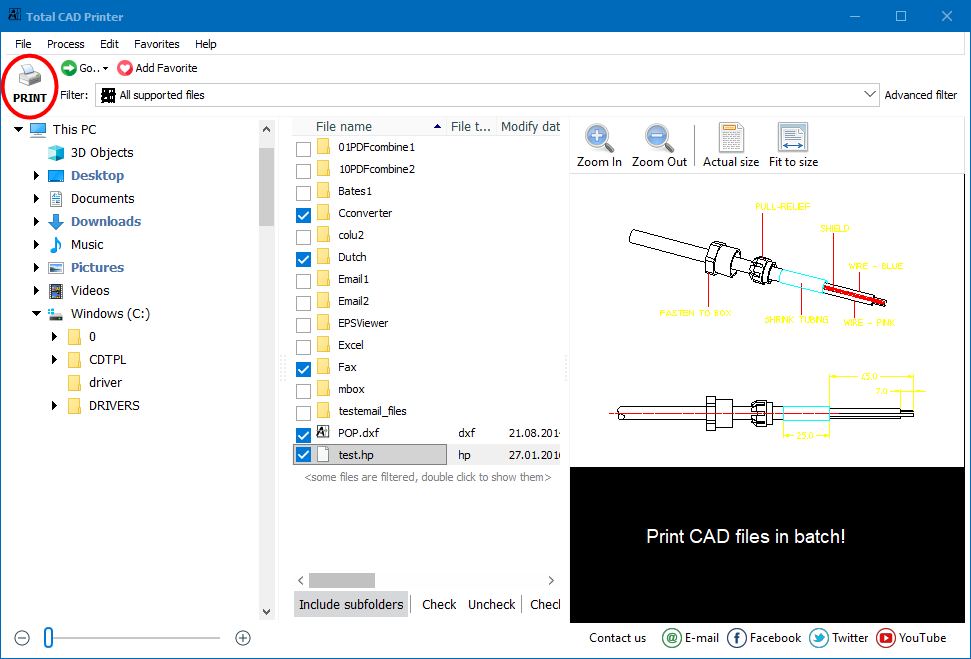
كل من يعمل مع ملفات CAD يحلم بتحسين مهام الطباعة تلقائيًا. يتيح لك برنامج "Total CAD Printer" طباعة مجلدات من ملفات DWG أو DXF بنقرات قليلة. ولا حاجة إلى برنامج AutoCAD.
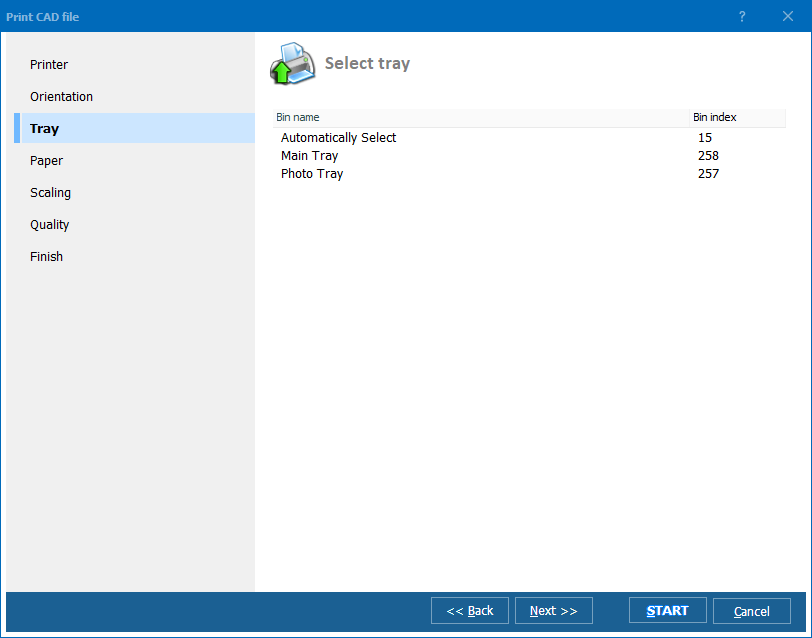
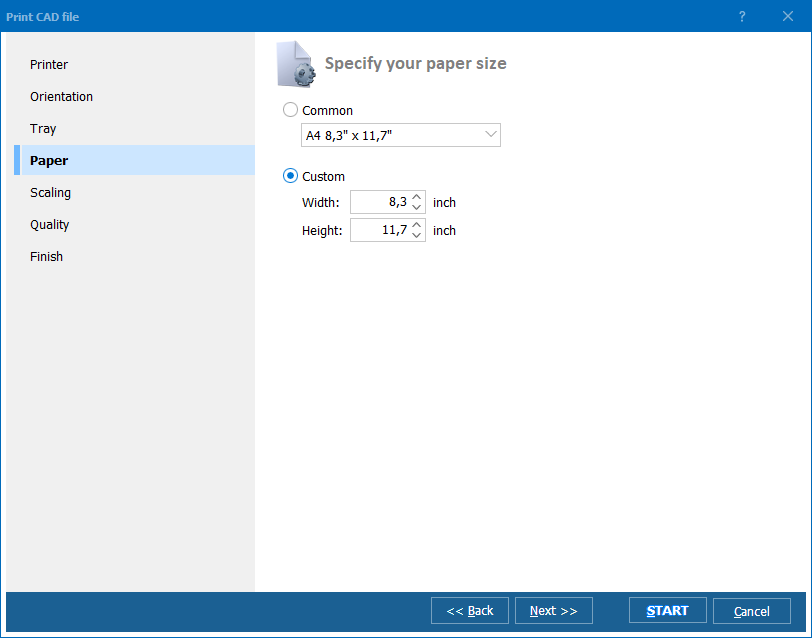
إذا كان لديك عدة طابعات، سيقوم "Total CAD Printer" بإرسال أي ملف CAD إلى طابعة محددة أو منفذ معين. يمكنك اختيار خيار التدوير التلقائي أو ضبط اتجاه واحد لجميع الملفات (عمودي أو أفقي). كما يمكنك اختيار الدرج وتحديد حجم الورق. قد يقوم "Total CAD Printer" بتكبير الرسم نيابةً عنك قبل الطباعة، فقط تأكد من خيار الالتصاق بالصفحة. غالبًا ما تتجاوز رسومات CAD حجم A4. إذا كانت ملفات CAD الخاصة بك بأحجام مختلفة ولديك أجهزة رسم مختلفة، سيقوم "Total CAD Printer" بطباعتها تلقائيًا بالطريقة الصحيحة.
الخيار الفريد لطابعتنا هو الطباعة على أجزاء. في حالة كنت بحاجة إلى طباعة ملف A1 ولكن لديك فقط جهاز رسم A4، سيقوم "Total CAD Printer" بطباعته بواسطة أجزاء A4.
يوفر عليك "Total CAD Printer" الوقت. إضافة إلى ذلك، فإنه يوفر حبر طابعتك. يقترح 4 مستويات لجودة الطباعة لملفات CAD - من العالية إلى المسودة.
يحتوي "Total CAD Printer" على واجهة شفافة يسهل اتباعها. بدلاً من ذلك، يمكن تشغيله عبر سطر الأوامر. قم بأتمتة مهام الطباعة الكبيرة اليوم - قم بتحميل النسخة التجريبية من "Total CAD Printer" واطبع مجلدات من ملفات CAD ببضع نقرات.
(يتضمن تجربة مجانية لمدة 30 يومًا)
(فقط $149.90)
"برنامج TotalCADPrinter رائع حقًا. لقد اشتريته وقمت بتثبيته وبدأت في طباعة الرسومات الهندسية في غضون دقائق. يفعل بالضبط ما وُعِد به. أود أن أرى بعض الأمثلة لاستخدام سطر الأوامر على شاشة سطر الأوامر فقط لتوضيح كيفية تنسيق سطور الأوامر."
 جون فليمينغ
شركة دورهام للموبيليا | www.durhamfurniture.com
جون فليمينغ
شركة دورهام للموبيليا | www.durhamfurniture.com
"نحن سعداء باستخدام برنامج Total CAD Printer في مهام الطباعة لدينا. إنه يعمل بسرعة وكانت السعر تنافسيًا. شكرًا لكم!"
 إريك نوك
المهندسون والفرق التي تطبع رسومات DWG وDXF وHPGL وغيرها من ملفات CAD دفعةً واحدة دون AutoCAD
طباعة مجلدات كاملة من رسومات DWG وDXF دفعةً واحدة
يطبع المعماريون والمهندسون مجموعات رسومات كاملة بتحديد مجلد المشروع والنقر على طباعة مرة واحدة. يتعامل Total CAD Printer مع أحجام الصفحات المختلطة بالتدوير التلقائي والملاءمة للصفحة، ويُرسل كل رسم إلى الراسمة الصحيحة تلقائيًا — دون الحاجة إلى تثبيت AutoCAD.
طباعة رسومات A1 على طابعات A4 بأجزاء متقاطعة
تستخدم مكاتب مواقع الإنشاء والفرق الميدانية ميزة الطباعة بالأجزاء الفريدة لتقسيم رسومات CAD الكبيرة الحجم على ورق أصغر. يُقسَّم الرسم بحجم A1 تلقائيًا إلى أجزاء بحجم A4، مما يتيح لأطقم العمل التي لا تمتلك راسمات كبيرة الحجم مراجعة الخطط الكاملة على طابعات المكاتب القياسية.
الطباعة الدفعية لملفات PLT وHPGL للإنتاج
تطبع فرق التصنيع ملفات PLT وHPGL وCGM دفعةً واحدة لمشغلي الورشة. وجّه ملفات CAD المختلفة إلى طابعات أو أدراج مختلفة بحسب حجم الورق، واختر من بين أربعة مستويات جودة لتوفير الحبر على المسودات الداخلية، واحتفظ بوضع الدقة العالية للمستندات المقدَّمة للعملاء.
طباعة ملفات CAD المؤرشفة للفحوصات والصيانة
يطبع مديرو المرافق رسومات DWG وDXF وSVG الجاهزة عند الحاجة للفحوصات وأعمال الصيانة أو عمليات التدقيق التنظيمي. يقيس Total CAD Printer الرسومات لتلائم حجم الورق المتاح ويتعامل مع الملفات ذات الأبعاد المختلفة في دفعة واحدة — دون تعديل يدوي.
جدولة طباعة CAD التلقائية عبر سطر الأوامر
تُؤتمت أقسام تكنولوجيا المعلومات طباعة CAD باستدعاء Total CAD Printer من البرامج النصية والمهام المجدولة. تُطبع الرسومات الجديدة المودعة في المجلدات المشتركة تلقائيًا على الراسمة المحددة — مع ضبط الاتجاه والتحجيم والجودة مسبقًا عبر معاملات سطر الأوامر.
محدث Wed, 07 Oct 2026
(فقط $149.90)
قم بتنزيل النسخة التجريبية المجانية وحول ملفاتك في دقائق.
لا تحتاج إلى بطاقة ائتمان أو بريد إلكتروني.





