도움이 필요하신가요? 연락처: 

 +1 (855) 418-2323
도움이 필요하신가요? 연락처:
+1 (855) 418-2323

 File Converters TIFF and PDF apps Forensic Freeware
PDF 파일을 텍스트로 변환해야 합니까? 그렇다면 운이 좋습니다! 이 가이드에서는 CoolUtils의 변환기를 사용하여 PDF를 텍스트로 변환하는 방법을 보여드리겠습니다. 또한 PDF 파일을 텍스트로 변환하는 이점에 대해서도 논의할 것입니다. 그럼 시작해볼까요!
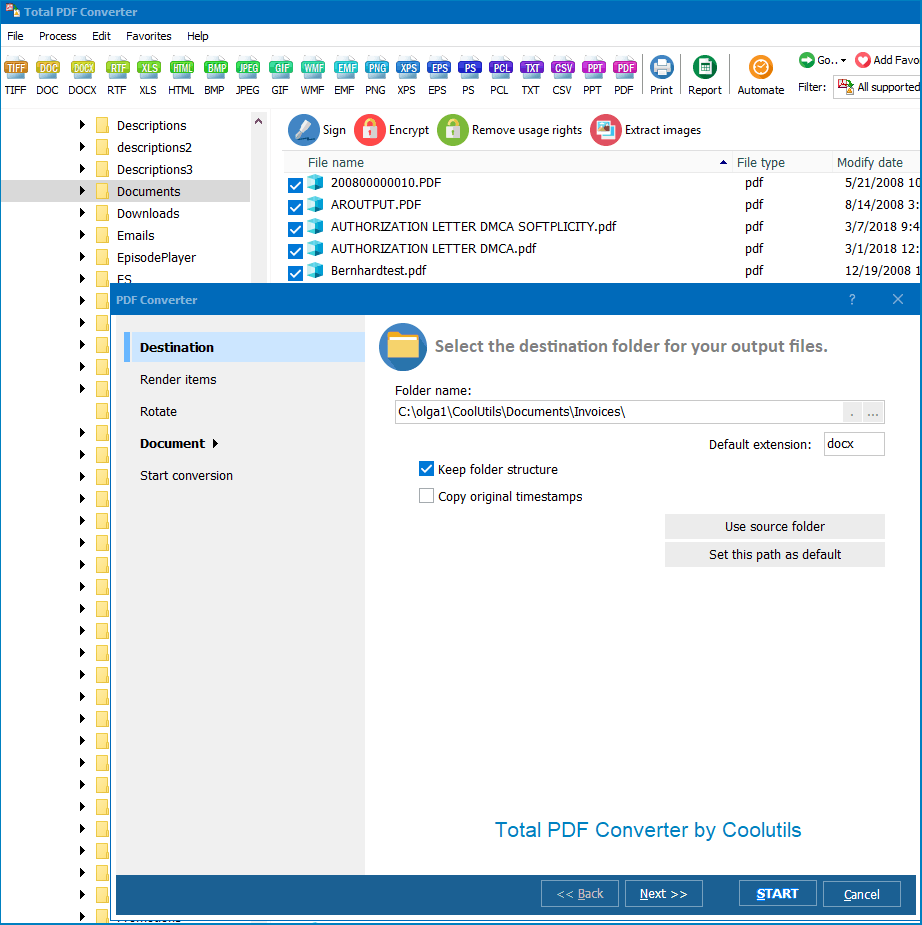

PDF를 텍스트로 변환하는 많은 이점이 있습니다. 하나는 PDF 파일을 훨씬 쉽게 편집할 수 있다는 것입니다. 또한 문서가 텍스트 형식일 때 특정 키워드나 구문을 훨씬 더 빠르게 검색할 수 있습니다. 또한 PDF 파일을 텍스트로 변환하면 컴퓨터나 다른 장치에서 공간을 절약할 수 있습니다.
이 가이드가 CoolUtils의 변환기를 사용하여 PDF를 텍스트로 변환하는 방법을 보여주는 데 도움이 되었기를 바랍니다! 추가 질문이 있는 경우 지원팀에 문의하십시오. CoolUtils를 선택해 주셔서 감사합니다!
string src  = @"C:\test\Source.pdf";
string dest = @"C:\test\Dest.docx";

var cnv = new PDFConverterX();
cnv.Convert(src, dest, "-cDOC -log c:\\test\\PDF.log");

if (!string.IsNullOrEmpty(cnv.ErrorMessage))
    throw new Exception(cnv.ErrorMessage);
public static class Function1
    {
        [FunctionName("Function1")]
        public static async Task Run(
            [HttpTrigger(AuthorizationLevel.Anonymous, "get", "post", Route = null)] HttpRequest req,
            ILogger log)
        {
            StringBuilder sbLogs = new StringBuilder();
            sbLogs.AppendLine("started...");
            try
            {
                ProcessStartInfo startInfo = new ProcessStartInfo();
                startInfo.CreateNoWindow = true;
                startInfo.UseShellExecute = false;
                var assemblyDirectoryPath = Path.GetDirectoryName(Assembly.GetExecutingAssembly().Location);
                assemblyDirectoryPath = assemblyDirectoryPath.Substring(0, assemblyDirectoryPath.Length - 4);

                var executablePath = $@"{assemblyDirectoryPath}\Converter\PDFConverterX.exe";
                sbLogs.AppendLine(executablePath + "...");
                var srcPath = $@"{assemblyDirectoryPath}\src\sample.pdf";
                var outPath = Path.GetTempFileName() + ".docx";
                startInfo.FileName = executablePath;

                if (File.Exists(outPath))
                {
                    File.Delete(outPath);
                }

                if (File.Exists(executablePath) && File.Exists(srcPath))
                {
                    sbLogs.AppendLine("files exists...");
                }
                else
                    sbLogs.AppendLine("EXE & source files NOT exists...");
                startInfo.WindowStyle = ProcessWindowStyle.Hidden;
                startInfo.Arguments = $"\"{srcPath}\" \"{outPath}\" -cDOC";
                using (Process exeProcess = Process.Start(startInfo))
                {
                    sbLogs.AppendLine($"wait...{DateTime.Now.ToString()}");
                    exeProcess.WaitForExit();
                    sbLogs.AppendLine($"complete...{DateTime.Now.ToString()}");
                }
                sbLogs.AppendLine("Conversion complete.");
            }
            catch (Exception ex)
            {
                sbLogs.AppendLine(ex.ToString());
            }

            return new OkObjectResult(sbLogs);
        }
    }
dim C
Set C=CreateObject("PDFConverter.PDFConverterX")
C.Convert "c:\test\source.pdf", "c:\test\dest.docx", "-cDOC -log c:\test\PDF.log"
Response.Write C.ErrorMessage
set C = nothing
dim C
Set C=CreateObject("PDFConverter.PDFConverterX")
Response.Clear
Response.AddHeader "Content-Type", "binary/octet-stream"
Response.AddHeader "Content-Disposition", "attachment; filename=test.docx"
Response.BinaryWrite C.ConvertToStream("C:\www\ASP\Source.pdf", "C:\www\ASP", "-cDOC -log c:\html.log")
set C = nothing
$src="C:\\test\\test.pdf";
$dest="C:\\test\\test.docx";
if (file_exists($dest)) unlink($dest);
$c= new COM("PDFConverter.PDFConverterX");
$c->convert($src,$dest, "-cDOC -log c:\\test\\PDF.log");
if (file_exists($dest)) echo "OK"; else echo "fail:".$c->ErrorMessage;
require 'win32ole'
c = WIN32OLE.new('PDFConverter.PDFConverterX')

src = "C:\\test\\test.pdf"
dest = "C:\\test\\test.docx"

c.convert(src, dest, "-cDOC -log c:\\test\\PDF.log")

if not File.exist?(dest)
  puts c.ErrorMessage
end
import win32com.client
import os.path

c = win32com.client.Dispatch("PDFConverter.PDFConverterX")

src  = "C:\\test\\test.pdf"
dest = "C:\\test\\test.docx"

c.convert(src, dest, "-cDOC -log c:\\test\\PDF.log")

if not os.path.exists(dest):
    print(c.ErrorMessage)
uses Dialogs, Vcl.OleAuto;

var
  c: OleVariant;
begin
  c := CreateOleObject('PDFConverter.PDFConverterX');
  c.Convert('c:\test\source.pdf', 'c:\test\dest.docx', '-cDOC -log c:\test\PDF.log');
  if c.ErrorMessage <> '' then
    ShowMessage(c.ErrorMessage);
end;
var c = new ActiveXObject("PDFConverter.PDFConverterX");
c.Convert("C:\\test\\source.pdf", "C:\\test\\dest.docx", "-cDOC");
if (c.ErrorMessage != "")
  alert(c.ErrorMessage)
use Win32::OLE;

my $src  = "C:\\test\\test.pdf";
my $dest = "C:\\test\\test.docx";

my $c = CreateObject Win32::OLE 'PDFConverter.PDFConverterX';
$c->convert($src, $dest, "-cDOC -log c:\\test\\PDF.log");
print $c->ErrorMessage if -e $dest;
무료 평가판을 다운로드하고 몇 분 만에 파일을 변환하세요.
신용카드나 이메일이 필요하지 않습니다.