Нужна помощь? Свяжитесь с нами по адресу 

 +1 (855) 418-2323
Нужна помощь? Свяжитесь с нами по адресу
+1 (855) 418-2323

 File Converters TIFF and PDF apps Forensic Freeware
Скачайте наш инструмент и конвертируйте XLS, XLSX, ODS, XML электронные таблицы в пакетном режиме автономно
Windows
2000/2003/Vista/7/8/10/11/Citrix
Total Excel Converter работает с любым типом таблиц. Входные форматы: Excel и Excel 2007, XLSM, XLT, XLTM, а также OpenOffice ODS, Apple Numbers, XML, SQL, WK2, WKS, WAB, DBF, TEX и DIF. Список целевых форматов ещё шире: DOC, DOCX, PDF, HTML, Access, TXT, ODT, ODS, XML, SQL, CSV, Lotus, DBF, TEX, DIFF, SYLK и LaTeX. Конвертация выполняется пакетно, полностью офлайн.
Краткий ответ: Чтобы конвертировать таблицу, установите Total Excel Converter, перейдите к своим файлам XLS, XLSX, XLSM, Apple Numbers или ODS, отметьте нужные, выберите выходной формат — PDF, DOC, HTML, CSV, XML, JPEG и другие — задайте параметры в мастере и нажмите Start. Программа конвертирует всю папку одним пакетом, сохраняет оригинальный макет и работает из командной строки. Бесплатная 30-дневная пробная версия.
Total Excel Converter сохраняет оригинальный макет документа — вы получаете точную копию исходного файла в новом формате. Программа также включает ряд удобных возможностей:
Доступна полная поддержка командной строки. Нужна быстрая конвертация прямо в браузере? Воспользуйтесь бесплатными онлайн-инструментами — без установки и регистрации: NUMBERS в XLSX, XLS в XLSX. Также доступна серверная версия без графического интерфейса. Скачайте бесплатную 30-дневную пробную версию сегодня.
(включает 30-дневный бесплатный пробный период)
(только $49.90)
"Каждый квартал мы получаем сотни файлов ODS и XLS из разных отделов. Total Excel Converter выполняет пакетную конвертацию в PDF, не нарушая расположение столбцов и формулы. Возможность работы через командную строку сэкономила нам ещё больше времени — мы настроили запланированную задачу, и теперь отчёты конвертируются автоматически за ночь."
 Linda Marsh
Financial Analyst, Redstone Capital
Linda Marsh
Financial Analyst, Redstone Capital
"Нужно было конвертировать около 3 000 устаревших файлов DBF и WK2 в современный формат XLSX после миграции системы. Total Excel Converter обработал всю партию менее чем за час и сохранил исходную структуру листов. Простой интерфейс, никакого обучения не требуется. Версия для командной строки — именно то, что нам было нужно для серверных скриптов."
 Kevin Trujillo
IT Administrator
Kevin Trujillo
IT Administrator
Все, кто конвертирует Excel, ODS, DBF и другие таблицы в PDF, DOC, CSV и прочие форматы пакетно
Конвертация отчётов Excel в защищённый PDF для заинтересованных сторон
Финансовые команды конвертируют отчёты XLS и XLSX в зашифрованные PDF-файлы с защитой от копирования и редактирования перед отправкой руководству, аудиторам или клиентам. Пакетно конвертируйте целые папки ежемесячных отчётов одновременно, строго сохраняя оригинальный макет документа, формулы и форматирование.
Конвертация между Excel, ODS, DBF и устаревшими форматами
ИТ- и дата-команды конвертируют таблицы между форматами для совместимости на разных платформах. Преобразуйте файлы OpenOffice ODS в Microsoft XLS, мигрируйте устаревшие базы DBF в XLSX или конвертируйте файлы WK2 и DIF в современные форматы. Каждый лист можно экспортировать как отдельный файл для детального управления.
Извлечение данных таблиц в CSV, XML, SQL и базы данных
Аналитики и разработчики извлекают данные из файлов Excel, конвертируя их в CSV для импорта в инструменты аналитики, XML для системных интеграций, SQL для прямой загрузки в базы данных или Access для облегчённых баз. Обрабатывайте сотни таблиц за один проход с сохранением структуры папок.
Конвертация таблиц в Word и HTML для отчётов и веба
Авторы отчётов и контент-команды конвертируют таблицы Excel в DOC или DOCX для включения в отчёты Word или в HTML для веб-публикации. Конвертер точно сохраняет табличный макет, поэтому сложные таблицы выглядят одинаково в целевом формате — с возможностью вывода в LaTeX и TEX для академических публикаций.
Пакетная конвертация файлов Excel через командную строку
ИТ-отделы автоматизируют конвертацию таблиц с помощью интерфейса командной строки. Ночные экспорты Excel из ERP и CRM конвертируются в PDF, CSV или HTML по расписанию. Для серверных развёртываний с ActiveX и без интерфейса используйте Total Excel ConverterX.
Обновлено Wed, 07 Oct 2026
(только $49.90)
Преобразование таблиц Excel в другие форматы может быть трудным. Но с помощью Total Excel Converter от CoolUtils этот процесс становится быстрым и простым. Наш инструмент имеет множество продвинутых функций, чтобы обеспечить преобразование файлов в предпочитаемый вами формат за секунды.
Возникли проблемы или нужна дополнительная информация? Наша служба поддержки всегда готова помочь и ответить на ваши вопросы по телефону, электронной почте или в социальных сетях.
Наше программное обеспечение легко установить. Загрузите пробную версию, чтобы протестировать его бесплатно - у вас будет 30 дней неограниченного преобразования. CoolUtils предлагает гибкий ассортимент бессрочных лицензий для личного или коммерческого использования. Вот как начать.
(включает 30-дневную бесплатную пробную версию)
(всего $49.90)
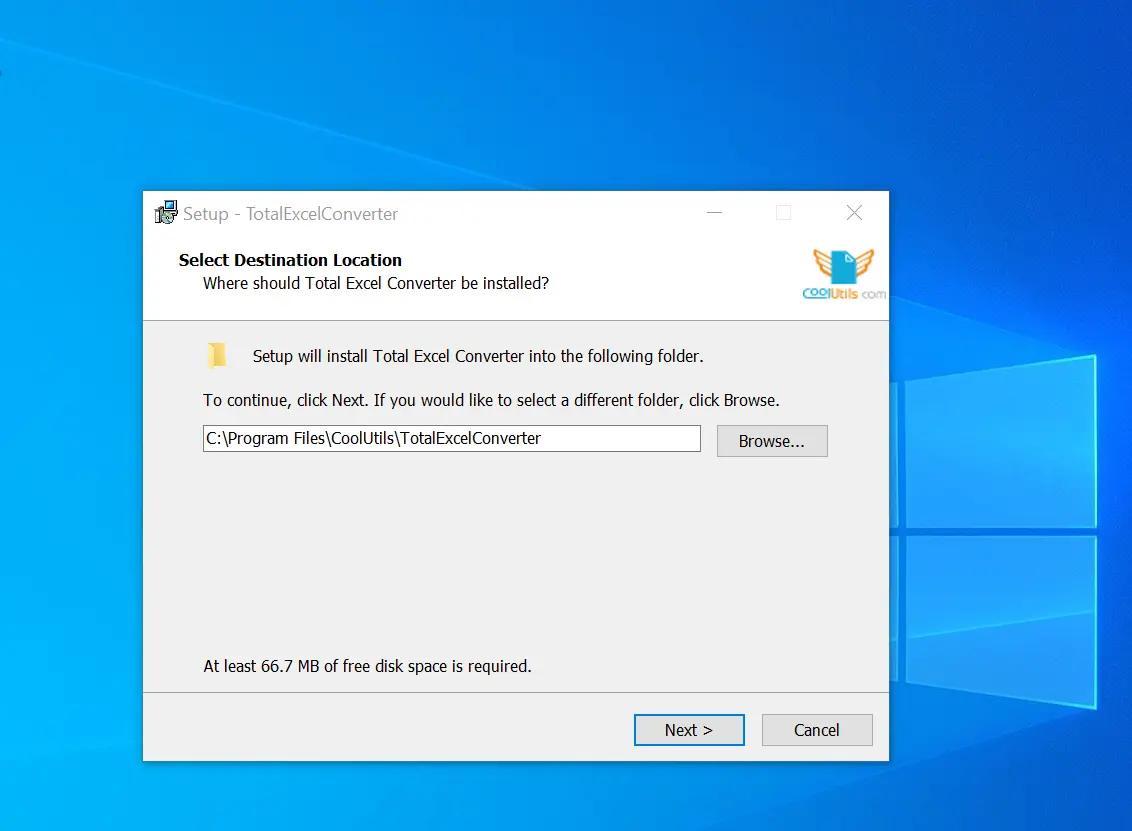
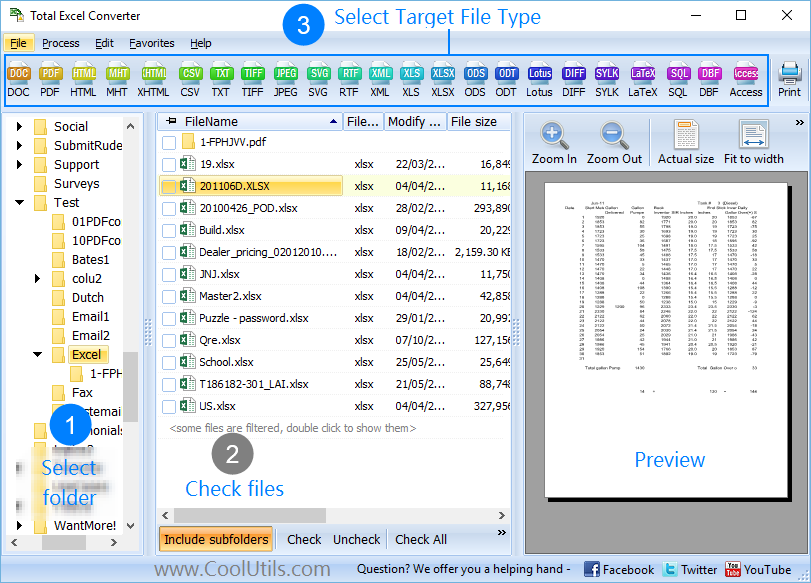
Наше программное обеспечение для конвертации Excel быстрое и простое в использовании - просто выберите файлы с таблицами, установите параметры и запустите преобразование. После загрузки и установки Total Excel Converter выполните несколько шагов:
1. Запустите оффлайн-конвертер, откройте папку, содержащую файлы, и отметьте галочками элементы, которые вы хотите преобразовать.
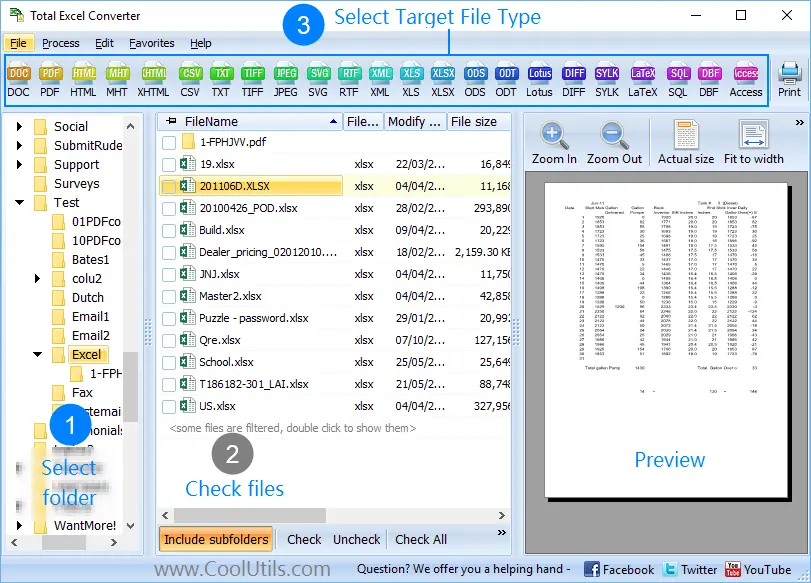
2. Нажмите на кнопку 'PDF' вверху, чтобы открыть мастер.

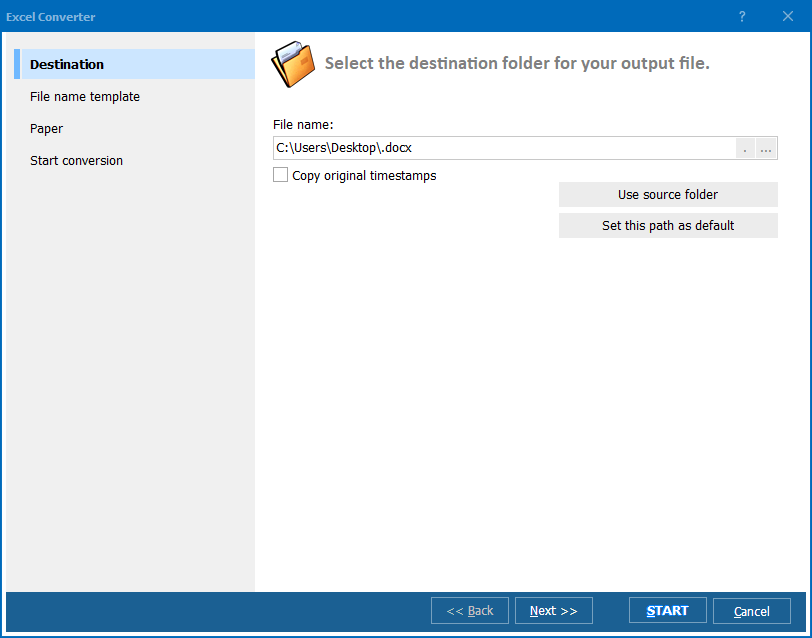
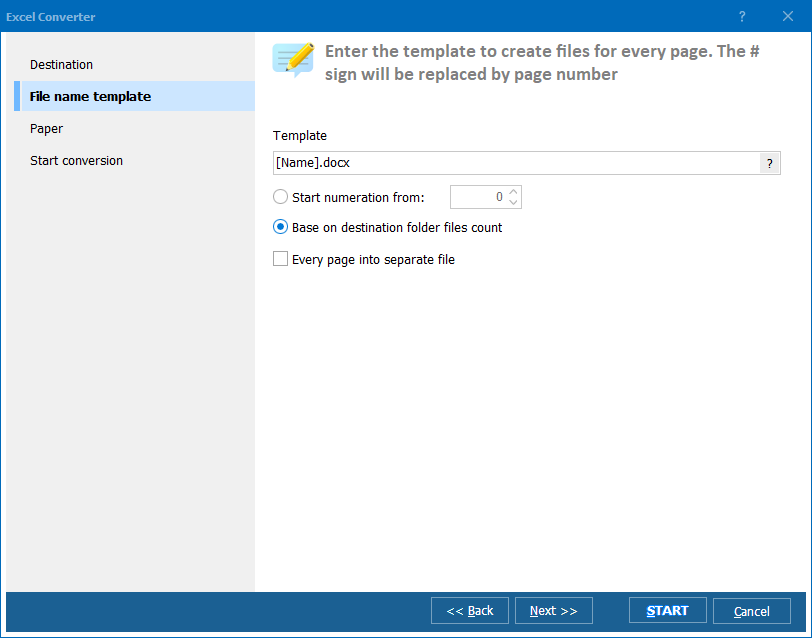
3. Измените внешний вид документов и другие настройки по вашему желанию.
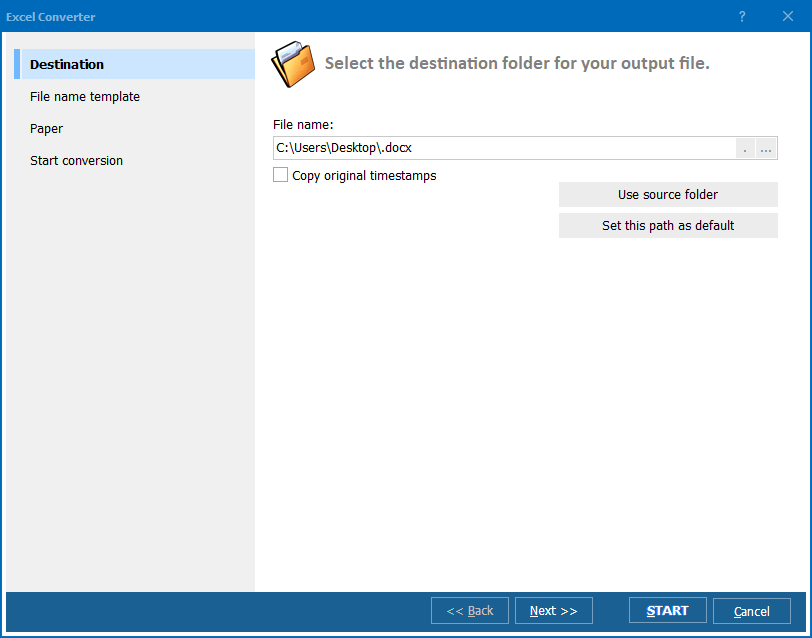
4. Нажмите на кнопку 'Начать', чтобы запустить преобразование! После завершения вы можете найти PDF-файл с вашими таблицами в обозначенном месте назначения.
Скачайте пробную версию и конвертируйте файлы за считанные минуты.
Не требуется ни банковская карта, ни email.



