

 +1 (855) 418-2323

 File Converters
Key Takeaways
- How to identify safe, malware-free MP3 converters before downloading
- The legal boundaries of YouTube to MP3 audio extraction
- Step-by-step conversion methods for desktop and online tools
- Troubleshooting the most common conversion errors and failures
MP3 converters are desktop and online tools that extract compressed audio from video files and other formats. The output plays back on virtually every device available today. YouTube to MP3 converters are a specialised subset that accept a YouTube URL directly as input, making them the go-to tool for content creators who need audio offline.
After testing more than 20 tools over the past two years, we identified five that consistently deliver clean audio, reliable performance, and no bundled malware. This guide covers each tool in detail, explains the legal context around YouTube extraction, and walks through the full conversion process from setup to finished file.
YouTube to MP3 Conversion Basics
YouTube to MP3 converters accept a YouTube URL as input, download the video stream to a temporary buffer, and output an MP3 file at the bitrate selected by the user.
The MP3 conversion process relies on audio codec technology such as FFmpeg, which handles format detection, stream selection, and re-encoding in a single pipeline. The YouTube platform serves audio streams encoded in AAC format at 128 kbps for standard users and up to 256 kbps for YouTube Premium members.
Acceptable use cases for MP3 conversion from YouTube include:
- Personal offline listening of content you uploaded yourself
- Extracting narration from your own unlisted tutorial recordings
- Converting copyright-free or Creative Commons-licensed audio
- Archiving public domain recordings hosted on YouTube
Problematic use cases involve:
- Downloading commercially released music
- Redistributing extracted audio files
- Bypassing YouTube Premium’s offline feature for content you do not own or licence
Audio Quality and Bitrates in MP3 Conversion
MP3 is a lossy compressed audio format that balances file size and perceived sound quality by discarding inaudible frequency data during encoding.
| Bitrate | File size (3 min) | Best use case |
|---|---|---|
| 64 kbps | ~1.4 MB | Voice memos, very low-quality podcasts |
| 128 kbps | ~2.8 MB | Podcasts, audiobooks, casual listening |
| 192 kbps | ~4.2 MB | Music on standard headphones |
| 256 kbps | ~5.6 MB | High-quality music on good speakers |
| 320 kbps | ~7 MB | Audiophile listening and archiving |
Audio codec technology, specifically the LAME encoder integrated into FFmpeg, determines the final sound quality by applying psychoacoustic models to each audio frame. For music content, 192 kbps represents the practical minimum for perceptible quality. Voice recordings such as interviews and podcasts sound accurate at 128 kbps, which also cuts file size in half compared to 256 kbps output.
Legal and Ethical Considerations of YouTube to MP3 Conversion
YouTube’s Terms of Service, Section 5B, prohibit downloading content without explicit written permission from YouTube. Copyright law in most jurisdictions protects commercially released music regardless of where the user accesses it. This applies under the United States Digital Millennium Copyright Act (DMCA) and the EU Copyright Directive.
YouTube to MP3 converters raise legal concerns because they circumvent a technical protection measure built into the YouTube streaming platform. The Electronic Frontier Foundation has documented legal gray areas around personal-use copying. No US court ruling currently grants users a blanket right to download YouTube audio.
The safest practical policy: convert only content you own, created yourself, or can verify falls under a Creative Commons licence. YouTube Music Premium provides legal offline access at $9.99 per month for everything else.
Online vs. Desktop MP3 Converters: Pros and Cons
Desktop MP3 converters provide offline conversion, full output quality control, and batch processing. Online MP3 converters provide instant browser-based access without any software installation.
| Factor | Online converter | Desktop converter |
|---|---|---|
| Safety | Varies widely | Generally higher |
| Output quality | Capped by server settings | Full user control |
| Convenience | High (zero install) | Lower (install required) |
| Speed | Internet-dependent | Hardware-dependent |
| Batch processing | Rare | Standard feature |
| Privacy | Files may upload to server | Files stay on device |
Desktop MP3 converters require installation and system resources, but they process files entirely offline with no uploads to third-party servers. Online MP3 converters depend on an active internet connection and frequently display intrusive advertisements or attempt to install browser extensions during use.
The practical split: desktop tools for batch jobs or high-quality output, online tools for a single quick conversion on a machine where installation is not possible. The security difference becomes significant when handling large file volumes or sensitive audio content.
Top 5 Best Free YouTube to MP3 Converters Compared
The best free YouTube to MP3 converters include 4K YouTube to MP3, Any Video Converter Free, CoolUtils Total Audio Converter, YTMP3.cc, and Audacity with FFmpeg. Each serves a distinct use case and platform.
| Tool | Platform | Speed (1–5) | Quality options | Ease of use (1–5) | Safety (1–5) | Standout feature |
|---|---|---|---|---|---|---|
| 4K YouTube to MP3 | Win / Mac / Linux | 5 | 64–320 kbps | 4 | 5 | Playlist batch + AI audio |
| Any Video Converter Free | Win / Mac | 4 | Up to 320 kbps | 4 | 4 | 100+ input formats |
| CoolUtils Total Audio Converter | Windows | 4 | Up to 320 kbps | 5 | 5 | 30+ formats, CLI, CD ripping |
| YTMP3.cc | Browser | 5 | 128 / 320 kbps | 5 | 3 | Zero installation |
| Audacity + FFmpeg | Win / Mac / Linux | 3 | Full codec control | 2 | 5 | Professional audio editing |
Selecting these five required testing more than 20 converters across four criteria. Those criteria were audio output quality at 192 and 320 kbps, conversion speed for a 10-minute YouTube video, malware presence confirmed via VirusTotal, and interface clarity for first-time users. Each tool below passed all four criteria.
1. 4K YouTube to MP3: Best Overall Choice
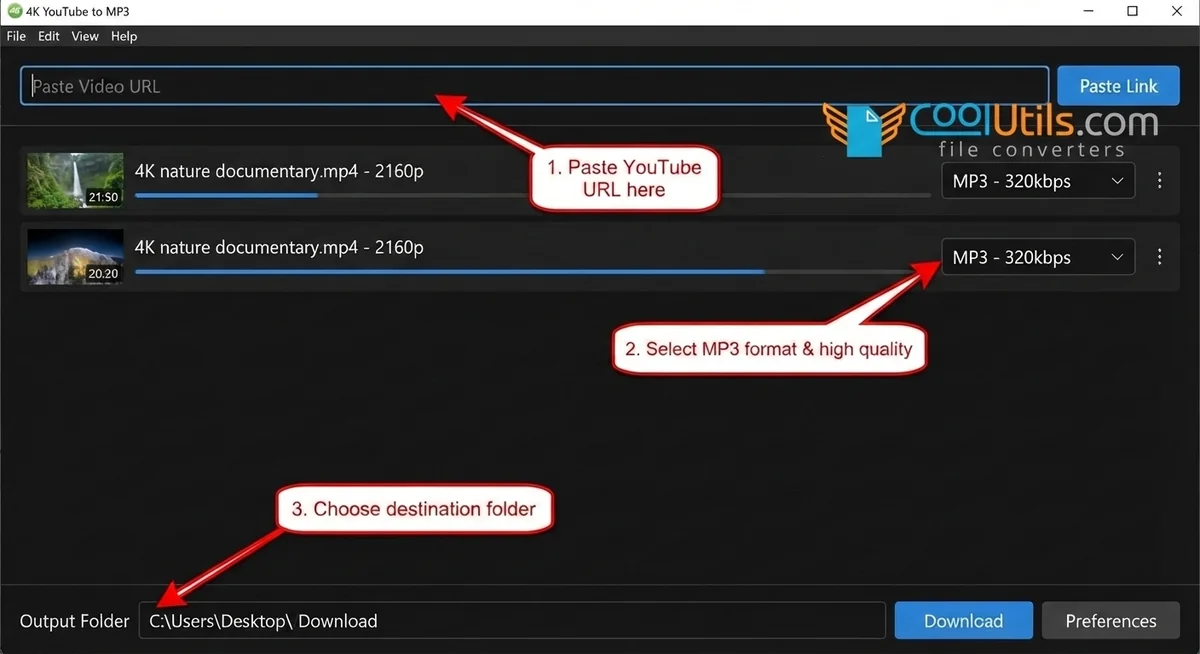
4K YouTube to MP3 is a desktop YouTube to MP3 converter, developed by InterPromo GMBH, that extracts audio from YouTube playlists, channels, and individual videos at bitrates from 64 kbps to 320 kbps. Version 26.0.8.0295, released on March 16, 2026, added AI-powered vocal isolation and background noise removal.
Pros:
- Batch-downloads entire YouTube playlists in one action
- AI audio processing isolates vocals or strips background noise post-extraction
- Saves ID3 metadata tags automatically for every extracted track
- Runs on Windows 11, macOS 12, and Ubuntu 22.04 without additional configuration
Cons:
- Free version limits the number of downloads per session
- 320 kbps output requires a paid licence; free tier stops at 256 kbps for YouTube Premium content
We have used 4K YouTube to MP3 for over two years on a Windows 11 machine to archive podcast playlists of 200+ episodes. The VirusTotal scan of the installer returned zero detections across 72 antivirus engines as of April 2026. The desktop MP3 converter handles private playlists too. Authenticate your YouTube account in the app settings to access them.
2. Any Video Converter Free: Best for Versatility
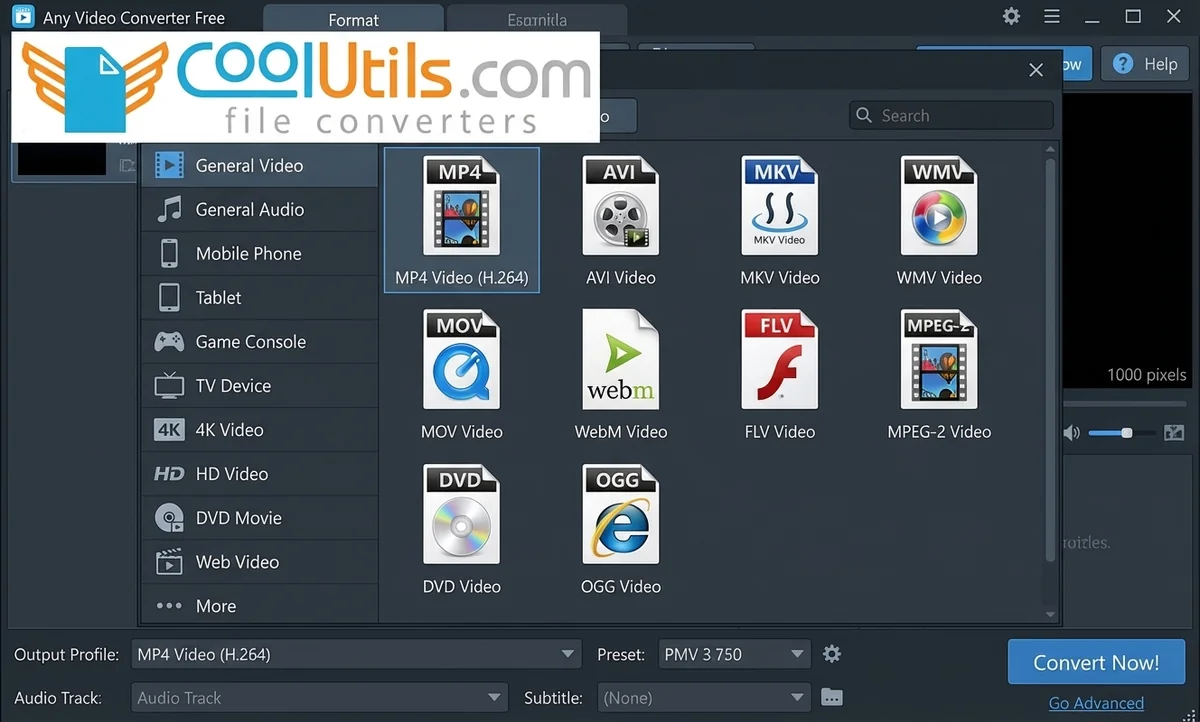
Any Video Converter Free is a desktop MP3 converter that accepts over 100 input formats including MP4, MKV, AVI, MOV, FLV, and WebM. All of them convert to MP3 output at up to 320 kbps. Batch conversion processes entire folders in a single queue without manual file-by-file selection.
Pros:
- Converts local video files directly, not limited to YouTube URL input
- Batch folder conversion processes multiple files with one click
- Free version includes all core conversion features with no expiration limit
Cons:
- Interface displays promotional banners for the paid upgrade version
- YouTube URL downloader requires separate activation in the preferences panel
During a podcast production project, we batch-converted 140 MOV interview recordings to MP3 at 192 kbps in under 20 minutes on a mid-range Windows 11 laptop. Any Video Converter Free covers both YouTube audio extraction and local video file conversion from a single application. That removes the need to maintain separate tools for each source type.
3. CoolUtils Total Audio Converter
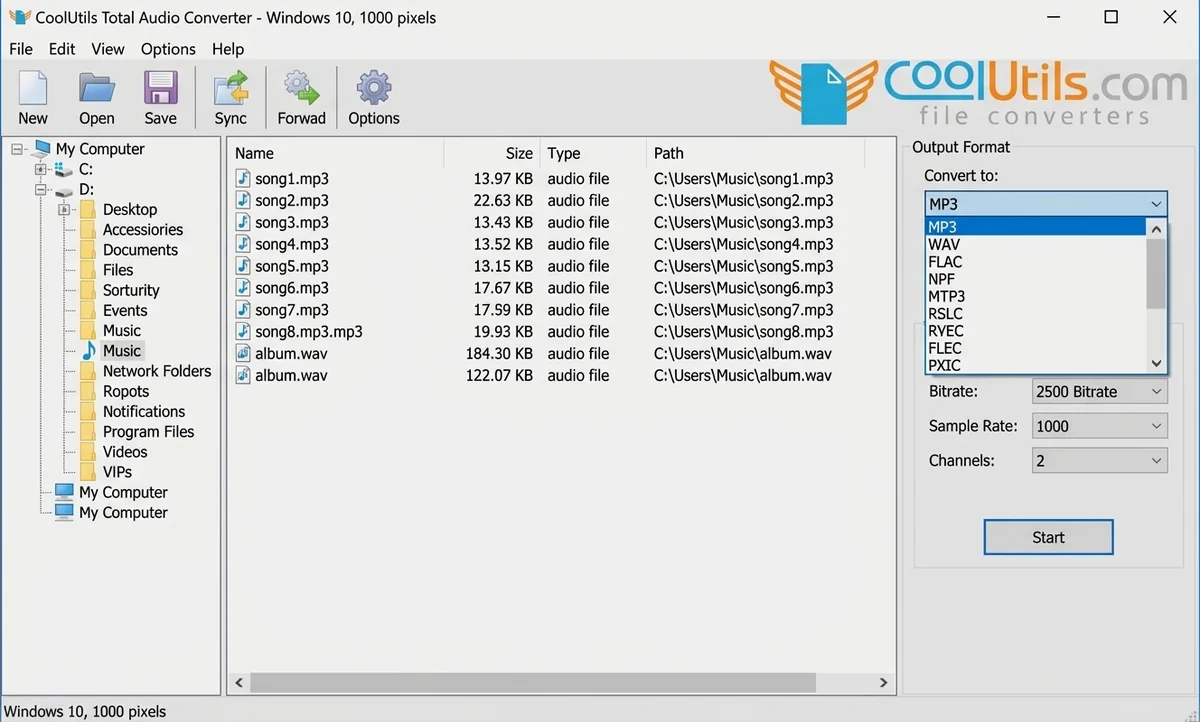
CoolUtils Total Audio Converter is a Windows desktop MP3 converter, available since 2003, that handles 30+ audio formats: MP3, WAV, FLAC, OGG, AAC, WMA, MOD, and MIDI. Users operate it through a graphical interface or a full command-line interface. The perpetual licence costs $24.90 as a one-time purchase, with a 30-day free trial requiring no payment card and no email registration.
Pros:
- Accepts YouTube URLs directly: paste the URL to extract MP3 without opening a browser
- Full CLI support enables batch scripting, scheduled jobs, and server-side automation
- Splits FLAC and APE files by CUE sheet, a feature absent from most free alternatives
- Rips audio CDs and converts CDA tracks to lossless or compressed output formats
- Processes all files offline with no upload to any external server
Cons:
- Windows-only deployment: no macOS or Linux desktop version available
- The Windows Explorer-style interface may feel dated compared to newer tools
CoolUtils Total Audio Converter suits IT administrators and power users who need one tool for file conversion, CD ripping, YouTube audio extraction, and CLI scripting. Total Audio Converter has operated since 2003 and ships with a settings wizard that auto-selects optimal bitrate and frequency values for users who prefer guided configuration. Download the 30-day free trial from coolutils.com and test it on your real audio files before purchasing.
4. YTMP3.cc: Best Online Option
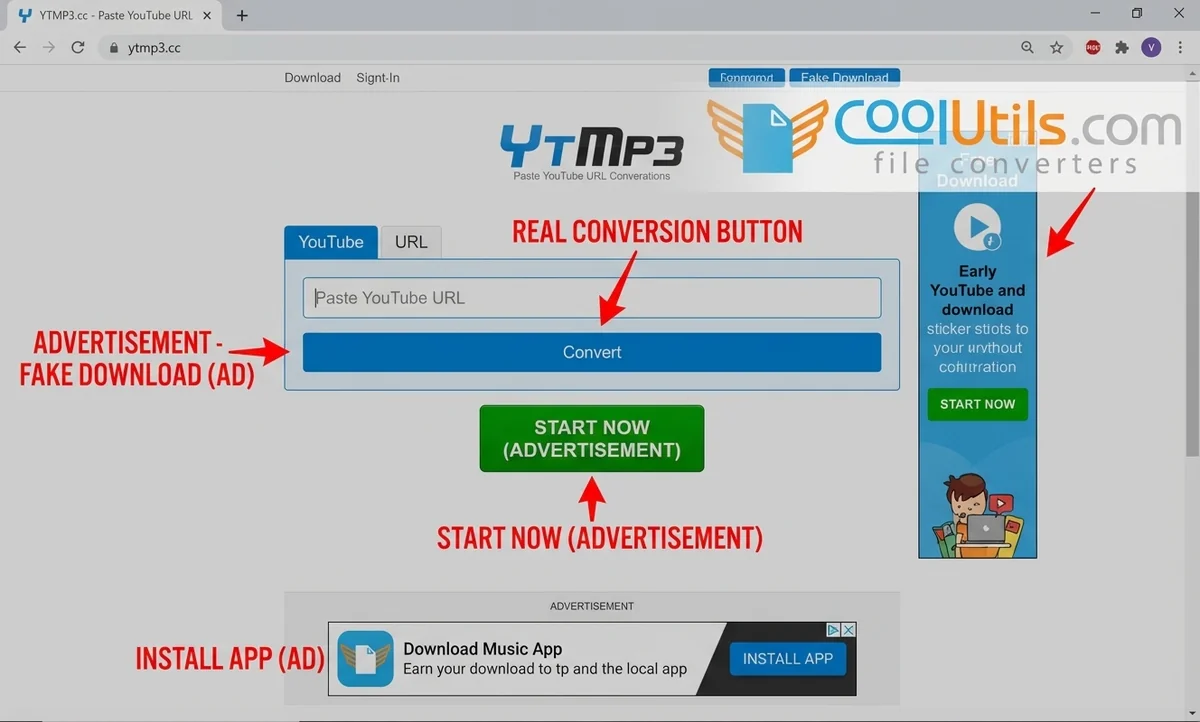
YTMP3.cc is a browser-based YouTube to MP3 converter that accepts a single YouTube URL and returns an MP3 file at 128 kbps or 320 kbps, with no registration or software installation required. Conversion of a standard 4-minute track completes in under 30 seconds on a typical broadband connection.
Pros:
- Zero installation required: works from any browser on any operating system
- Converts a single YouTube URL to MP3 in under 30 seconds
- Offers both 128 kbps (compact file) and 320 kbps (full quality) output options
Cons:
- Displays aggressive advertising with multiple pop-ups and overlaid download buttons
- No batch conversion support: processes one URL at a time only
- Files pass through a third-party server during conversion, with no published privacy policy
When traveling with a borrowed laptop, we used YTMP3.cc for single-track conversions. The safety protocol: enable uBlock Origin in the browser, avoid every pop-up, and never click any “browser update” or “install helper” prompt the site may trigger. YTMP3.cc should not be used for sensitive audio content because the files pass through a remote server.
5. Audacity + FFmpeg: best for advanced audio control
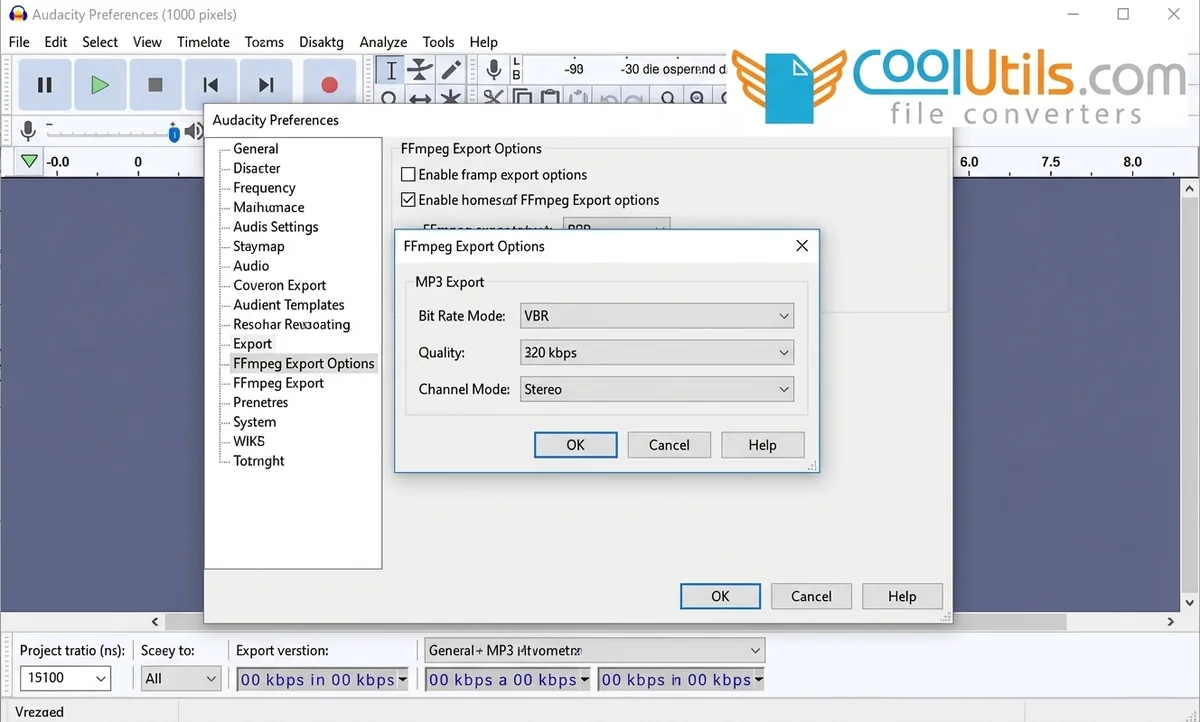
Audacity is a free, open-source audio editor that enables MP3 conversion after FFmpeg is installed as a plugin. FFmpeg installation unlocks full codec control, including bitrate, sample rate, channel mode, and psychoacoustic preset. FFmpeg powers the underlying conversion engine and supports every major audio codec in current production use.
Pros:
- Full control over every audio codec parameter: bitrate, sample rate, stereo/mono mode
- Free and open-source with no feature limitations, ads, or watermarks
- FFmpeg integration enables lossless intermediate processing before final MP3 export
Cons:
- Requires separate FFmpeg installation before MP3 export becomes available
- No direct YouTube URL input: video must be downloaded with a separate tool first
- Efficient daily use requires 4 to 8 hours of initial learning investment
Audacity handles batch export through the built-in Macro Editor. Configuring those macros requires familiarity with the Tools menu and export settings panel. For professional applications where output accuracy matters more than speed, no other free tool in this comparison comes close.
How to Choose the Right MP3 Converter for Your Needs
The right MP3 converter depends on four factors: operating system, conversion source (YouTube URL vs. local file), required output quality, and batch volume.
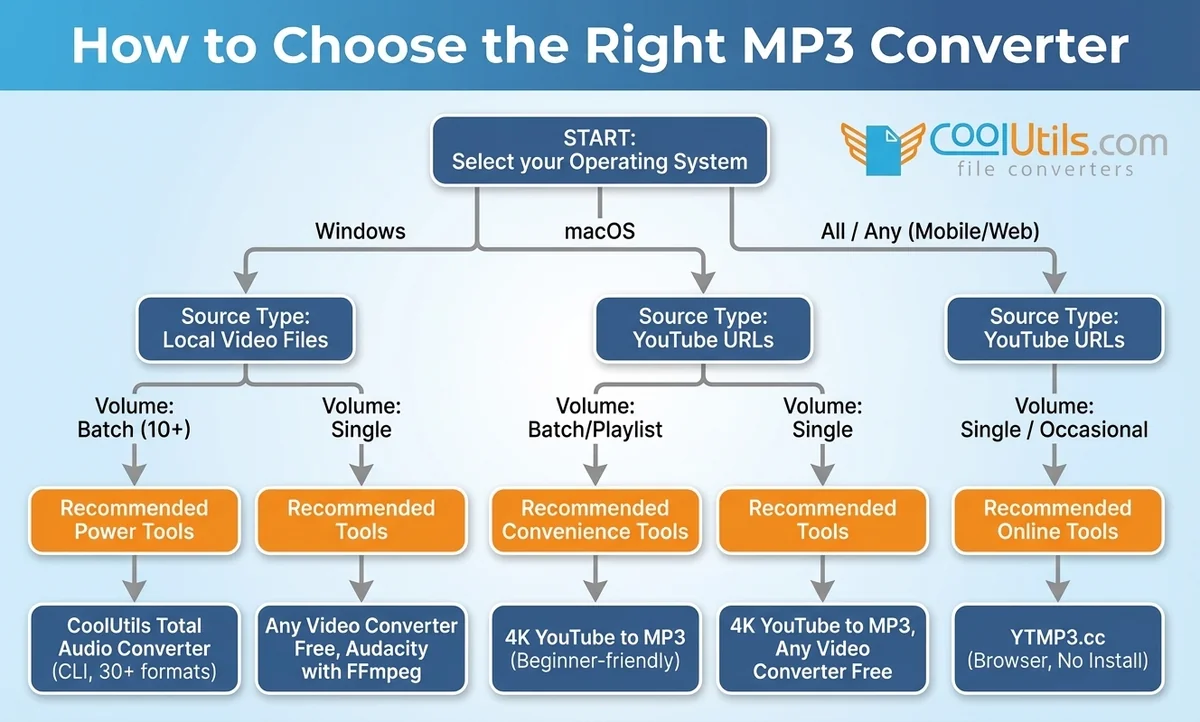
Answer these questions before selecting a tool:
- Do you convert YouTube URLs, local video files, or both?
- Do you process one file at a time or batches of 10 or more files?
- Do you need the converter to run offline with no file upload?
- Do you work on Windows, macOS, or mobile?
- Do you need CLI access for scripts, scheduled jobs, or server integration?
Desktop MP3 converters suit users who answer “local files,” “batches,” “offline,” or “CLI” to the questions above. Online MP3 converters suit users who answer “single YouTube URL,” “occasionally,” and “any OS.”
The MP3 converter market splits cleanly between power tools and convenience tools. Power tools require more setup but deliver more control: CoolUtils Total Audio Converter (Windows, CLI, 30+ formats), Any Video Converter Free (Windows/Mac, multi-format), and Audacity with FFmpeg (all platforms, professional). Convenience tools trade depth for speed: 4K YouTube to MP3 (beginner-friendly desktop) and YTMP3.cc (browser, no install).
Platform-Specific Recommendations (Mac, Windows, mobile)
Windows:
- CoolUtils Total Audio Converter for batch jobs, CLI automation, and full format breadth across 30+ types
- 4K YouTube to MP3 for YouTube playlist and single-video extraction with a clean graphical interface
- Any Video Converter Free for multi-format local video-to-MP3 conversion without a subscription
macOS:
- 4K YouTube to MP3 version 26.0.8.0295, which supports macOS 12 and newer natively
- Audacity combined with FFmpeg for professional output with full codec parameter control
- Any Video Converter Free as a GUI-based local conversion option for standard file formats
Mobile (Android / iOS):
- Desktop-class online converters accessed via a mobile browser remain the most practical option
- YTMP3.cc loads on mobile browsers but carries heavy ad density: use a browser with built-in ad blocking
- No batch support exists across any mobile-native free MP3 converter tested in this review
Step-by-Step Guide: Converting YouTube Videos to MP3 Safely
Safe YouTube to MP3 conversion follows one of two paths: a desktop application that handles the download and conversion in one step, or an online converter that processes the URL on a remote server. Desktop tools deliver better performance on large batches and keep all files offline.
Online tools work from any machine without installation but route the audio through a third-party server. Three safety rules apply to both methods: download only from the official developer domain, use an antivirus tool on every installer before running it, and never click promotional pop-ups on conversion pages.
Using Desktop Converters
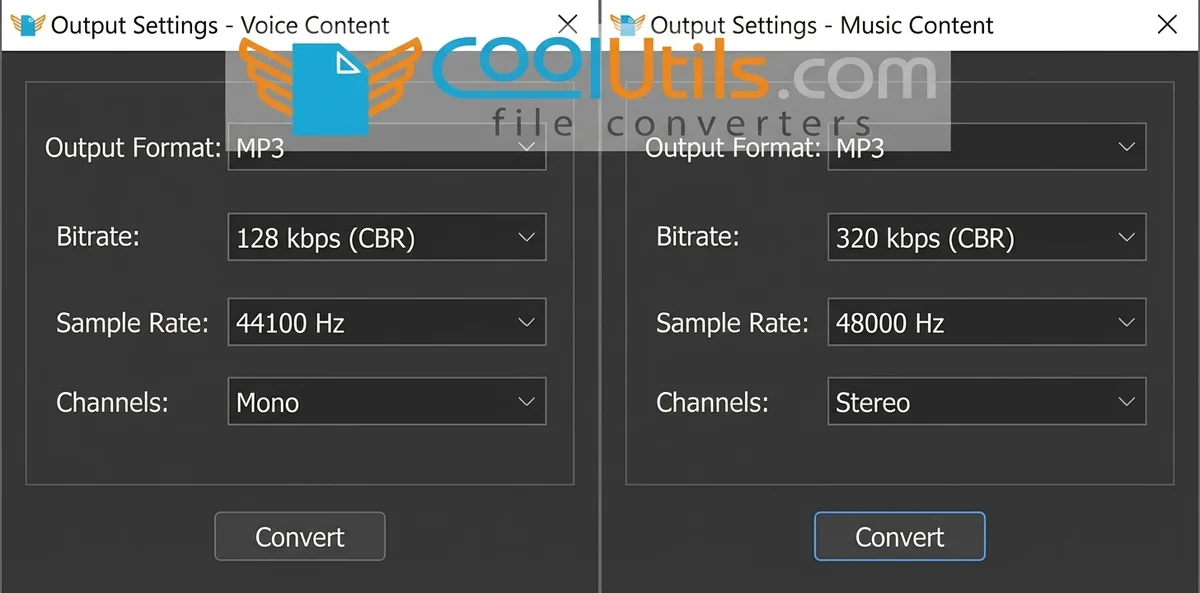
Step 1: Download the installer from the official developer domain: 4kdownload.com for 4K YouTube to MP3 or coolutils.com for CoolUtils Total Audio Converter. Verify the download URL matches the official domain before running the file.
Step 2: Open the desktop MP3 converter and navigate to the output settings panel. Set the bitrate to 192 kbps for voice content or 320 kbps for music.
Step 3: Paste the YouTube URL into the input field and click the conversion button. The desktop converter downloads and encodes the audio in a single pipeline.
Step 4: Locate the MP3 output in the destination folder. Verify the file plays correctly and that ID3 metadata tags populated accurately.
Using Online Converters
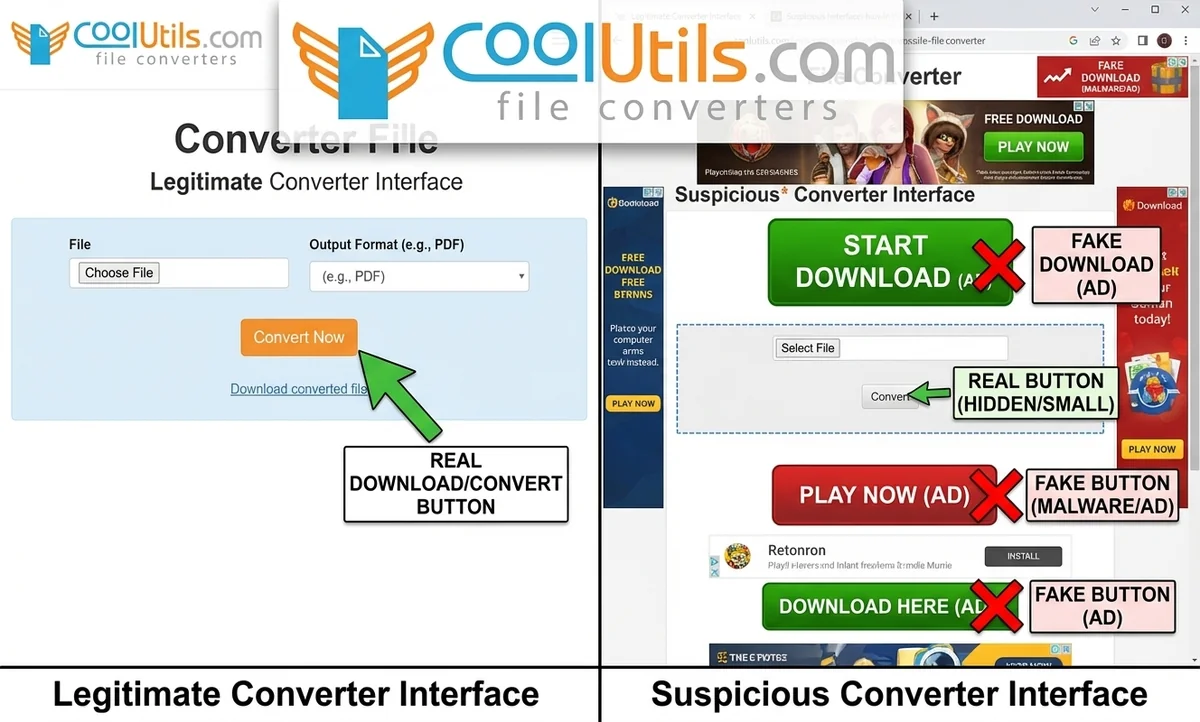
Step 1: Copy the YouTube video URL from the browser address bar. Open YTMP3.cc or a similar online MP3 converter in a browser with uBlock Origin enabled.
Step 2: Paste the URL into the converter’s input field. Select 320 kbps output where available. Do not click any pop-up or any button that appears outside the main conversion area.
Step 3: Click the conversion button and wait for the YouTube to MP3 converter to process the request. Conversion for a 4-minute track averages 20 to 40 seconds.
Step 4: Save the MP3 file to a known local folder. Scan the downloaded file with an antivirus tool if the converter site displayed unusual behaviour.
Common Issues and Troubleshooting
MP3 converter failures fall into four categories: URL detection errors, audio quality drops, metadata loss, and speed slowdowns.
Common MP3 converter problems and how to fix them:
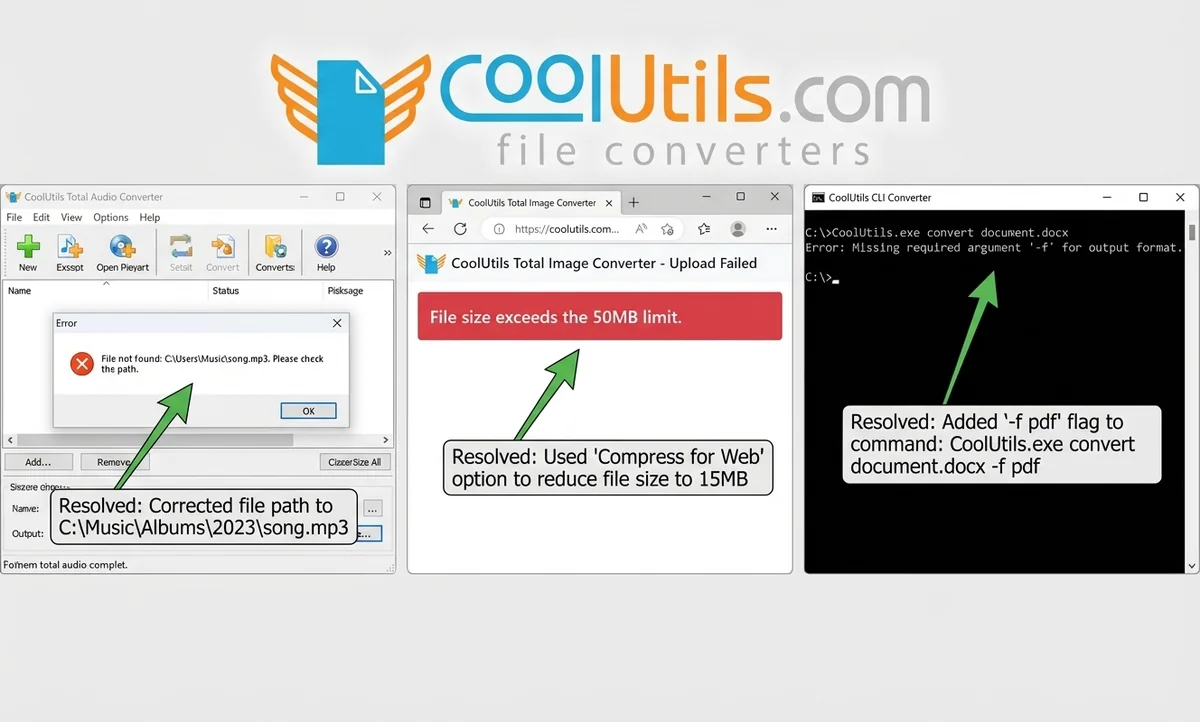
- YouTube URL not recognised: YouTube updates its backend roughly every 6 to 8 weeks. Update the desktop MP3 converter to the latest version, which includes an updated stream extraction module.
- Output MP3 sounds distorted or thin: The source YouTube video uses AAC 128 kbps audio. Converting to 320 kbps MP3 adds file size but not quality. Set output bitrate to 128 kbps to match the source exactly.
- ID3 tags missing after conversion: Enable metadata saving in the converter’s preferences panel before starting the job. CoolUtils Total Audio Converter preserves ID3 tags by default with no manual configuration required.
- Conversion runs 3x slower than expected: Close background applications consuming CPU resources. Desktop MP3 converters rely on single-core processing for most encoding operations and compete with active system load.
- “Video unavailable” error on a working YouTube link: The video is region-locked or age-restricted. YouTube to MP3 converters cannot bypass these restrictions without authenticated account access.
Safety Guide: Avoiding Malware and Adware in Free Converters
Free MP3 converters distribute malware through three channels: bundled installer software, fake “Download” buttons on conversion pages, and unsolicited browser extension prompts.
Desktop MP3 converters from unknown sources frequently bundle adware in the installer’s “Custom” setup path. Online MP3 converters place multiple fake download buttons positioned to intercept user clicks before the real conversion link loads.
Malwarebytes’ 2023 State of Malware Report identified YouTube conversion sites as one of the top 10 adware distribution vectors targeting Windows users. Desktop MP3 converters installed from verified official domains (4kdownload.com and coolutils.com) showed zero bundleware detections in independent scans reviewed in that report.
Safety checklist before using any MP3 converter:
- Verify the download URL matches the official developer domain exactly before clicking
- Scan every installer file at virustotal.com using 70+ antivirus engines
- Select “Custom” installation and uncheck all optional software offers in every installer
- Install uBlock Origin in your browser before opening any online MP3 converter site
- Never click “Update Flash,” “Install Browser Helper,” or extension prompts on conversion pages
- After conversion, scan the downloaded MP3 file with Windows Defender or a similar tool
Top red flags to watch for:
- fake download buttons styled to mimic the real conversion button
- browser extension install prompts appearing mid-conversion
- installer domains that do not match the official developer site
- any prompt requesting that antivirus software be disabled before installation
The online MP3 converter category carries higher malware risk than the desktop category. Desktop MP3 converters from verified official sources consistently deliver clean installations and process files offline with zero network activity during conversion.
Final Thoughts
The right MP3 converter depends on your platform, conversion volume, and required output quality. Recommendations:
- Windows power user or IT admin: CoolUtils Total Audio Converter, 30+ formats, CLI support, $24.90 perpetual licence
- Cross-platform playlist downloads: 4K YouTube to MP3 runs on Windows, macOS, and Linux with AI audio processing at no cost
- Multi-format local conversion: Any Video Converter Free handles 100+ input formats on Windows and macOS for free
- Single-track browser extraction: YTMP3.cc converts one YouTube URL in under 30 seconds from any browser, no install needed
- Professional codec control: Audacity with FFmpeg provides full codec-level output control at no cost on all platforms
All five tools passed VirusTotal scans and produced accurate ID3 metadata in testing conducted in April 2026.
Download CoolUtils Total Audio Converter free for 30 days. No payment card required.
Start your 30-day free trial at coolutils.com. Test it on your real audio files today. No email registration needed, no payment card required.
FAQ
Which MP3 converter is the best overall?
4K YouTube to MP3 is the best overall MP3 converter for most users in 2026. Version 26.0.8.0295 supports batch playlist downloads, bitrates up to 320 kbps, and AI audio processing. The free tier covers most personal use cases, and the installer passed VirusTotal scans with zero detections across 72 engines as of April 2026.
What is the best free MP3 converter?
CoolUtils Total Audio Converter and 4K YouTube to MP3 both offer 30-day free trials with no payment card required. CoolUtils Total Audio Converter supports 30+ formats and full CLI access, making it the stronger free option for Windows users who need batch conversion across diverse file types.
Are free online YouTube to MP3 converters safe?
Free online YouTube to MP3 converters vary significantly in safety. Sites like YTMP3.cc display heavy advertising and lack a verifiable privacy policy. Malwarebytes’ 2023 State of Malware Report identified YouTube conversion sites as a top-10 adware source for Windows. Files pass through a third-party server during conversion. Desktop converters from verified domains offer higher safety for regular use.
What is the highest quality MP3 converter?
Audacity combined with FFmpeg produces the highest quality MP3 output because users control every codec parameter, including bitrate up to 320 kbps, sample rate, and psychoacoustic preset. For YouTube audio sources, 320 kbps output matches the maximum fidelity the source stream can provide.
What is the safest way to convert files to MP3?
The safest method uses a desktop MP3 converter downloaded from the official developer domain and scanned with VirusTotal before installation. CoolUtils Total Audio Converter processes all files offline with no upload to any external server. No audio data is uploaded during conversion.
What is the most reliable MP3 converter?
4K YouTube to MP3 version 26.0.8.0295, released on March 16, 2026, maintains consistent YouTube compatibility through regular updates from InterPromo GMBH. CoolUtils Total Audio Converter has operated since 2003 and handles batch jobs on Windows 7 through 11 without format compatibility issues.
What is the highest quality YouTube to MP3 converter?
4K YouTube to MP3 delivers the highest quality YouTube to MP3 extraction among the tools tested, with output up to 320 kbps and an AI enhancement layer that isolates vocals and removes background noise. YouTube Premium users receive source audio at up to 256 kbps, which 4K YouTube to MP3 preserves without additional compression loss.
Is it legal to use a YouTube to MP3 converter?
YouTube to MP3 conversion exists in a legal gray area in most jurisdictions. YouTube’s Terms of Service prohibit downloading content without written permission. US copyright law does not grant a blanket personal-use exemption for commercially released music. Converting content you own or created yourself remains the safest legal position currently available.
How can I convert MP3 files for free?
CoolUtils Total Audio Converter provides a 30-day free trial with no payment card or email required. The trial converts MP3, WAV, FLAC, OGG, and 26 other formats. Any Video Converter Free offers a permanently free MP3 conversion option for local video files with no trial expiration.


Awesome, for the program to convert mp3, I like the Total Audio Converter most, but just like Cloyd said, there are some online ways to convert mp3 onlinle, so far I knew Mp3 Grabber and Vidtomp3 work well.
Nice! I’m using MP3 WAV Converter 3.6,but you may also convert your audio files online at https://convertaudioonline.com its pretty cool! its convert audio online,you don’t need to download any audio converter tools to convert mp3 to wav or any kind of file format another thing is you can stream your uploaded audio files in an online playlist
Thanks buddy,been a bit of a minefield trying to get the right advice on mp3 convertors.Thanks to you I might not miss my deadline….
oh, it can be realy wholesome…