मदद की आवश्यकता है? हमसे संपर्क करें 

 +1 (855) 418-2323
मदद की आवश्यकता है? हमसे संपर्क करें
+1 (855) 418-2323

 File Converters TIFF and PDF apps Forensic Freeware
कमांड लाइन के माध्यम से कैड फाइल्स को बैच में प्रिंट करें।
Windows
2000/2003/Vista/7/8/10/11/Citrix
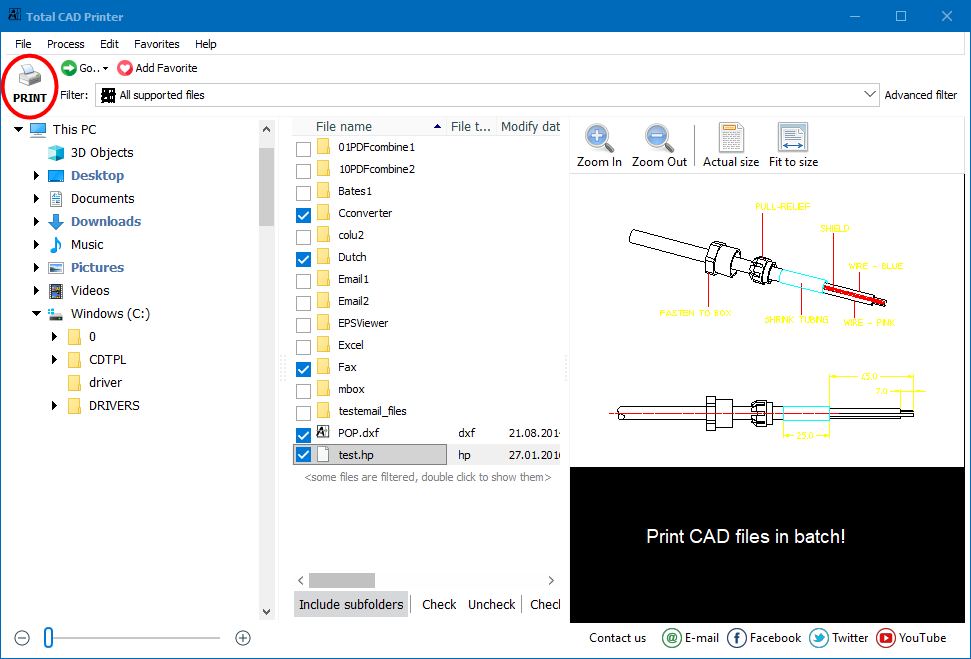
हर कोई जो CAD फाइलें काम करता है स्वचालित रूप से प्रिंटिंग कार्यों को अनुकूलित करने का सपना देखता है। टोटल CAD प्रिंटर आपको कुछ क्लिक में DWG या DXF फाइलों के फोल्डर प्रिंट करने की अनुमति देता है। और इसके लिए ऑटोकैड की आवश्यकता नहीं है।
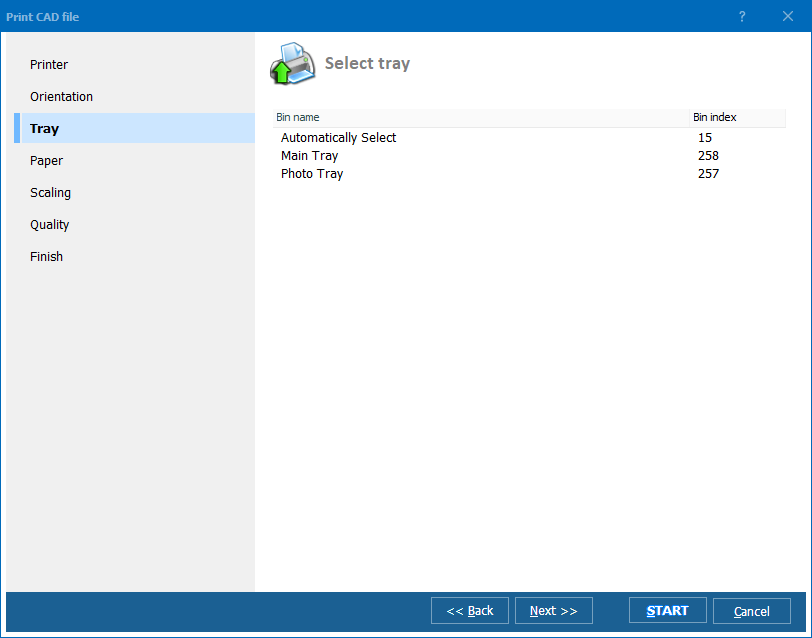
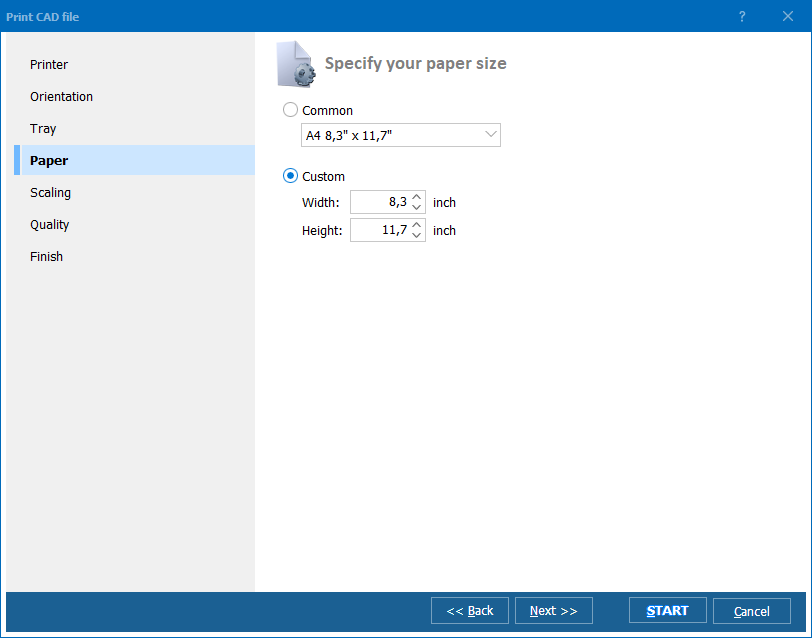
यदि आपके पास कई प्रिंटर हैं, तो टोटल CAD प्रिंटर किसी भी CAD फाइल को निर्दिष्ट प्रिंटर या पोर्ट पर भेज देगा। आप ऑटो रोटेट विकल्प चुन सकते हैं या सभी फाइलों (पोर्ट्रेट या लैंडस्केप) के लिए एक अभिविन्यास सेट कर सकते हैं। आप ट्रे का चयन भी कर सकते हैं और कागज के आकार को निर्दिष्ट कर सकते हैं। टोटल CAD प्रिंटर आपके लिए प्रिंट करने से पहले ड्रॉइंग को स्केल कर सकता है, बस फिट टू पेज विकल्प की जांच करें। CAD ड्रॉइंग अक्सर A4 आकार से अधिक होते हैं। यदि आपकी CAD फाइलें विभिन्न आकारों की हैं और आपके पास विभिन्न प्लॉटर हैं, तो टोटल CAD प्रिंटर उन्हें स्वचालित रूप से सही तरीके से प्रिंट करेगा।
हमारे प्रिंटर का अद्वितीय विकल्प टुकड़ों में प्रिंटिंग है। यदि आपको A1 फाइल प्रिंट करनी है लेकिन आपके पास केवल A4 प्लॉटर उपलब्ध है, तो टोटल CAD प्रिंटर इसे A4 खंडों में प्रिंट करेगा।
टोटल CAD प्रिंटर आपका समय बचाता है। इसके अलावा यह आपकी स्याही भी बचाता है। यह CAD फाइलों के लिए प्रिंटिंग गुणवत्ता के 4 स्तर प्रदान करता है - उच्च से ड्राफ्ट तक।
टोटल CAD प्रिंटर का पारदर्शी इंटरफेस है जो अत्यधिक अनुसरण करने में आसान है। वैकल्पिक रूप से इसे कमांड लाइन के माध्यम से भी चलाया जा सकता है। बड़े प्रिंट कार्यों को आज ही स्वचालित करें - टोटल CAD प्रिंटर की मूल्यांकन प्रति डाउनलोड करें और कुछ क्लिक में CAD फाइलों के फोल्डर प्रिंट करें।
(30 दिन मुफ्त परीक्षण शामिल है)
(केवल $149.90)
"TotalCADPrinter शानदार है। मैंने इसे खरीदा, इसे स्थापित किया और कुछ ही मिनटों में CAD ड्रॉइंग्स को प्रिंट कर रहा था। यह वही करता है जो वादा किया गया था। मैं कमांड लाइन स्क्रीन पर कमांड लाइन के उपयोग के कुछ उदाहरण देखना चाहूँगा ताकि यह स्पष्ट हो सके कि कमांड लाइनों को कैसे स्वरूपित किया जाना चाहिए।"
 जॉन फ्लेमिंग
डरहम फर्नीचर इंक | www.durhamfurniture.com
जॉन फ्लेमिंग
डरहम फर्नीचर इंक | www.durhamfurniture.com
"हम अपने प्रिंटिंग कार्यों में टोटल CAD प्रिंटर का उपयोग करके खुश हैं। यह तेजी से काम करता है और कीमत प्रतिस्पर्धात्मक थी। धन्यवाद!"
 एरिक नोक
इंजीनियर और टीमें जो AutoCAD के बिना DWG, DXF, HPGL और अन्य CAD ड्राइंग बैच-प्रिंट करती हैं
एक बार में DWG और DXF ड्राइंग के पूरे फ़ोल्डर प्रिंट करें
आर्किटेक्ट और इंजीनियर प्रोजेक्ट फ़ोल्डर चुनकर और एक बार Print क्लिक करके पूरे ड्राइंग सेट प्रिंट करते हैं। Total CAD Printer AutoRotate और Fit to Page के साथ मिश्रित पेज आकार संभालता है, प्रत्येक ड्राइंग को स्वचालित रूप से सही प्लॉटर पर भेजता है — AutoCAD इंस्टॉलेशन की आवश्यकता नहीं।
टाइल्ड सेगमेंट द्वारा A4 प्रिंटर पर A1 ड्राइंग प्रिंट करें
निर्माण साइट कार्यालय और फील्ड टीमें छोटे कागज़ पर बड़े CAD ड्राइंग टाइल करने के लिए अनूठी print-by-parts सुविधा का उपयोग करती हैं। एक A1 ड्राइंग स्वचालित रूप से A4 सेगमेंट में विभाजित होती है, इसलिए बड़े-फॉर्मेट प्लॉटर के बिना भी कर्मचारी मानक ऑफिस प्रिंटर पर पूर्ण आकार की योजनाएं देख सकते हैं।
उत्पादन के लिए PLT और HPGL प्लॉटर फ़ाइलें बैच-प्रिंट करें
निर्माण टीमें शॉप फ्लोर ऑपरेटरों के लिए PLT, HPGL और CGM प्लॉटर फ़ाइलें बैच में प्रिंट करती हैं। कागज़ आकार के आधार पर विभिन्न CAD फ़ाइलों को विभिन्न प्रिंटर या ट्रे पर रूट करें, आंतरिक ड्राफ्ट पर स्याही बचाने के लिए चार गुणवत्ता स्तरों में से चुनें, और क्लाइंट डिलीवरेबल के लिए उच्च-रिज़ॉल्यूशन मोड आरक्षित रखें।
निरीक्षण और रखरखाव के लिए आर्काइव CAD फ़ाइलें प्रिंट करें
सुविधा प्रबंधक निरीक्षण, रखरखाव कार्य या नियामक ऑडिट के लिए as-built DWG, DXF और SVG ड्राइंग प्रिंट करते हैं। Total CAD Printer ड्राइंग को उपलब्ध कागज़ आकार में फिट करता है और एकल बैच में विभिन्न आयामों की फ़ाइलें संभालता है — मैन्युअल समायोजन की आवश्यकता नहीं।
कमांड लाइन के माध्यम से बिना हस्तक्षेप के CAD प्रिंटिंग शेड्यूल करें
IT विभाग स्क्रिप्ट और शेड्यूल्ड कार्यों से Total CAD Printer को कॉल करके CAD प्रिंटिंग स्वचालित करते हैं। साझा फ़ोल्डर में जमा की गई नई ड्राइंग निर्धारित प्लॉटर पर स्वचालित रूप से प्रिंट होती हैं — ओरिएंटेशन, स्केलिंग और गुणवत्ता कमांड लाइन पैरामीटर के माध्यम से पूर्व-सेट होती है।
अपडेटेड Wed, 07 Oct 2026
(केवल $149.90)
नि:शुल्क ट्रायल डाउनलोड करें और अपने फाइलों को मिनटों में कन्वर्ट करें।
कोई क्रेडिट कार्ड या ईमेल की आवश्यकता नहीं।



