Logo
होम उत्पाद समर्थन संपर्क हमारे बारे में
arrow1 File Converters
arrow1 TIFF and PDF apps
arrow1 Forensic
arrow1 Freeware

OST को बैच में Text में बदलें — Outlook ईमेल TXT export

OST फ़ाइल Exchange या Microsoft 365 mailbox की पूरी local copy रखती है, लेकिन कोई text editor, search tool या script इसे पढ़ नहीं सकता — यह binary format है और उसी Outlook profile से जुड़ा है जिसने इसे बनाया। Total Outlook Converter OST ईमेल को batch में plain text फ़ाइलों में export करता है, जिससे content searchable, scriptable और कहीं भी readable हो जाती है।

  • Batch export. एक OST फ़ाइल से सैकड़ों या हज़ारों messages को एक बार में TXT में बदलें — अलग-अलग ईमेल नहीं, folders चुनें।
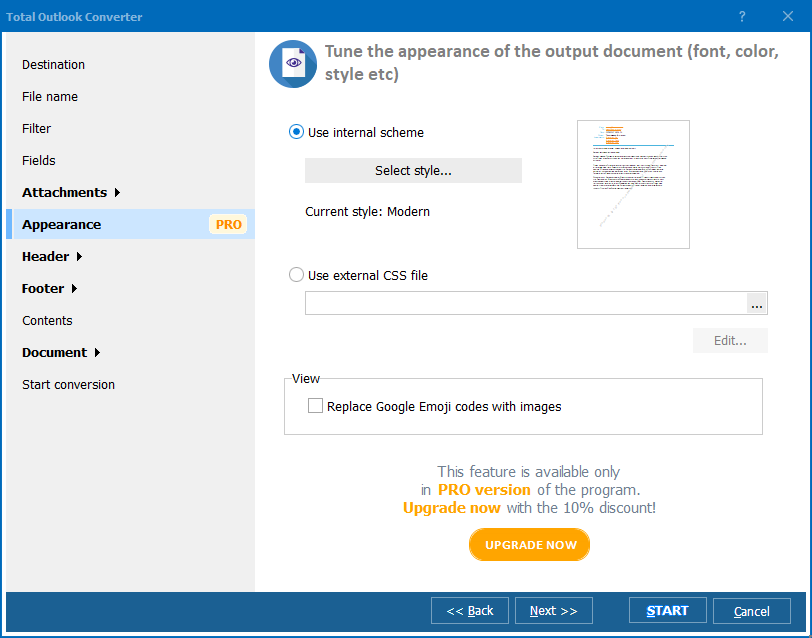
  • Custom text layout. चुनें कि output में कौन से fields जाएं: sender, recipients, date, subject, body। जो चाहिए वही रखें।
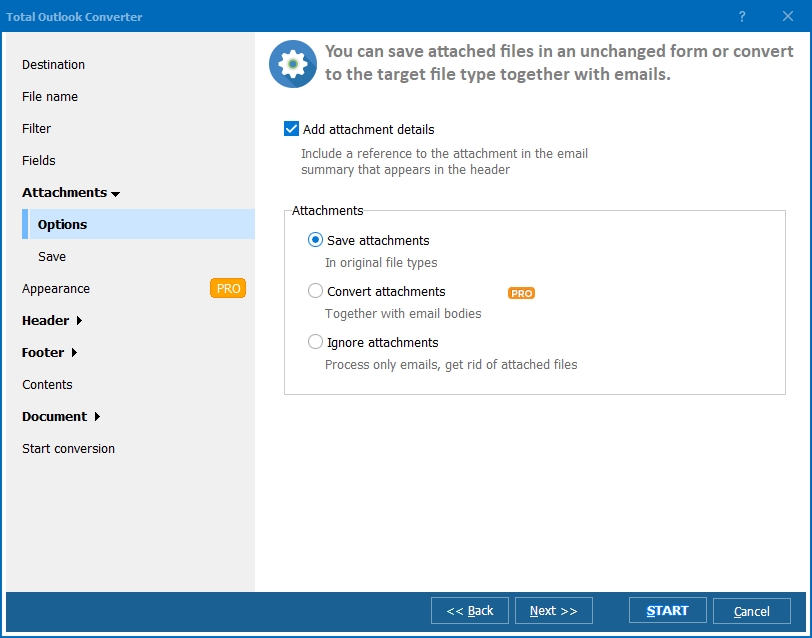
  • Attachments नियंत्रण में। Attached files उनके original format में text output के साथ save होती हैं; Total Outlook Converter Pro attachments को भी convert कर सकता है।
  • TXT से अधिक। वही tool OST और PST ईमेल को PDF, DOC, HTML, TIFF, JPEG और EML में भी export करता है।
  • Command line शामिल। .bat scripts से exports schedule करें या server पर चलाएं।

OST बनाम Plain Text: Convert क्यों करें?

OST (Offline Storage Table) server mailbox का Outlook का local cache है। यह ठीक एक बार काम आता है: उस Outlook profile के अंदर जो इसे own करती है। बाकी जगह यह समस्या है — आप इसे grep नहीं कर सकते, index नहीं कर सकते, case file में attach नहीं कर सकते, या बिना original account के किसी machine पर खोल नहीं सकते।

Plain text इसके विपरीत है: हर operating system, search indexer, review platform और script इसे पढ़ता है। OST को TXT में बदलने से एक बंद mailbox snapshot ऐसी files बन जाती हैं जिन्हें Windows Search या किसी grep tool से search कर सकते हैं, scripts और data pipelines में feed कर सकते हैं, reports में quote कर सकते हैं, और Outlook versions की चिंता किए बिना वर्षों तक archive कर सकते हैं।

OST फ़ाइलTXT export
Outlook के बिना खुलती हैनहींहाँ — कोई भी editor, कोई भी OS
Full-text searchकेवल Outlook के अंदरकोई भी search tool
Scripts / pipelines में उपयोगनहींहाँ
Long-term archive formatProfile और software से जुड़ाUniversal, future-proof

OST को Text में कैसे बदलें

  1. Total Outlook Converter डाउनलोड करें — 30 दिन का trial मुफ़्त है, कोई credit card या email नहीं चाहिए।
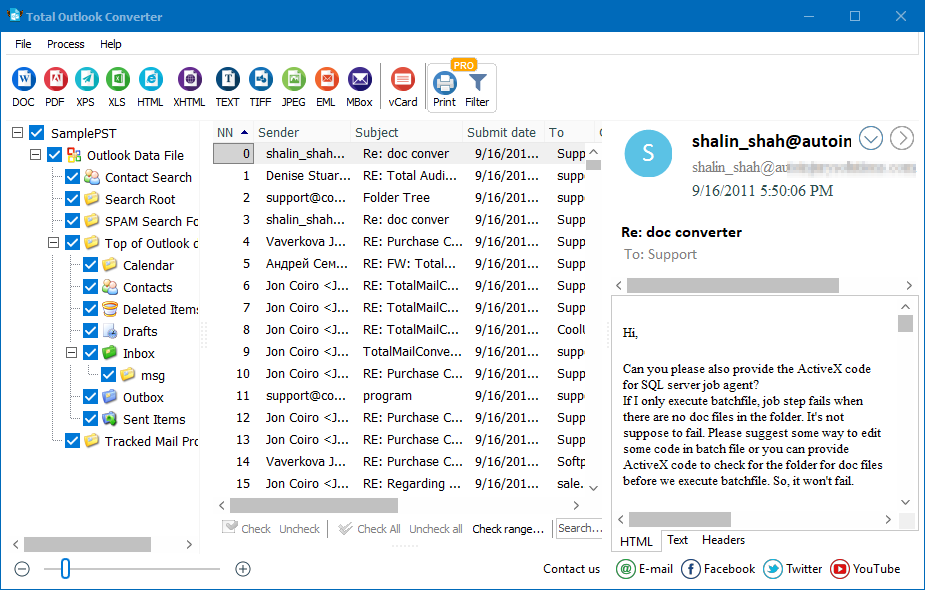
  2. Program install और launch करें। यह आपका Outlook data automatically detect करके mailbox tree दिखाता है।
  3. Export करने के लिए folders या messages tick करें। पूरा Inbox, चुने हुए subfolders — कोई भी combination।
  4. Format bar में TXT button click करें।
  5. Options set करें: कौन से header fields include करने हैं, attachments कहाँ रखने हैं, output files का नाम कैसे रखना है।
  6. Start! press करें और destination folder से text files लें।

Command-Line Conversion

Total Outlook Converter में unattended jobs के लिए command-line interface आती है। .bat file में nightly archive task इस तरह दिखती है:

OutlookConverter.exe "C:\Mail\backup.ost" "C:\Archive\TXT\" -cTXT

इसे Task Scheduler से चलाएं और हर सुबह पिछले दिन की mail archive में आ जाएगी — कोई clicks नहीं। पूरी switch list program के Help में है।

Total Outlook Converter क्यों?

यह single messages नहीं, पूरा mailbox handle करता है

बीसवें message के आसपास ईमेल एक-एक करके forward करना या body copy-paste करना option नहीं रहता। Converter एक single run में हज़ारों emails वाले folders process करता है और output files consistently नाम देता है।

Output configurable है

Legal review को sender, date और body चाहिए; data pipeline को सिर्फ body text। Export settings में fields एक बार चुनें और batch के हर message पर लागू करें।

एक license में आठ formats

जब अगले task में filing के लिए PDF या re-import के लिए EML चाहिए, वही program करेगा — दूसरी खरीद नहीं। PDF, DOC, HTML, XHTML, TXT, TIFF, JPEG और EML built-in हैं।

Honest licensing

Personal license एक बार $49.90 है — कोई subscription नहीं। Trial 30 दिन बिना credit card के चलता है। Windows 7/8/10/11 supported हैं।

OST to Text Conversion कब चाहिए?

  • Legal discovery और compliance. Counsel reviewable form में correspondence माँगे: plain text files with headers बिना live mailbox access दिए request satisfy करती हैं।
  • Exchange या Microsoft 365 छोड़ते समय। Account decommission होने पर TXT export server और profile gone होने के बाद भी history readable रखती है। अगर Outlook के लिए mailbox preserve करना है, तो OST को PST में convert करें।
  • वर्षों की mail में search। Windows Search, grep या desktop indexer "किसने क्या वादा किया और कब" का जवाब सेकंडों में दे सकता है — एक बार mail text बन जाए।
  • Email archives को scripts और AI tools में feed करना। Text files indexing, classification और analysis pipelines का native input हैं; OST files उन्हें unreadable हैं।

Related: OST से PDF court-ready documents के लिए, Total Outlook Converter overview, और Pro version अगर attachments भी output documents में convert करनी हों।


quote

Total Outlook Converter — आउटलुक फ़ाइलों को सुविधाजनक रूप से बदलें ग्राहक समीक्षाएं 2026

इसकी रेटिंग करें
ग्राहक समीक्षाओं के आधार पर 4.7/5 रेटेड
5 Star

"हमें एक departed employee के offline mailbox से तीन साल की correspondence produce करनी थी। Total Outlook Converter ने OST को headers intact clean text files में बदल दिया — review platform ने एक भी complaint के बिना उन्हें ingest किया। Batch run ने रात भर में लगभग 11,000 messages cover किए।"

5 Star Marcus Whitfield Litigation Support Specialist

"हम हर महीने Exchange accounts decommission करते हैं और हर mailbox का plain-text archive रखते हैं। Command line पूरा काम scheduled task से करती है: OST in, TXT out, attachments subfolder में। February में एक बार setup किया और तब से नहीं छुआ।"

5 Star Inge Sorensen IT Administrator, logistics company

"Auditors को Outlook access नहीं, selected folders की searchable copies चाहिए थीं। Date और sender fields के साथ text में export करने से काम एक दोपहर में हो गया। एक star कम इसलिए कि field settings ढूंढने के लिए Help पढ़नी पड़ी — उसके बाद सब smooth था।"

4 Star Priya Raman Compliance Officer

अक्सर पूछे जाने वाले प्रश्न ▼

नहीं। OST एक binary database format है — text editor unreadable bytes दिखाता है, आपके ईमेल नहीं। Readable text पाने के लिए, Total Outlook Converter से messages export करें: हर ईमेल अपने headers और body के साथ एक normal .txt file बन जाता है।
दोनों Outlook data files हैं। OST server mailbox (Exchange, Microsoft 365) का offline cache है और उस profile से जुड़ा है जिसने इसे बनाया; PST एक portable personal archive है जिसे Outlook कहीं भी खोल सकता है। अगर लक्ष्य Outlook में re-import करने योग्य mailbox है, तो OST को PST में convert करें; अगर लक्ष्य searchable, future-proof files हैं, तो text में export करें।
हाँ। Program PST और OST दोनों data के साथ काम करता है और messages को TXT, PDF, DOC, HTML, XHTML, TIFF, JPEG और EML में export करता है — एक license में सब।
Attachments उनके original format में text output के साथ save होती हैं, इसलिए कुछ भी नष्ट नहीं होता। Total Outlook Converter Pro आगे जाकर attachments को भी target format में convert कर सकता है।
हाँ — यही conversion का उद्देश्य है। .txt files plain UTF-8 text हैं: Windows Search और grep उन्हें index करते हैं, review platforms स्वीकार करते हैं, और scripts या AI pipelines directly पढ़ते हैं, जो binary OST के साथ संभव नहीं।
Personal license एक बार $49.90 है — कोई subscription नहीं, license terms के भीतर मुफ़्त updates। 30 दिन का trial पूरी तरह functional है और credit card या email नहीं माँगता। Attachment conversion वाला Pro version अलग से licensed है।
Conversion पूरी तरह आपके computer पर होती है — OST file और exported text कभी आपकी machine नहीं छोड़ते। इससे desktop converter legal, HR और financial correspondence के लिए सही tool है जिसे किसी online service पर upload नहीं करना चाहिए।


अभी काम शुरू करें!

नि:शुल्क ट्रायल डाउनलोड करें और अपने फाइलों को मिनटों में कन्वर्ट करें।
कोई क्रेडिट कार्ड या ईमेल की आवश्यकता नहीं।

⬇ मुफ्त ट्रायल डाउनलोड करें Windows 7/8/10/11 • 88 MB

Support
Total Outlook Converter — आउटलुक फ़ाइलों को सुविधाजनक रूप से बदलें Preview1
Total Outlook Converter — आउटलुक फ़ाइलों को सुविधाजनक रूप से बदलें Preview2
Total Outlook Converter — आउटलुक फ़ाइलों को सुविधाजनक रूप से बदलें Preview3

ताज़ा खबर

न्यूज़लेटर की सदस्यता

चिंता न करें, हम स्पैम नहीं करते।


© 2026. सभी अधिकार सुरक्षित. CoolUtils File Converters

Cards