Need help? Reach us at 

 +1 (855) 418-2323
Need help? Reach us at
+1 (855) 418-2323

A forensic examiner receives a disk image, a seized laptop, or an exported mailbox and has to answer one question fast: which emails matter? The evidence is scattered across PST and OST archives, loose EML and MSG files, and MBOX backups — tens of thousands of messages, often with no Outlook profile attached. Enterprise forensic suites do this, but they cost thousands per seat and take training to drive.
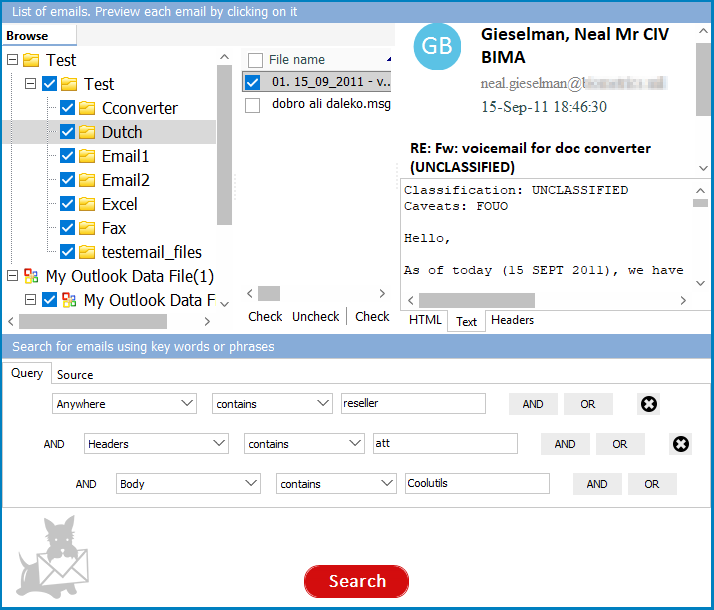
Mail Terrier is a lightweight email forensics tool that searches every email archive on a drive by keyword, date, and participant — entirely offline, with the original files left untouched. Find the relevant messages in seconds and export them, with full headers and metadata, to PDF or Excel for your report.
Quick answer: To run an email forensic search, install Mail Terrier on your examination workstation, point it at the folder or image-mounted volume holding the PST, OST, EML, MSG, or MBOX files, then search by keyword with AND/OR/NOT rules plus a date or sender filter. It reads the files read-only, shows each hit with full metadata, and exports results to PDF or Excel for evidence reports — no Outlook and no internet needed.
Email forensics is the practice of recovering, searching, and analyzing email evidence for investigations — incident response, insider-threat cases, fraud, HR matters, and litigation support. The examiner has to locate relevant messages across mixed archive formats, preserve their metadata (sender, recipient, timestamps, message-ID, attachments), and produce a defensible record of what was found and how.
The hard part is that email evidence almost never arrives in one clean format. A single custodian can leave a PST from Outlook, an OST cache, an MBOX from a Gmail Takeout, and loose EML or MSG files pulled from webmail. Opening each in its native client — if a client even exists for it — risks altering timestamps and read flags. A forensic search tool reads the archives directly, without a mail client and without modifying the source.
(includes 30 day FREE trial)
(only $199.00)
Every search is logged with its exact terms, date range, and filters, so you can reproduce and document the methodology if the findings are challenged.
Mail Terrier runs entirely on the local workstation and reads the source archives without writing back to them. Evidence never leaves the machine and is never uploaded to a cloud service — critical for chain of custody and for confidential or privileged material.
Results carry the full header set: sender, recipient, subject, send and receive timestamps, and attachment names. PDF and EML exports keep this metadata so the evidence stays meaningful in a report or exhibit.
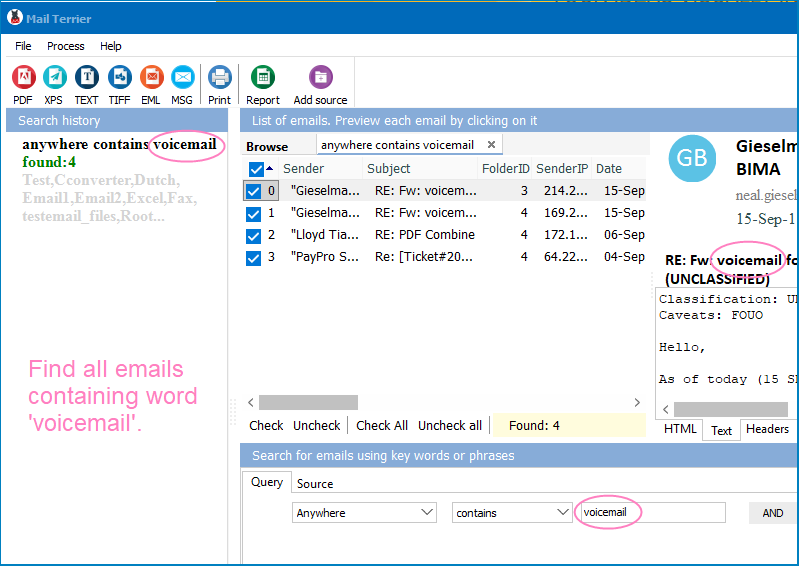
The search history records every query you ran. When methodology matters, you can show exactly which terms found which documents and when the search was performed.
| Feature | Enterprise Forensic Suite | Mail Terrier |
|---|---|---|
| Price | Thousands per seat / year | $199 one-time (free at home) |
| Formats | Varies | PST, OST, EML, MSG, MBOX, EMLX |
| Boolean keyword search | Yes | Yes (AND, OR, NOT, proximity) |
| Date and custodian filters | Yes | Yes |
| Source modified | Depends on workflow | No — read-only |
| Cloud dependency | Often | None — 100% local |
| Export | Platform-dependent | PDF, XLS, DOC, TIFF, EML, MSG |
| Setup | Days to weeks | Install and search in minutes |
Incident response. After a phishing compromise, you need every message from a malicious sender or carrying a known subject line across the affected mailboxes. Mail Terrier searches the exported PST and OST files by sender and keyword and exports the hits for the incident report.
Insider threat and data exfiltration. An employee under investigation may have emailed confidential files out. Search their archive for attachment names, external recipients, and trigger keywords, with a date range around the suspected window.
Internal and HR investigations. A complaint references specific exchanges. Search the relevant mailboxes by keyword and participant, producing a tight set of relevant emails without exposing the matter to extra staff.
Fraud and compliance. Auditors or investigators ask for communications mentioning a transaction, account, or counterparty. Mail Terrier scans every archived mailbox and exports a structured Excel index for review.
(includes 30 day FREE trial)
(only $199.00)
Download free trial and convert your files in minutes.
No credit card or email required.


 Forensic