Need help? Reach us at 

 +1 (855) 418-2323
Need help? Reach us at
+1 (855) 418-2323

Download Mail Terrier and run your first legal email search in under five minutes.
(includes 30 day FREE trial)
(only $199.00)
Quick answer: To search email archives for a legal case, install Mail Terrier, point it to the folder of PST, OST, EML, MSG, MBOX, or EMLX files, enter keywords with Boolean operators plus a date or custodian filter, then click Search. It scans every archive offline and exports the hits to PDF, XLS, or EML for court filings, all for a one-time $199 license.
Email is the primary evidence source in modern litigation. Courts expect parties to produce relevant electronic communications quickly and completely. This obligation — known as eDiscovery — applies to lawsuits, regulatory investigations, internal HR matters, and compliance audits.
The challenge is scale. A single employee generates thousands of emails per year. When a legal matter involves multiple custodians across several years, you are looking at tens of thousands of messages spread across PST exports, MBOX backups, and loose EML files. Manually reading through these is not feasible. You need a search tool that can scan all of them by keyword, date, and participant — then export the hits in a format you can attach to a court filing or share with opposing counsel.
Enterprise eDiscovery platforms (Relativity, Nuix, Everlaw) solve this problem at scale, but they are built for large law firms and corporate legal departments. Licensing starts at thousands of dollars per year, often per-seat. Solo practitioners, small firms, paralegals, and in-house compliance teams frequently need the same search capability without the enterprise price tag.
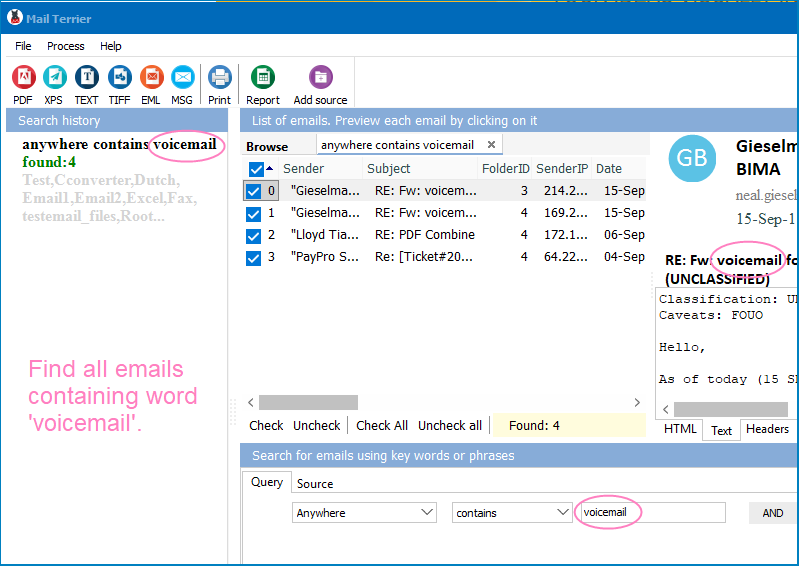
Mail Terrier fills this gap. It searches local email archives by keyword with Boolean logic, date ranges, and sender/recipient filters. It exports results to PDF and Excel for court submissions. And it costs $199 once — no subscription, no per-seat fees, no cloud dependency.
"settlement agreement" AND NOT "draft" finds emails discussing the final agreement while excluding drafts.The entire process takes minutes, even on archives with tens of thousands of emails. Each search is logged, so you can demonstrate to the court exactly what terms were used and when the search was performed.
| Feature | Enterprise eDiscovery | Mail Terrier |
|---|---|---|
| Price | $2,000–$10,000+/year | $199 one-time |
| Email formats | Varies by platform | PST, OST, EML, MSG, MBOX, EMLX |
| Boolean search | Yes | Yes (AND, OR, NOT, proximity) |
| Date/sender filtering | Yes | Yes |
| Export formats | Platform-dependent | PDF, XLS, DOC, TIFF, EML, MSG |
| Cloud dependency | Usually cloud-hosted | 100% local, no internet needed |
| Setup time | Days to weeks | Install and search in 5 minutes |
| Per-seat licensing | Yes | No — one license, one price |
| Training required | Extensive | Minimal — familiar search interface |

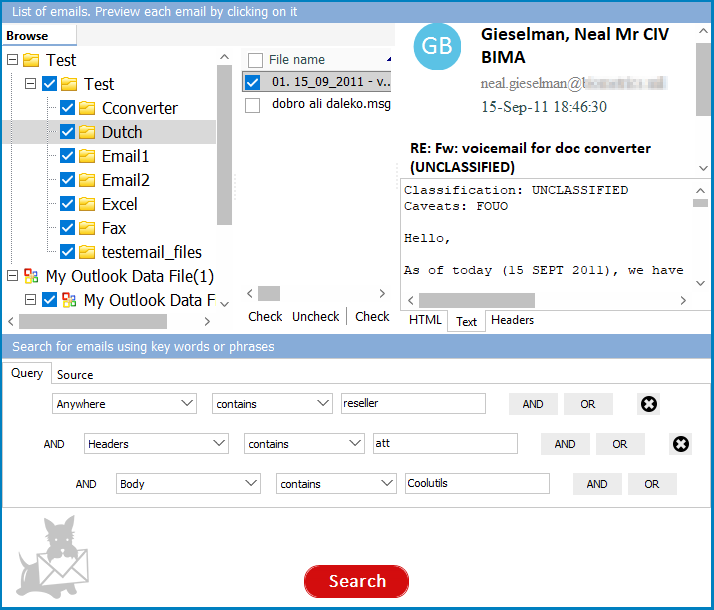
Mail Terrier supports AND, OR, and NOT operators, phrase matching with quotes, and proximity search to find words appearing near each other. You can combine multiple conditions in a single query. This level of search logic matches what enterprise eDiscovery tools offer for keyword searches.
Matching emails export to PDF with full headers (sender, recipient, date, subject) intact. PDF output is suitable for court filings, exhibits, and document production. XLS export creates a spreadsheet index of all matching emails — useful for privilege logs and review tracking.
Legal matters rarely involve a single email format. A departing employee might have a PST from Outlook, an MBOX from a personal Gmail backup, and loose EML files from a webmail download. Mail Terrier searches all six major formats in the same session without conversion.
Every search you run is logged with the exact query, date range, and filters used. If opposing counsel or the court challenges your search methodology, you have a record showing precisely how you found the produced documents.
Mail Terrier runs entirely on your local Windows machine. Email data never leaves your hard drive. This eliminates confidentiality concerns that come with uploading client communications to cloud-based eDiscovery platforms. Attorney-client privilege stays intact because the data stays on premises.
Litigation discovery. Opposing counsel requests all emails between two parties discussing a specific contract term during 2021–2023. You point Mail Terrier at the custodian's PST exports, search for the contract term with a date range filter, and export the results to PDF. What would take days of manual review is done in an afternoon.
HR investigation. An employee files a harassment complaint referencing specific email exchanges. HR needs to search the accused employee's mailbox for corroborating messages. Mail Terrier scans the PST or OST file by keyword and sender, producing a clear set of relevant emails without involving IT or exposing the investigation to more people than necessary.
Compliance audit. Financial regulations require firms to retain and search communications related to specific transactions. When auditors ask for emails mentioning a deal name or client during a particular quarter, Mail Terrier finds them across all archived mailboxes and exports the results to Excel for a structured review log.
Regulatory response. A government agency issues an information request covering email communications over a multi-year period. You need to identify responsive documents fast. Mail Terrier searches across PST, MBOX, and EML files from multiple custodians simultaneously, filtering by date range and keywords specified in the request.
(includes 30 day FREE trial)
(only $199.00)
Download free trial and convert your files in minutes.
No credit card or email required.


 Forensic