Need help? Reach us at 

 +1 (855) 418-2323
Need help? Reach us at
+1 (855) 418-2323

You have thousands of .eml files saved from Outlook Express, Thunderbird, or Windows Live Mail. You need to find one specific email by a phrase or sender name. Windows Explorer search chokes on EML content — it indexes file names but ignores what is inside the messages. Renaming or opening files one by one is not an option when the folder holds 10,000+ emails.
Mail Terrier solves this. It reads EML and EMLX files directly from your hard drive and searches them by keywords, phrases, sender, recipient, date range, and boolean rules. No email client required. Results appear in seconds, and you can export matching emails to PDF, Excel, DOC, or other formats.
(includes 30 day FREE trial)
(only $199.00)
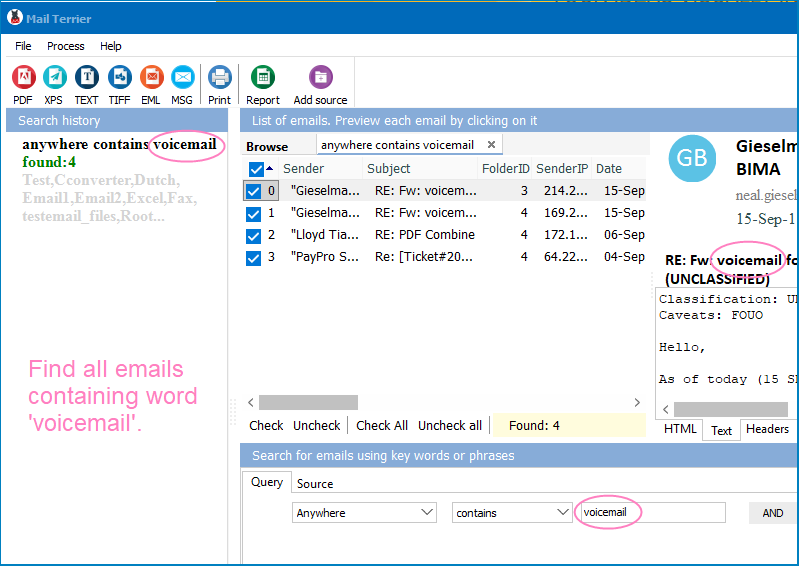
Quick answer: To search EML files by keyword on Windows, install Mail Terrier, add the folder where your .eml and .emlx files live, type a keyword, phrase, or AND/OR/NOT rule with a date or sender filter, then click Search. Mail Terrier reads inside every file, shows matches with previews in seconds, and exports them to PDF, XLS, DOC, TIFF, EML, or MSG.
EML is a plain-text file format defined by RFC 822 and its successors. Each .eml file stores one email message: headers (From, To, Date, Subject), the body in plain text or HTML, and any attachments encoded in MIME/Base64. Outlook Express, Windows Live Mail, Thunderbird, and dozens of other clients export messages as .eml. Because one file equals one email, a mailbox backup can contain tens of thousands of individual .eml files scattered across nested folders.
EMLX is Apple Mail's variant. It wraps the same RFC 822 content in a slightly different container and adds a metadata plist at the end of the file. Migrating from macOS to Windows leaves you with .emlx files that Windows cannot open natively.
The problem with both formats: Windows does not index their content. Standard search returns results by file name only. If the file is named 00000137.eml (a common pattern), the file name tells you nothing. You need a tool that reads inside every file.
Windows Explorer indexes file names and, at best, basic file properties. Mail Terrier parses each .eml file from headers to the last MIME part. It reads the subject line, the full message body (plain text and HTML), sender and recipient addresses, dates, and attachment file names. When you search for "invoice Q3", Mail Terrier finds it inside the body of a message named 00004782.eml — something Windows search will never do.
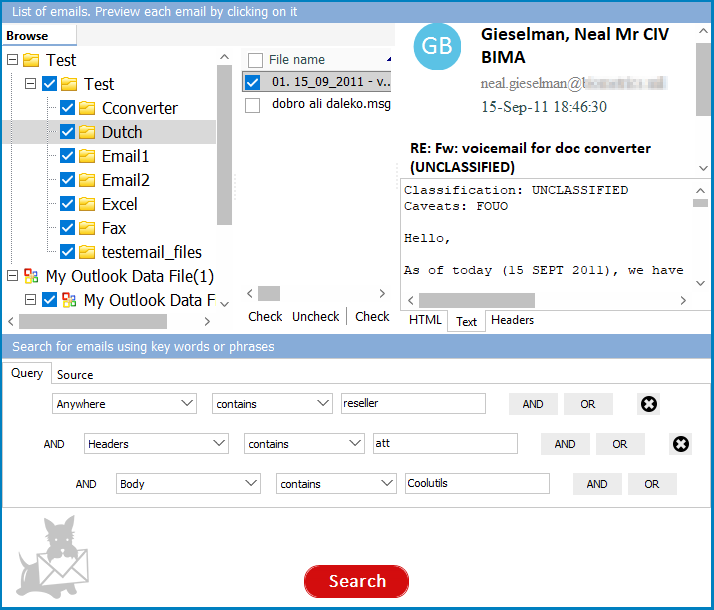
Simple keyword search is not always enough. Mail Terrier supports AND, OR, and NOT operators so you can build precise queries. Search for "tax return" AND 2024 NOT draft to find final tax documents from a specific year. Proximity search lets you find terms that appear within a certain number of words of each other, which is critical for legal and compliance investigations.
A typical email archive has 5,000 to 50,000 .eml files. Mail Terrier processes large folders without freezing or running out of memory. The search runs locally on your machine — no data is uploaded anywhere. Results appear within seconds even on modest hardware.
After you find the right emails, export them to PDF for archiving, XLS for analysis, DOC for editing, or TIFF for litigation. You can also re-export as EML or MSG to import into another mail client. The export preserves headers, body, and metadata.
| Feature | Windows Search | Mail Terrier |
|---|---|---|
| Searches inside .eml bodies | No (file names only) | Yes (headers, body, attachments) |
| Searches .emlx files | No | Yes |
| Boolean operators (AND/OR/NOT) | Limited | Full support + proximity |
| Filter by sender/recipient | No | Yes |
| Filter by date range | File date only | Email send date |
| Preview email content | No | Yes (built-in viewer) |
| Export results to PDF/XLS/DOC | No | Yes (6 formats) |
| Handles 10,000+ files | Slow/unreliable | Fast, consistent |
| Requires email client | N/A | No |
| Privacy | Local | Local (no upload) |
Recovering old correspondence. You migrated from Outlook Express or Windows Live Mail years ago and the backup folder still sits on an external drive. Now you need a specific email — a contract, a confirmation, or a receipt. Mail Terrier finds it in seconds without reinstalling the old mail client.
Legal discovery and compliance. A legal hold requires you to search through a former employee's email archive exported as .eml files. You need to find every message containing specific keywords within a date range and produce them as PDF. Mail Terrier handles the search and the export in one workflow.
Migrating from macOS. Apple Mail stores messages as .emlx files. After copying them to a Windows machine, you cannot open or search them with standard tools. Mail Terrier reads .emlx natively, so you can search and export without converting the files first.
IT administration and forensics. A system administrator collects .eml files from multiple user accounts during an internal investigation. Searching each user's archive manually would take days. Mail Terrier points to all the folders at once and searches across the entire set in a single query.
(includes 30 day FREE trial)
(only $199.00)
contract AND 2024 NOT draft returns emails that contain both “contract” and “2024” but not “draft”. Proximity search is also available for finding terms that appear near each other.
Download free trial and convert your files in minutes.
No credit card or email required.


 Forensic