Need help? Reach us at 

 +1 (855) 418-2323
Need help? Reach us at
+1 (855) 418-2323

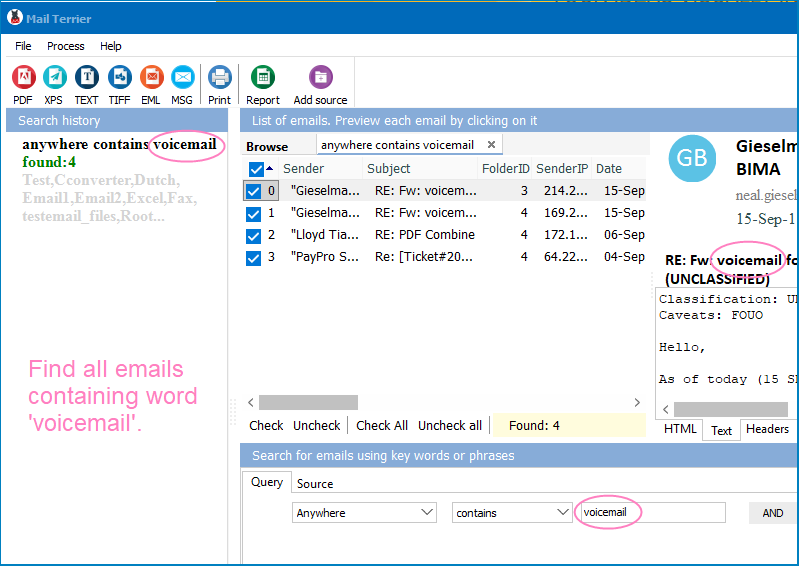
You exported your Gmail archive through Google Takeout. Now you have a pile of MBOX files on your hard drive — and no way to search them. Gmail's web interface only works with messages still on Google's servers. Thunderbird can import MBOX files, but its built-in search chokes on large archives and does not support advanced filters. Mail Terrier solves this: it indexes MBOX files directly on your hard drive and finds emails by keyword, phrase, sender, date range, or Boolean rules in seconds.
Quick answer: To search MBOX files from Google Takeout, install Mail Terrier, add the extracted folder of .mbox files, type a keyword, exact phrase, or AND/OR/NOT rule with a date or sender filter, then click Search. Mail Terrier indexes the archive on disk and returns matching emails in seconds, ready to export to PDF, XLS, DOC, TIFF, EML, or MSG.
(includes 30 day FREE trial)
(only $199.00)
MBOX is a plain-text file format that stores multiple email messages end-to-end in a single file. Each message starts with a From line (note the space after "From"), followed by the full RFC 822 headers and body. Messages are separated by blank lines.
Several major email clients produce MBOX files:
~/Library/Mail/.The problem is that MBOX is a storage format, not a search engine. Once you have 50,000 emails in a 4 GB MBOX file, finding a specific message by opening the file in a text editor or importing it into Thunderbird is not practical. You need a dedicated search tool that can parse the MBOX structure and build an index.
"invoice payment"), combine terms with AND/OR/NOT (contract AND 2023 NOT draft), or use proximity operators ("project deadline"~5 to find these words within 5 words of each other).Mail Terrier reads MBOX files directly from disk. You do not need Thunderbird, Outlook, or any other email client installed. Point the program at a folder, and it parses every MBOX file it finds — including nested subdirectories from Google Takeout exports.
Google Takeout exports for active Gmail accounts routinely exceed 5–10 GB. Mail Terrier processes files of this size without running out of memory. Indexing runs in the background, and once the index is built, every subsequent search returns results in under a second.
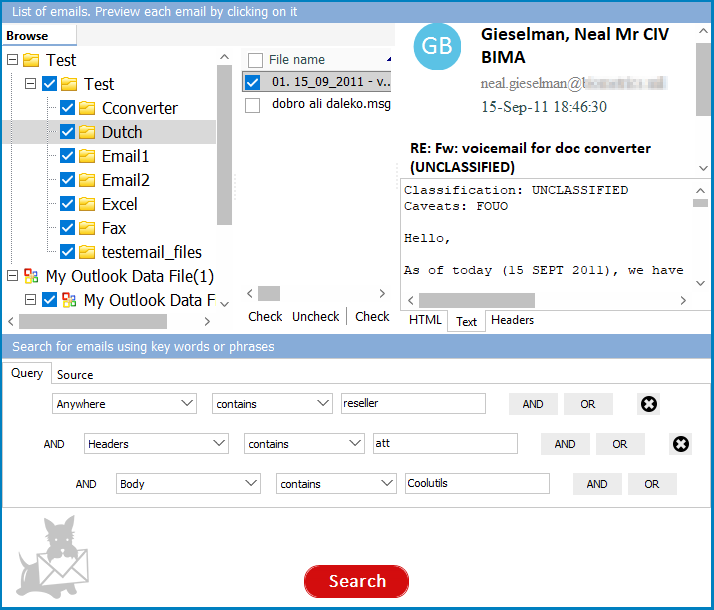
Simple keyword search is a starting point. Mail Terrier adds Boolean logic (AND, OR, NOT), proximity matching, wildcard patterns, and field-specific filters (From, To, Subject, Date). These operators let you construct precise queries that eliminate false positives — essential when you are searching through years of email history.
Found the emails you need? Export them to PDF for court submissions, to XLS for data analysis, or to EML/MSG to re-import into an email client. Every export preserves headers, body text, and attachments. This makes Mail Terrier a practical tool for e-discovery, compliance audits, and FOIA requests.
Google Takeout (takeout.google.com) lets you download a copy of your Gmail data. Here is how the process works:
takeout.google.com and sign in with your Google account..mbox files.At this point, you have raw MBOX files on your hard drive with no search capability. Open Mail Terrier, add the extracted folder, and run your query. The program indexes the MBOX files and returns matching emails with previews and export options.
Leaving Gmail. You exported your entire Gmail history through Google Takeout before deleting your account or switching providers. Now you need to find a specific conversation from 2019 buried in a 7 GB MBOX file.
Legal discovery. A law firm or compliance officer receives a Google Takeout export from a custodian. The archive contains 200,000 emails across multiple labels. Searching for privileged or responsive documents requires keyword-based filtering with date ranges and sender restrictions.
Thunderbird backup recovery. Your Thunderbird profile got corrupted, but the MBOX files in the profile directory are intact. You need to locate a specific email with an attached contract without rebuilding the entire Thunderbird profile.
Migrating between email providers. During a migration, you exported MBOX files from your old email system. Before importing everything into the new system, you need to search for and extract only the messages from a specific project or client.
Download free trial and convert your files in minutes.
No credit card or email required.


 Forensic