Need help? Reach us at 

 +1 (855) 418-2323
Need help? Reach us at
+1 (855) 418-2323

You have a stack of PST files on a hard drive, a departed colleague's mailbox, or an old backup from three jobs ago. You need to find a specific email — a contract, a receipt, a confirmation — but Outlook is not installed, its search is broken, or the PST is not even connected to a profile. Opening each file manually and scrolling through thousands of messages is not realistic.
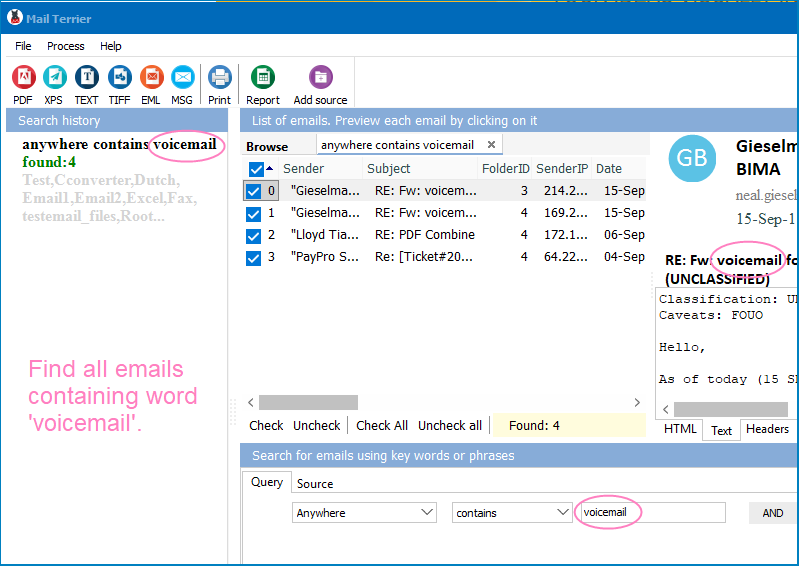
Mail Terrier solves this problem. It searches inside PST, OST, EML, MSG, MBOX, and EMLX files stored anywhere on your drive — no Outlook required. Type a keyword, set a date range or sender filter, and get results in seconds. When you find what you need, export matching emails to PDF, DOC, XLS, TIFF, EML, or MSG.
Quick answer: To search PST files for keywords without Outlook, install Mail Terrier, point it to the folder holding your PST, OST, EML, or MBOX files, type a keyword or combine keywords with AND, OR, and NOT plus a date or sender filter, then click Search. Matching emails appear in seconds and export to PDF, DOC, XLS, TIFF, EML, or MSG.
(includes 30 day FREE trial)
(only $199.00)
PST stands for Personal Storage Table. It is the file format Microsoft Outlook uses to store a local copy of emails, contacts, calendar events, tasks, and notes. Every Outlook user has at least one PST file, and many have several — one per email account or one per archive year.
PST files are self-contained databases. They hold everything: message headers, body text, attachments, folder structure. A typical corporate mailbox produces PST files ranging from 2 GB to 50 GB.
The problem is that PST is a proprietary format. Only Outlook can open it natively. If Outlook is not installed — or if the PST belongs to someone else's account — you cannot just double-click the file and browse its contents. Even when Outlook is available, its built-in search often fails on disconnected or archived PST files. The indexing service may skip them entirely.
This is where a standalone PST search tool becomes necessary. You need software that reads the PST structure directly, without relying on Outlook or Windows Search indexing.
Mail Terrier makes keyword search inside PST files straightforward. Here is the process from start to finish:
The entire process takes minutes, not hours. There is no need to import PST files into an email client, rebuild search indexes, or wait for Windows to crawl through gigabytes of data.
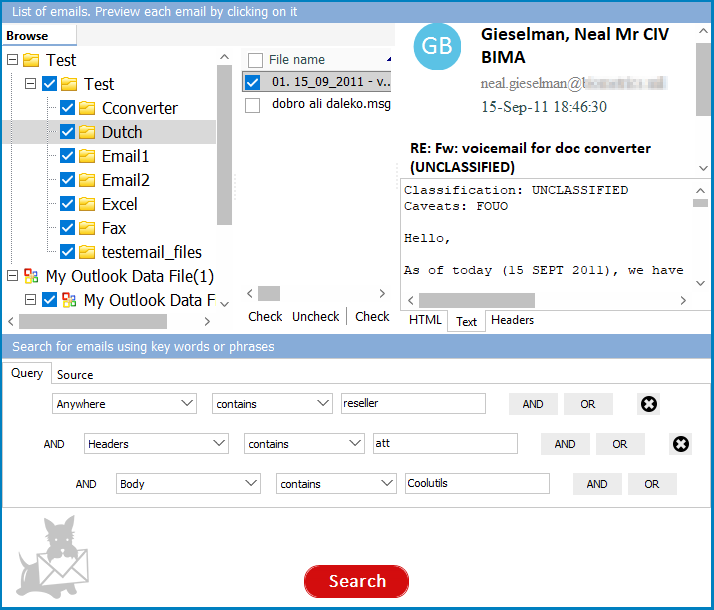
The point of a PST keyword search is precision. Mail Terrier lets you combine keywords with Boolean operators so you get the exact emails you need, not hundreds of near-misses:
invoice AND March returns only emails that contain both words.contract OR agreement returns emails containing either word.refund NOT draft finds emails about a refund while excluding drafts."purchase order") to match the exact phrase.Add a date range or a sender/recipient filter on top of any keyword rule to narrow a multi-gigabyte PST down to a handful of relevant messages.
Mail Terrier reads PST files using its own parser. It does not call Outlook, does not use MAPI, and does not require any Microsoft Office component. This means you can search PST files on a clean Windows machine, a server without Office, or a forensic workstation. The PST file does not need to be connected to any Outlook profile.
Simple keyword search is only the starting point. Mail Terrier supports Boolean operators (AND, OR, NOT), proximity search (find two words within N words of each other), exact phrase matching, date range filtering, and sender/recipient filtering. These features let you build precise queries that return exactly the emails you need — not hundreds of irrelevant matches.
PST is not the only email archive format. Departed employees may leave behind OST files (offline Outlook cache), EML files (individual messages), MSG files (Outlook single-message exports), MBOX files (Thunderbird, Apple Mail), or EMLX files (Apple Mail). Mail Terrier searches all of these in a single session. You do not need separate tools for each format.
Finding an email is only half the job. You usually need to save it, forward it, or submit it as evidence. Mail Terrier exports search results to PDF (for legal and compliance), DOC and XLS (for reports), TIFF (for imaging workflows), and EML/MSG (for re-importing into email clients). The export preserves message headers, body, and attachments.
| Feature | Online PST Viewers | Mail Terrier (Desktop) |
|---|---|---|
| File size limit | Usually 50–200 MB | No limit (handles 50 GB+ files) |
| Privacy | PST uploaded to third-party server | Files never leave your machine |
| Search operators | Basic keyword only | AND, OR, NOT, proximity, date range, sender/recipient |
| Multiple files | One file at a time | Search across multiple PST/OST/EML/MBOX files at once |
| Export options | Limited or none | PDF, DOC, XLS, TIFF, EML, MSG |
| Speed | Depends on upload bandwidth | Local processing, results in seconds |
| Offline access | Requires internet | Works fully offline |
| Cost | Free with limitations or subscription | Free for home use; $199 commercial |
Legal discovery and compliance. A litigation hold requires you to locate every email related to a contract, a client, or a specific date range. PST files from former employees sit on a file server. Mail Terrier searches them directly and exports matching messages to PDF for legal review.
IT offboarding. An employee leaves the company. Their mailbox is exported as a PST file. Months later, the team needs a project document that was shared via email. Instead of importing the entire PST into someone else's Outlook, the IT admin runs a keyword search in Mail Terrier and extracts the specific message.
Email migration and auditing. You are moving from Outlook to another email platform. Before migration, you need to verify that specific messages exist in the archive. Mail Terrier lets you search across dozens of PST files in one pass and confirm the presence of critical correspondence.
Personal email recovery. You kept PST backups from a previous job or an old computer. Now you need a receipt, a confirmation number, or a document that was sent as an attachment. Mail Terrier finds it without reinstalling Outlook or configuring a mail profile. And for personal home use, the software is free.
Download free trial and convert your files in minutes.
No credit card or email required.


 Forensic