Logo
Home Products Support Contact About Us

How To Register the Server License Without Internet Connection


To activate a server license in offline-mode, please, follow these steps.

Quick answer: To register a CoolUtils server license without an internet connection, run the app as Administrator, enter your key, click Follow this link to open a page with your activation codes, copy that URL to any internet-connected machine to get the reply code, then paste the reply code back into the app. Activation completes fully offline.
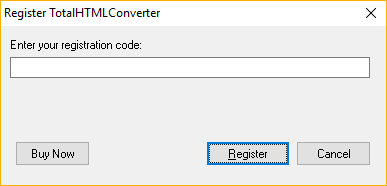
  • Launch the app with a right mouse click Run As Administrator.
  • You will see the standard dialogue window.
    regsiter coolutils app
  • Enter the key and press Ok.
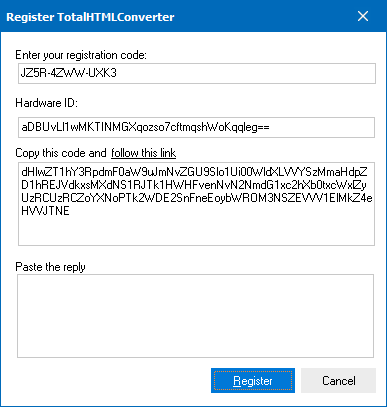
  • You will see this window
    register
  • Click on 'Follow this link'. The browser will open with all the codes automatically. Copy the url and open it on any other machine with Internet connection. You will get the reply code on the page.
  • Copy and paste the reply code to the app.

how to register

Offline Server License Registration — FAQ ▼

Run the app as Administrator, enter your key, and click Follow this link. Copy the resulting URL to any internet-connected machine to obtain a reply code, then paste that reply code back into the app. The server never needs to go online.
The reply code is how CoolUtils confirms your license on a machine that has no internet access. The app generates activation codes locally, and the online page turns them into a matching reply code that unlocks the program.
Yes. That is the point of offline activation. Copy the activation URL to a phone, laptop, or any device with an internet connection, open it, and read the reply code from the page.
Administrator rights let the program save the license data on the server. Without elevated rights the activation may not be stored and the app will keep asking for the key.
You only need a browser on the machine that fetches the reply code, not on the server. Copy the activation URL off the server by any means and open it on a connected device to get the reply code.
Contact CoolUtils support with your purchase details and they will resend the key. You then repeat the offline activation steps with the recovered key.
Yes. Once you paste the reply code and the license is accepted, the server stays registered. You do not need to repeat the code exchange unless you reinstall or move the license to new hardware.


Start working now!

Download free trial and convert your files in minutes.
No credit card or email required.

⬇ Download Free Trial Windows 7/8/10/11 • 159 MB

Support
Total PDF Converter X Preview1

Latest News

Newsletter Subscribe

No worries, we don't spam.


© 2026. All rights reserved. CoolUtils File Converters

Cards