|
Coolutils ConverterTotal HTML ConverterTotal PDF ConverterTotal Doc ConverterTotal Excel ConverterTotal CAD ConverterTotal CSV ConverterTotal XML ConverterTotal Mail ConverterTotal Outlook ConverterTotal Thunderbird ConverterOST to PST ConverterTotal Image ConverterTotal Audio ConverterTotal Movie Converter
|
Like all lossless compression image files, PSD (Photoshop Document) files are very large in size. They consist of several layers and contain a lot of addtonal contour, color, transparency, etc. information. This makes them hard, if not impossible, to transmit online. In order to upload what you have just created in Photoshop, you should first convert it to a more compact format. If you have many files to convert to PDF, Total Image Converter will save you a lot of time and effort! Because PDF is software-, hardware and OS-independent format, it is one of the most convenient in terms of graphic storage and transmission. Being a resolution-independent format, PDF reflects all possible combinations of graphics, fonts, images, etc. If you have lots of raster graphics files and have to convert them to a more compact and portable format, this is a ideal PSD PDF converter for you!
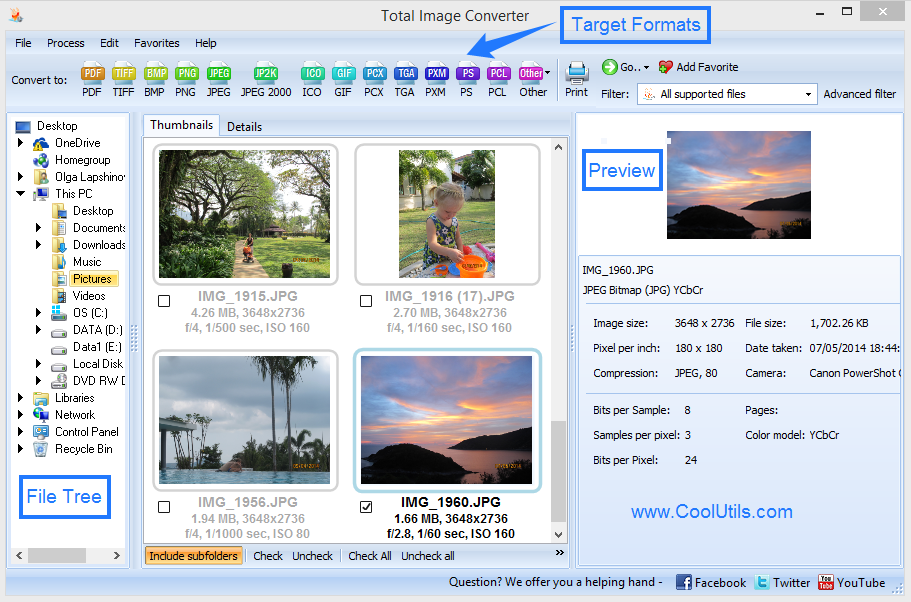
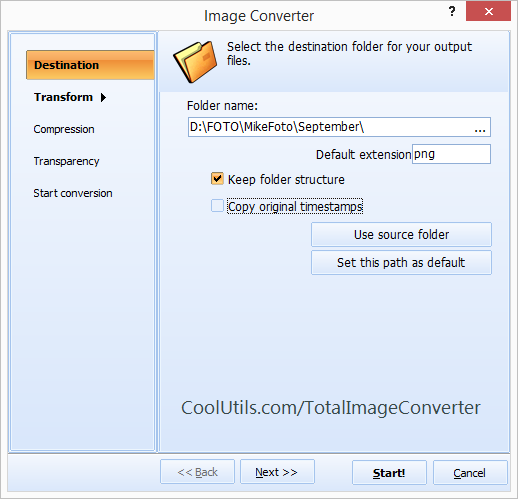
How to Convert PSD to PDF Using Total Image Converter You do not have to be PC expert to handle Total Image Converter. Even a novice can master it in a matter of minutes. Actually, all you need to do is make your selections and follow the Wizard's recommendations. You do not have to be PC expert to handle Total Image Converter. Even a novice can master it in a matter of minutes. Actually, all you need to do is make your selections and follow the Wizard's recommendations.
Total Image Converter has a built-in viewer that permits you to preview both PSD and PDF files. You can also rely on thumblail images. By aid of Total Image Converter, you can crop, resize and rotate your files and give them names and descriptions. With Total Image Converter, you can convert PSD to PDF in batch. The batch mode ensures instant conversion of scores of files with just one click of a button. All you have to do is specify the files to be converted and select PDF. Total Image Converter integrates into Windows. Once installed, Convert to option is added to the right-button popup menu. This enables you to manage your files right from the desktop. Command line option allows you to manage files from within other utilities. To sum the whole thing up, Total Image Converter is the most advanced file conversion utility. It is readily available online, and is much less expensive than many other less effective converters. Buy our versatile PSD PDF converter and get all tech support and upgrades for free! If you are not sure yet, download the free trial version and take a 30-day training course. Do not just take descriptions on trust and make your choice! Related topicsHow to convert JPEG to TIFF in batches?Convert files from RAW to JPEG Convert JPEG files to PDF with comfort Convert JPEG to PNG in batches with comfort
|
  |