Need help? Reach us at 

 +1 (855) 418-2323
Need help? Reach us at
+1 (855) 418-2323

 File Converters TIFF and PDF apps Forensic Freeware
Safely convert your CAD files to pdf or images in batch by downloading CoolUtils software
Windows
2000/2003/Vista
7/8/10/11/Citrix
Total CAD Converter converts CAD files to PDF, TIFF, JPEG, BMP, WMF, PNG, DXF, BMP, CGM, HPGL, SVG, PS, and SWF. Source formats include DXF, DWG, DWF, DWFX, PLT, HPGL, HPGL2, SVG, CGM, SPL, XCS, PDF, and more. No AutoCAD installation required. The user-friendly interface and built-in wizard make it easy to apply project settings (auto-remembers previous job settings). Includes command-line support.
Quick answer: To convert CAD drawings, install Total CAD Converter, add your DWG, DXF, DWF, PLT, or HPGL files, pick the output — PDF, TIFF, JPEG, PNG, SVG, or DXF — set page size, colors, and any watermark in the wizard, then click Start. It converts in batch with no AutoCAD, keeps the layout, and runs from the command line. Free 30-day trial.
Total CAD Converter offers unique options when converting lots of CAD files at once:
The converter also runs the other way round and turns PDF drawings back into DXF. A sheet that reached you as a PDF — a supplier's part, a contractor's floor plan, a logo you have to drop into an assembly — is normally dead weight in CAD: you can look at it, but you cannot snap to it or edit a line. Total CAD Converter rebuilds the geometry and the texts as DXF entities, so the drawing goes back into your project as something you can work on. SVG, CGM and HPGL are available as targets too, and whole folders of PDFs convert in one batch. The source has to be a vector PDF, exported from CAD or printed to PDF — a scanned sheet is an image and carries no geometry to recover.
The converter also opens XCS project files from xTool Creative Space, the software that drives xTool laser cutters and engravers. An XCS project is normally locked to that one application, so sharing a design with a client, attaching it to a quote or archiving a finished job means exporting it by hand. Total CAD Converter turns XCS files into PDF, DXF, SVG or an image straight from the folder they sit in, in batch, with the same page-size and line-weight settings as the rest of your drawings.
For pipe and tube parts, Total CAD Converter reads the 3D geometry in STEP, STP and IGS files and turns it into a laser-cutting report. Convert a batch of pipe files to CSV or JSON and each output lists, per part, the hole count, the total cut perimeter, the face count and the two open tube ends, plus a line for every cutout with its shape (circle, oblong, hexagon...), perimeter, diameter and position — the numbers a laser-cutting ERP needs to estimate cut time, without opening every file by hand.
For server-side conversion with ActiveX, use Total CAD ConverterX (SDK). Works on Windows 7/8/10/11. 30-day free trial, no registration. $99 lifetime license.
For a quick one-off in the browser, try the free online tools — no install, no signup: DWG to PDF, SVG to DXF, DWG to DXF. The desktop tool below is for batch jobs and CAD-specific output options.
In-depth guides: SVG to JPEG, VSD to SVG.
| Feature | Total CAD Converter | Online Services |
|---|---|---|
| Batch conversion (hundreds of files) | Yes | 1–3 files per upload |
| File size limit | None | Usually 10–50 MB |
| Input formats | 19+ (DWG, DXF, DWF, PLT, HPGL, CGM, SVG...) | DWG/DXF only |
| Privacy (files stay local) | Yes | Uploaded to third-party servers |
| No AutoCAD needed | Yes | Yes |
| Combine into multi-page PDF/TIFF | Yes | No |
| Resize / crop / rotate | Yes | No |
| Line weight & B/W control | Yes | No |
| Watermarks | Yes | No |
| Command-line automation | Yes | No |
| Pricing | $99 one-time | Monthly subscription or per-file |
(includes 30 day FREE trial)
(only $99.00)

 Dennis Braithwaite
 Brian Litherland, PE
Chief Engineer Transportation Design
Engineers, architects, and teams that convert CAD drawings to PDF, TIFF, and images — without AutoCAD
Convert DWG and DXF drawings to PDF for sharing
Architects and engineers convert AutoCAD drawings to PDF for clients, contractors, and review boards who don't have CAD software. Batch-convert entire project folders at once, select specific layers to include, and combine multiple sheets into a single multi-page PDF — all without an AutoCAD license.
Archive construction drawings as TIFF or PDF
Construction firms and facility managers convert as-built DWG, DXF, and HPGL drawings to archival TIFF or PDF for long-term storage. Increase line weight for better readability, convert to black-and-white to save print costs, and merge related drawings into one document per building or project phase.
Convert PLT and HPGL plotter files to viewable formats
Manufacturing teams convert legacy PLT, HPGL, and CGM plotter files to JPEG, PNG, or PDF so shop floor operators can view drawings on screens and tablets. Resize and crop drawings for specific print sizes, and use command line mode to automate conversion as new files arrive from CNC systems.
Batch-convert survey drawings to images and PDF
Surveying companies and GIS departments convert DXF site plans, boundary maps, and topographic drawings to high-resolution TIFF or PDF for inclusion in reports and permit applications. Rotate and resize output to fit standard paper sizes, preserving accuracy and scale across hundreds of files.
Integrate CAD conversion into server-side workflows
IT teams use Total CAD Converter's command line interface to build automated conversion pipelines on file servers. New CAD uploads are converted to PDF or SVG on arrival, distributed to stakeholders, and archived — all hands-free. The ActiveX SDK enables integration into custom ASP and PHP applications.
Updated Sat, 19 Sep 2026
(only $99.00)
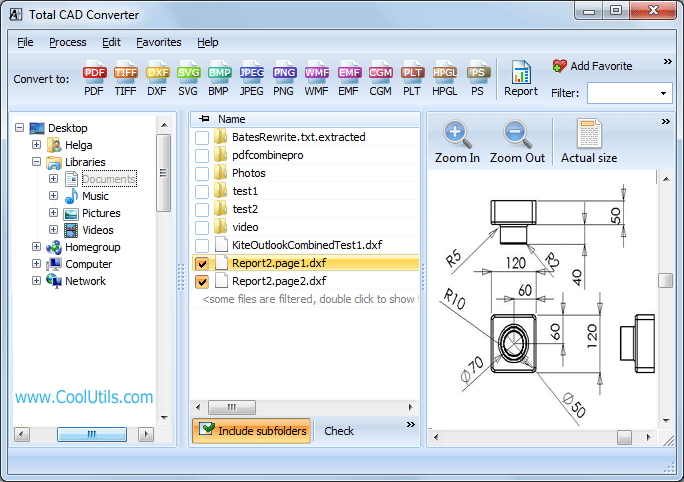
Launch Total CAD Converter on your Windows PC.

In the left navigation tree, click the folder that contains your CAD drawings.

In the middle file list, tick one CAD file or select multiple files you want to convert.

To select all files in the current folder, click Check All.

On the top “Convert to …” toolbar, click the output format you need (PDF, TIFF, JPG, PNG, etc.).

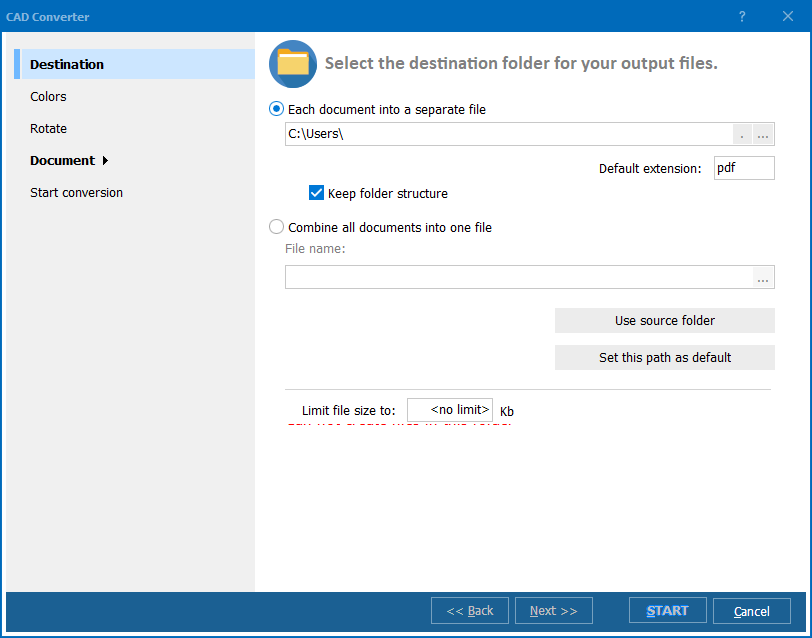
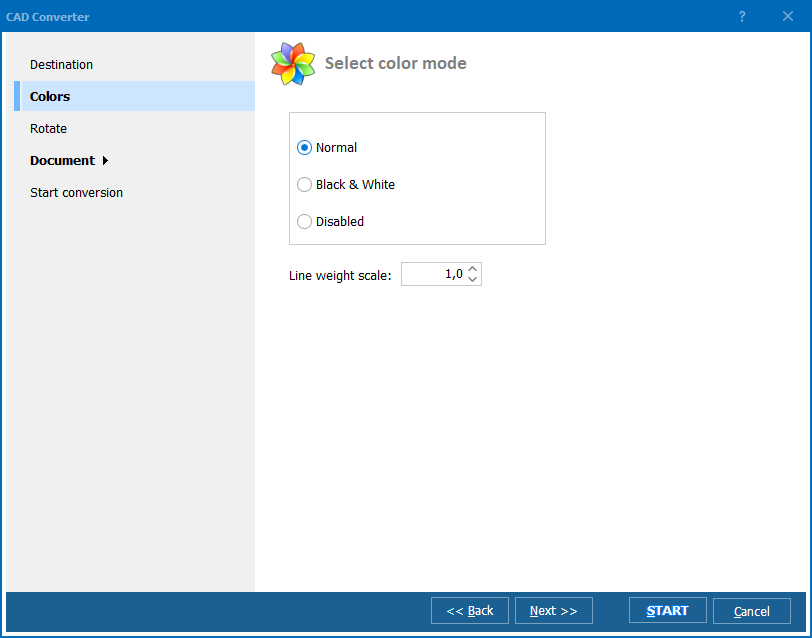
After selecting the target format, a settings dialog opens. Configure the options you need:
Click Start and wait until the conversion finishes.
Updated Sat, 19 Sep 2026
(only $99.00)
Updated Sat, 19 Sep 2026
(only $99.00)
Download free trial and convert your files in minutes.
No credit card or email required.