Need help? Reach us at 

 +1 (855) 418-2323
Need help? Reach us at
+1 (855) 418-2323

 File Converters TIFF and PDF apps Forensic Freeware
Tiff Paging: whatever you do with TIFF files

Windows
2000/2003/Vista
7/8/10/11/Citrix
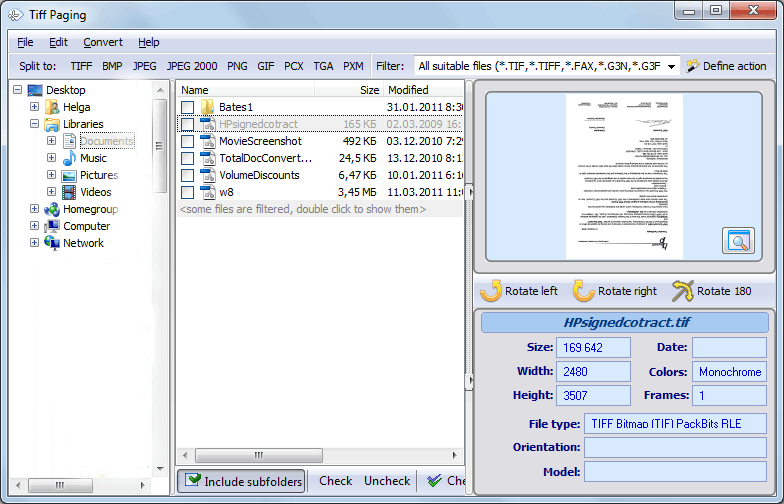
A new unique all-in-one solution for those who want to re-arrange pages in multi-page TIFF files.
Quick answer: To re-arrange pages, install Tiff Paging, open your multi-page TIFF file, then extract the pages you want (the first 10 or every odd or even one), split the file after any page, or merge several files into one, resize and rotate as needed, and save. Output can be TIFF, BMP, PNG, JPEG, JPEG2000, GIF or PXM — free 30-day trial, command line support.
Tiff Paging can extract the pages you want from your tiff file, i.e. the first 10 ones or every odd\even one. Extracted pages can get new names for easier sorting.
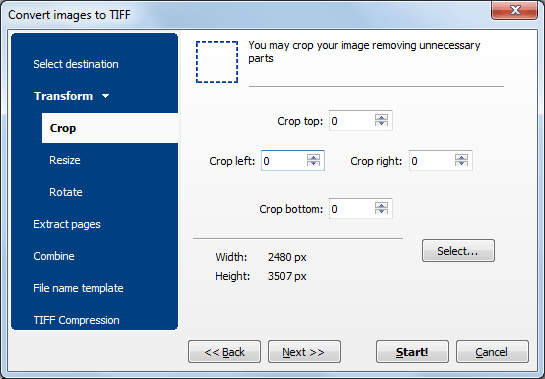
Tiff Paging allows you to split a multipage TIFF regardless of page count (i.e. splitting a 40 page TIFF into two files after page 5 is available). On top of that Tiff Paging can merge several split files into one. At the same time you can resize and rotate the pages. It's the most flexible app to re-arrange the pages in your TIFF files.
There are two standards of TIFF files: tif and tiff. Choose the one you need and set it the default extension in the main menu of Tiff Paging (File-Options).
Users may set photometric interpretation and compression level for output TIFF files to make them smaller in size. Apart from TIFF, the app can save your documents in BMP, PNG, JPEG, JPEG2000, GIF, and PXM formats.
Tiff Paging is extremely easy-to-use. The well-thought interface helps even a beginner do the job in few seconds. Advanced users will appreciate command line support. Try it for free (30 days trial period, no limitations) and find out that it is really worth its money.
Here is a server version(includes 30 day FREE trial)
(only $39.50)

"Congratulations on your dilligent support and very functional application. I will not fail to recommend your products and services to my colleagues in the industry."
 Andy McKerral
"Your software is fantastic! I used to extract pages with one program and merge tiff pages with another. Now I have TiffPaging - all-in-one utility that is also so handy and easy-to-use. Thanks!"
 Laura Dewees
Landmark Engr. & Surveying Corp.
Laura Dewees
Landmark Engr. & Surveying Corp.
Teams that split, merge, extract, and rearrange pages in multi-page TIFF files
Split, merge, and rearrange pages in scanned TIFF archives
Records managers reorganize multi-page TIFF files from scanning departments. Split a 40-page TIFF into separate documents at any page boundary, merge related files into one, or extract specific pages — like the first 10, or every odd page — with automatic renaming for easy sorting.
Extract specific pages from multi-page TIFF evidence files
Law firms extract relevant pages from large multi-page TIFF files received during discovery. Pull out specific page ranges for exhibits, split combined scans into individual documents per case, and resize or rotate pages as needed — all while controlling compression and photometric settings for court requirements.
Fix and reorganize scanned batches after scanning
Scanning operators fix multi-page TIFF files after batch scanning. Remove misfeeds by extracting good pages, merge split scan batches into one file, rotate upside-down pages, and resize to standard dimensions. Set compression level and photometric interpretation to optimize file size for archival storage.
Split and merge patient TIFF files for records systems
Healthcare providers and insurers split combined patient scans into individual documents per visit or claim, and merge related pages from different scan batches into unified records. Export to BMP, PNG, JPEG, or JPEG2000 when image formats other than TIFF are required by partner systems.
Split and merge TIFF files via command line
IT departments automate TIFF page operations using the command line interface. Incoming multi-page scans are split into individual documents, odd and even pages are separated for duplex workflows, and files are merged on schedule — all hands-free. A server version (TiffPagingX) is available for web server deployments.
Updated Tue, 08 Sep 2026
(only $39.50)
Updated Tue, 08 Sep 2026
(only $39.50)
Download free trial and convert your files in minutes.
No credit card or email required.



