Are you happy with CoolUtils products? Tell your friends and co-workers about them!
If you have a site in the web feel free to put our text link below from your site.
|
<A HRef= "http://www.CoolUtils.com"> Advanced Software by CoolUtils.com</A> Audio, image, html and pdf converters, directory print utilities, file rename utilities and much more.
|
|
Total Image Converter
Image Converter: convert JPG, GIF, BMP, PCX, PNG, TIFF, RAW file formats

"A perfect tool for both amateur and professional photographers and everybody to deal with digital photos". Jeff J Mattingly, photographer
|
 (only $19.90)
 |
Total Image Converter allows you to take an image and create a new one with a different size or format, or perform the task for huge batches of graphic files with one click. It is invaluable for web designers and other IT professionals.
There are 9 reasons to choose Total Image Converter (no ad, just facts):
All image formats
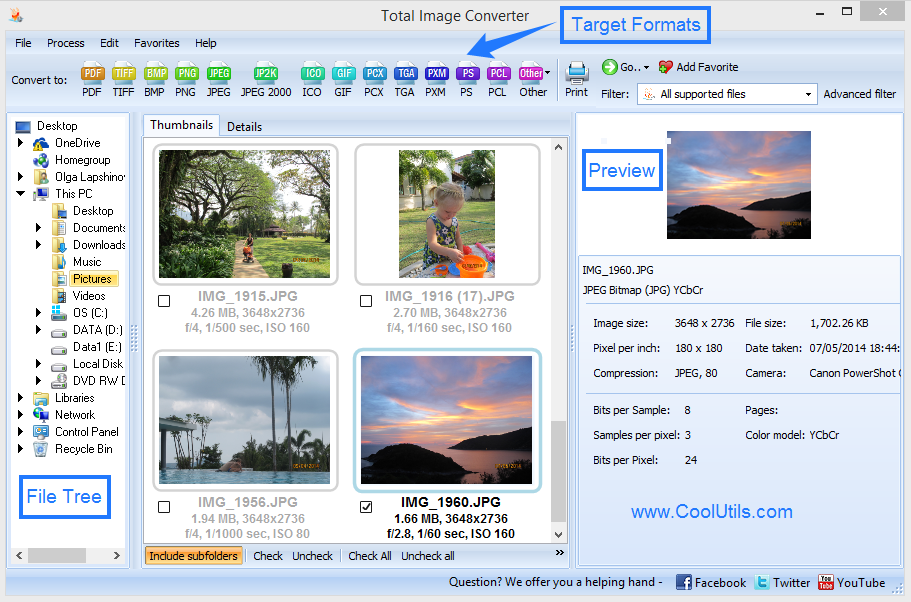
Total Image Converter supports almost all image formats (see the list ->). It's all-in-one solution for those who do not want to waste time and effort searching for 10 different converters to deal with different formats. Besides, it's the only converter to deal right with non-standard WMF files.
Batch conversion
If you have hundreds of images to be converted, you can use its batch file convert option. Just check the files that you want to process or just press Select All button to save your time. Get any amount of image files converted or resized in one click!
3 ways of handling
First, there is well-thought user interface. Second, Total Image Converter seamlessly integrates into Windows. That means that you may select the file in your desktop and make right-button mouse click. You will see ConvertTo item in the standart Windows popup menu. And there is also Command line support. Run Total Image Converter from the command line within other programs.
Built-in viewer and thumbnails
Total Image Converter has user-friendly interface to help you deal with images. You may easily view your images inside the program before or after the conversion. You can either work with detailed list of files (name, size, type, modify, attributes) or with their thumbnails.
Resize, rotate, crop
With Total Image Converter you can also resize, crop, or rotate images. All this done when converting your image with Total Image Converter! Note that when you rotate multi-page TIFF file the output is also multi-page.
Watermarking
Yes, Total Image Converter lets you apply watermarks to your images! You may add your comment, logo or date to a single photo or a bunch of them.
No special knowledge required
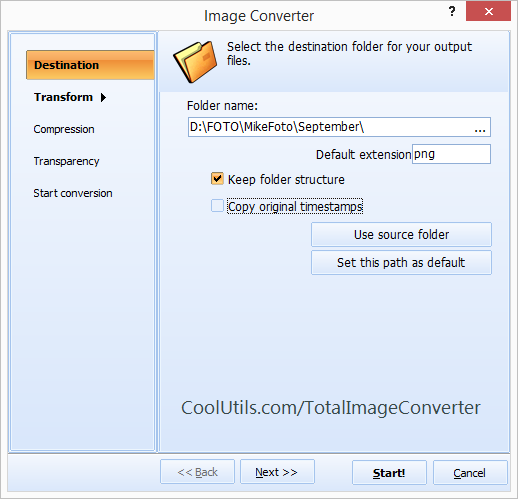
Even if you never dealt with image converters before you will master the program in seconds. The program will itself ask you all the questions about the conversion settings and in case you are at a loss it will advise you the best setting for each conversion. Click here to make a quick tour on the program and see how simple it is to use it.
High quality
Total Image Converter is the most advanced solution for converting image files.
We are absolutely sure in that. So sure that we offer you to use the program for 30 days for free to make your own opinion. The trial version applies Converted by Total Imge Converter note to each image. The registered version doesn't do that. Just buy the key and register the program. The low price is a reflection of our philosophy, not the quality of the software.
Price
No hidden costs! Our pricing is clear and concise. Once paid you get all the upgrades for free. Tech support is also free to registered users.
Ok, now when you've read a huge lists of features and benefits of Total Image Convetrer you know the facts. What we are really proud of is the simplicity of our tool. As Albert Einstein once said everything should be made as simple as possible, but not simpler. That's what we had in mind developing Total Image Converter.
If you're thinking of looking around, make sure to bookmark us right now. We know you won't find a better value!
By the way, if you happen to need some format that Total Image Converter doesn't support, please write to us. We will do our best to meet your wishes.
For use on web-servers or services - use Total Image ConverterX (Active X is available for registered users).
Some of the currently supported file format conversions:
Complete list of supported format conversions
|
|
Take your chance to save!
Supported Formats:
- Windows Bitmap
(BMP, DIB, RLE)
- JPEG
(JPEG, JFIF, JPG, JPE)
- JPEG 2000
(J2K, JP2, JPC, J2C)
- Portable Network Graphics
(PNG)
- Adobe Photoshop
(PSD)
- Portable Document Format
(PDF)
- Adobe Photo Deluxe
(PDD)
- Kodak Photo CD
(PCD)
- Tagged Image File Format
(TIFF, TIF, FAX, G3N, G3F).
Supports CMYK tiff to RGB tiff conversion
- Windows Icon
(ICO)
- Graphics Interchange Format
(GIF)
- Vector graphics
(WMF, EMF, WMZ, EMZ).
To convert Image to WMF - Total Vectorize.
- ZSoft Paintbrush
(PCX, DCX)
- DR Halo (CUT)
- Portable Pixmap
(PXM, PPM, PBM, PGM)
- Truevision TGA
(TGA, TARGA, VDA, ICB, VST, WIN)
- Digital Negative file format
(DNG)
- Raw formats
(CRW, CR2, NEF, PEF, RAF, X3F, RAW, BAY, ORF, MRW, SRF, MRW)
Complete list of supported cameras
Sample conversions:
PCD to JPEG
For developers
If you want to:
- use Image converter in your asp or php application
- have ActiveX
- use Image Converter SDK
- get command line Image converter without GUI
Or if you are ASP or .NET developer -
try Total Image ConverterX (Active X is available for registered users).
|
Useful articlesProfessional ORF ConverterReliable NEF ConverterConvert Resize Crop Photos In YOUR WayHow To Add Watermarks To ImagesAvatar, a Virtual IdentityConvert PDD to TIFFQuick and Easy Way to Convert JPG to GIFWhy Use Total Image Converter to Convert RAW FilesHow to Reduce Photo Size For EmailingConvert PNG File to JPEG and JPEG to EverythingWhy Would You Want to Convert GIF to GIF?How to Crop an Image?How to convert Tiff to JpegTotal Image Converter as BMP Resizer, JPG Resizer and a Universal Resizer for Image Formats
|
 |
|
|
(only $19.90) |
Updated Wed, 03 Feb 2010 |
|
What are users saying
|
"This tool has exceeded my expectatons."
David Zepnick
President and CEO
#1AAA Business Solutions, Inc.
" I have used my TotalImageConverter a few times to change banners from gif to jpeg and it worked perfectly and so easy even for a newbie like me. Your product is well worth the money." Anamaria Bustamante
"I can make no suggestions for the improvement of the website, - it is clear, intuitive and simple to naviagate,
the veiwing/ conversion utility I optained from the site is a pleasure to use, I am very pleased.
Thank you and keep up the great job" Jerry Beasley
"The total image converter is a life saver and thank you for such a great product and if i ever need to i will definately purchase some of your other software as well." Nicole Adamski
"I'd been using Total Image Converter as a tiff converter for a week when I found out that it can convert also raw files, and png to ico, and bipmap to jpeg, and what not. A nice surprise!" Brian Shi
|
"Thank you for your interest in my use of the "Total Image Converter".
I've only used it a couple of times. It worked as advertised.
It's a little like a snow blower or life insurance;
You should have them, but hope you never need them.
My only negative is when I purchased it I was never told that
I had to go back to use it and then paste in your number.
I thought I had to download and install.
Thanks again"
Jeff Broberg JB/jb
"Yes, the product is doing exactly what I needed it for. I have 8 PhotoCDs from Kodak that have my daddy's slides on them and I couldn't get to them because everyone has dropped support for .pcd format including Kodak. I thought the site was very informative. I was a little intimidated by the length of the security code. But when I found that I only needed to cut and paste, it was very easy to make the copy legal." Beth
"Converting tiff files is Loads of tiff files have become jpeg files without giving me a lot of trouble. Thank you so much!" Richard Klein
"Thank you for your quick response - I really appreciate the good
customer service and the quick development." Reymond
"The software is terrific...the best image converter I have seen...does the work perfectly...the download method works well...no problems...great job..."
JerryDKidd
|
Leave your testimonial
|
Key Features | - Convert files of all image formats
- Convert images in batches
- View images directly inside the program
- Friendy interface: work with lists of files or with their thumbnails
- Resize, Crop, Rotate and Mirror images
- Convert images to black and white
- Apply steganography and watemarmark
- Command line
- Vista compatible
|
 MS Windows® 2000/XP/2003/2008/ Vista / Windows 7
|