Need help? Reach us at 

 +1 (855) 418-2323
Need help? Reach us at
+1 (855) 418-2323

 Freeware
An old mailbox left you with a stray .ost or .pst file, and Outlook is no longer installed on the machine. You need to read those emails today, not reinstall Office first. Three free viewers open Outlook data files without Outlook: CoolUtils Outlook Viewer, SysTools OST Viewer, and Kernel OST Viewer.
Quick answer: All three open OST files without Outlook installed. CoolUtils Outlook Viewer is the only one that opens both PST and OST and exports emails to EML free for home use; SysTools and Kernel lock export behind paid Pro editions. Pick CoolUtils for personal PST and OST access, SysTools or Kernel for OST-only repair previews.
Every fact below about CoolUtils Outlook Viewer comes from the product itself. Competitor facts are taken from the current SysTools and Kernel OST Viewer product pages. All three read Outlook files without an Outlook or Exchange install — the differences are in formats, search, and what the free version lets you export.
| Feature | CoolUtils Outlook Viewer | SysTools OST Viewer | Kernel OST Viewer |
|---|---|---|---|
| Opens PST | Yes | Not in the free version (Pro+ exports to PST) | No — OST only (PST is a separate product) |
| Opens OST | Yes | Yes | Yes |
| Needs Outlook installed | No | No | No |
| Search / find emails | Yes — sort and search included | Basic browsing free; advanced search is Pro | Yes — Find with From/To/Subject/date filters |
| Attachment preview | Yes | Yes | Yes |
| Export / print in the free version | Export to EML free for home use | Preview only; export and print are Pro | Saves the email list to HTML; full export is paid |
| License & price | Free for personal, education, charity, government; commercial from $99 | Free view-only; Pro $69, Pro+ $129 | Free view-only; paid edition for full export |
Both are strong at what they target: reading damaged or orphaned OST files. SysTools OST Viewer opens corrupted, orphaned, and inaccessible OST files and shows attachments in a dedicated view. Kernel OST Viewer scans orphaned OST files, previews every folder, and gives you a real Find with sender, recipient, subject, and date-range filters in the free build. If your only job is to inspect a broken OST from an old Exchange profile, either one previews it without Outlook.
Both vendors also publish separate PST tools and paid editions that export to PST, PDF, MSG, and EML. For a one-off forensic look at a single damaged OST, their free versions do the job.
SysTools free reads OST but not PST, and Kernel reads OST only — PST is a separate download. CoolUtils Outlook Viewer opens both PST and OST from the same file tree. When an old profile leaves you a mix of both, you open them in one window.
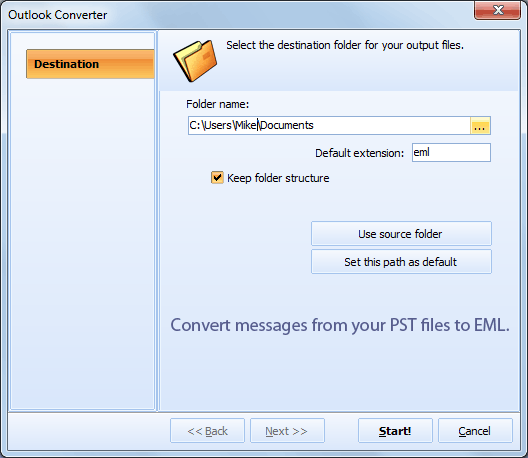
SysTools and Kernel keep every export behind a paid upgrade. CoolUtils Outlook Viewer lets home users convert PST to EML at no cost, so you can move old mail into Thunderbird, Windows Live Mail, or Apple Mail without buying anything.
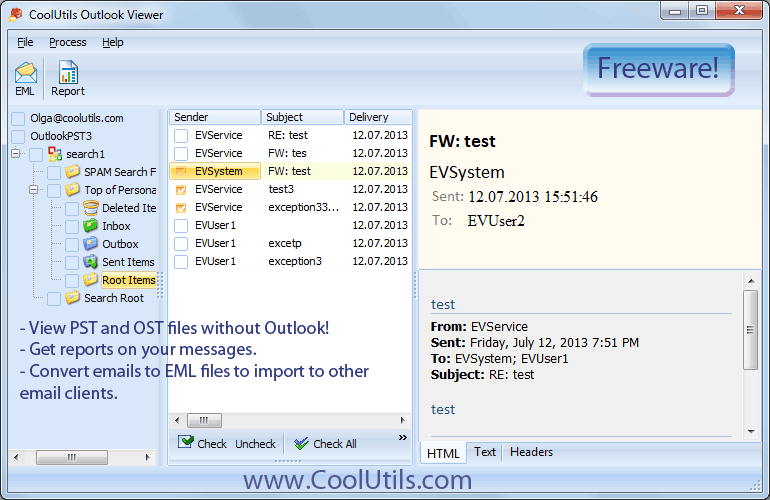
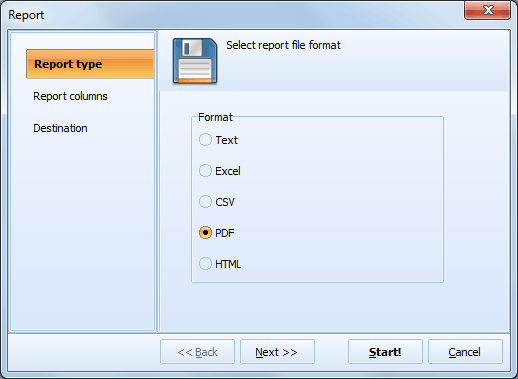
Sort emails by name, date, sender, or recipient, and generate a report with columns like Sender, Subject, To, CC, BCC, and delivery time. It is a viewer that also helps you inventory a mailbox before an archive or migration.
Outlook Viewer is free for personal, educational, charity, and government use. You only need a license for commercial use, which starts at $99 for one user. See CoolUtils Outlook Viewer.
Download CoolUtils Outlook Viewer, launch it, and pick the .ost file from the built-in file tree. The message list opens on the right; click any email to read the body and see its attachments. No Outlook, no Exchange connection, and no import step — the viewer reads the OST directly. SysTools and Kernel open OST the same way; only CoolUtils also opens PST in the same window.
Yes. CoolUtils Outlook Viewer previews attachments inside PST and OST files, and it is free for home use. Select an email and its attachments appear with the message. SysTools and Kernel also preview attachments from OST, but neither opens PST for free — SysTools puts PST behind its Pro+ edition and Kernel ships PST as a separate product.
A viewer previews mail; converting a whole mailbox to PDF is a converter's job. CoolUtils Outlook Viewer exports to EML free for home users. When you need PDF, DOC, TXT, HTML, or TIFF — with batch processing and command-line automation — use Total Outlook Converter. It reads the same PST and OST files and turns thousands of emails into PDF in one run, keeping attachments. SysTools and Kernel charge for PDF export in their paid editions.
Looking for an EML reader rather than a PST or OST viewer? See our roundup of free EML viewers.
Download free trial and convert your files in minutes.
No credit card or email required.