Logo
Home Products Support Contact About Us
arrow1 TIFF and PDF apps

TIFF files: convert to PDF and delete blank pages


Very often after scanning documents, the TIFF file which we get is not correct. It can contain a lot of blank pages that you do not need. To get rid of these pages use TIFF PDF Cleaner. It will automatically scab your files or folders, find the blank pages and delte them. The output files can be TIFF or PDF.

delete blank pages in tiff files

CoolUtils is pleased to present a specialized tool for removing blank pages from TIFF and PDF docuemnts. It is also perfectly suited to split multi-page files to make them more readable. In this article we'll show you how to convert TIFF files to PDF and delete blank pages.
  • Download and install TIFF PDF Cleaner. You can purchase the fully functional version of Total PDF Cleaner or take advantage of a 30-day free trial copy offered by CoolUtils for 30 days. There are no restrictions, anyone can use download it!
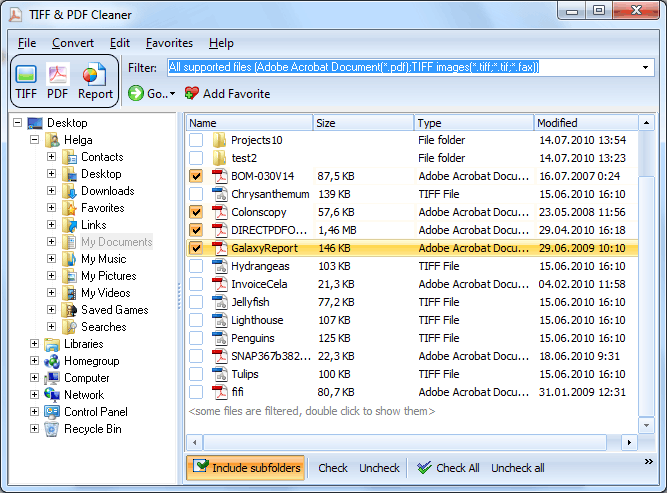
  • Open TIFF PDF Cleaner. In the column on your left-hand side you will see the tree of files and folders. TIFF PDF Cleaner creates this list automatically so you don't need to upload any files. Having selected the folder, tick off the TIFF files you want to convert.
  • Then set PDF as the target format for conversion. To do so, simply click on the "PDF" button located on the upper toolbar.
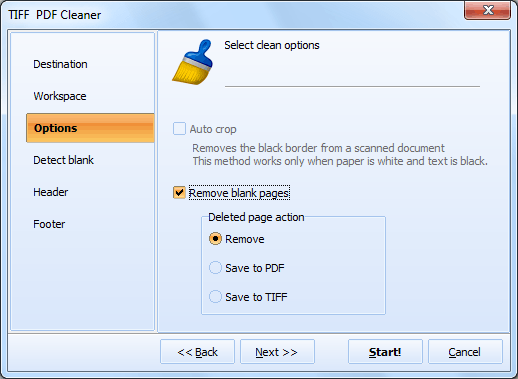
  • In a new window that will open, select "Options" and choose the "Remove blank pages" option.
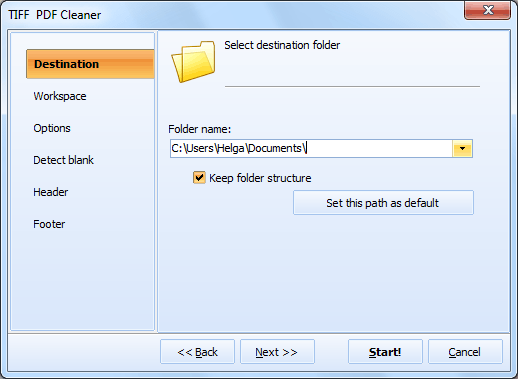
  • To begin conversion, press "Start!"

TIFF files: convert to PDF and delete blank pages

The 100% automatic conversion process will last a couple of seconds or minutes depending on the amount of files being processed. Tiff Pdf Cleaner can scan subfolders within folders, delete blank pages and keep folders' structure.

Download your 30-day free trial copy of TIFF PDF Cleaner to see what other options are supported!

Total Image Converter is a comprehensive software that efficiently converts TIFF files to PDF with ease. Its user-friendly interface and step-by-step process make the conversion simple. Just select the TIFF files, choose PDF as the output format, and initiate the conversion. It ensures high-quality output and supports batch processing for quick results.


quote

Tiff PDF Cleaner Customer Reviews 2026

Rate It
Rated 4.8/5 based on customer reviews
5 Star

"Our scanners produce TIFF but our document management system requires PDF. Tiff PDF Cleaner converts and removes blanks in one step. We were using two separate tools before. Now it's one batch job that runs in 5 minutes."

5 Star Laura Bennett Document Services Manager, Atlantic Federal Credit Union

"Converting multi-page TIFF archives to searchable-ready PDF while stripping blank pages. The CCITT-to-JPEG recompression during conversion significantly reduces file sizes. Command-line integration into our pipeline was straightforward."

5 Star Hiroshi Nakamura Systems Engineer, Mitsubishi Document Solutions

"Regulatory auditors require PDF format but our legacy scanner only outputs TIFF. Tiff PDF Cleaner converts to PDF, removes blank pages, and sets proper PDF metadata. One tool replaces what used to be a three-step manual process."

4.5 Star Emily Watson Compliance Analyst, Barrington Insurance

FAQ: Converting TIFF to PDF and Deleting Blank Pages ▼

Yes. Select PDF as the output format, enable blank page detection, and the program converts TIFF files to PDF while removing blank pages in a single pass.
Yes. You can set compression type and quality for the output PDF. Options include JPEG compression for color scans and CCITT for bitonal documents.
Yes. Tiff PDF Cleaner supports both TIFF-to-PDF and PDF-to-TIFF conversion. Blank page removal, deskewing, and cropping work in both directions.
Yes. Add a folder with hundreds of TIFF files and convert them all to PDF in one run. Each TIFF becomes a separate PDF (or you can combine them into one).
Yes. You can set the PDF title, author, subject, and keywords during the conversion process. This embeds proper metadata in the output files.
Yes. Use the -c pdf option to convert TIFF files to PDF from the command line. Combine with -crop and blank page options for a complete cleanup workflow.


Start working now!

Download free trial and convert your files in minutes.
No credit card or email required.

⬇ Download Free Trial Windows 7/8/10/11 • 50 MB

Support
Tiff PDF Cleaner Preview1
Tiff PDF Cleaner Preview2

Latest News

Newsletter Subscribe

No worries, we don't spam.


© 2026. All rights reserved. CoolUtils File Converters

Cards