Need help? Reach us at 

 +1 (855) 418-2323
Need help? Reach us at
+1 (855) 418-2323

 File Converters TIFF and PDF apps Forensic Freeware
Batch print PDF, DOC, XLS, TIFF, and images in one job — with smart scaling, tray control, and separator sheets.
Windows
2000/2003/Vista
7/8/10/11/Citrix
Quick answer: To batch-print a folder of mixed documents, install Total PDF Printer Pro, add your PDF, DOC, XLS, TIFF and image files, choose the printer, set the tray, smart scaling, duplex and separator sheets, then click Print — every format prints in one unattended job, with page counters or Bates stamps if you need them. It also runs from the command line, and needs no Adobe or Office.
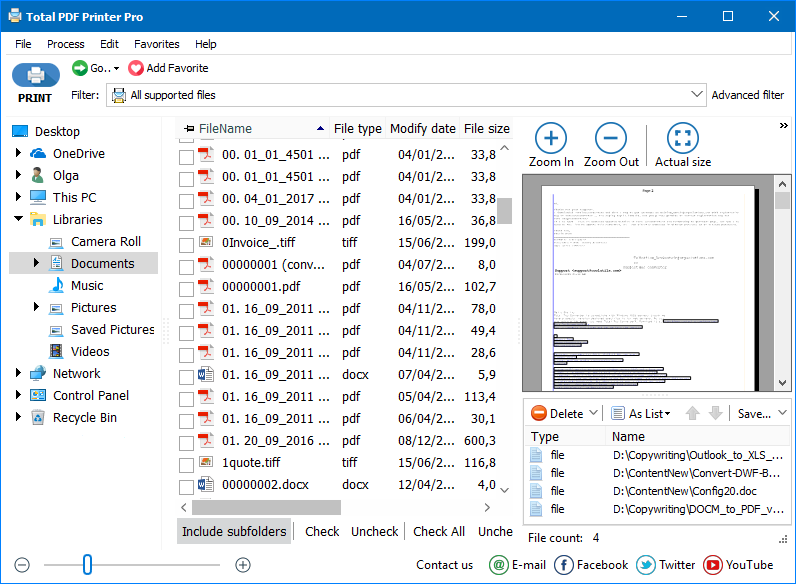
Total PDF Printer Pro lets you easily print out numerous documents of different file types. You can have DOC, PDF, XLS, TIFF files in your folder and the program will automatically print them all for you. Total PDF Printer Pro supports PDF, DOC, TXT, DOCX, HTML, XLS files and almost all images (TIFF, JPEG, PNG, etc.)
Total PDF Printer Pro takes the pain out of printing many documents at once, with options to control exactly how they print.
Stop pressing Print over and over — Total PDF Printer Pro automates routine printing. Put all the files in one list and print them in one go. Download your free evaluation copy now.
Total PDF Printer Pro prints PDF, DOC, DOCX, TXT, HTML, XLS and almost every image format (TIFF, JPEG, PNG) in a single job — the standard Total PDF Printer handles PDF only. Mix formats freely in one list: smart scaling fits each document to the paper size and auto-orientation rotates landscape pages, so a folder of invoices, spreadsheets and scans comes out correctly without touching each file. No Adobe Acrobat or Microsoft Office is required.
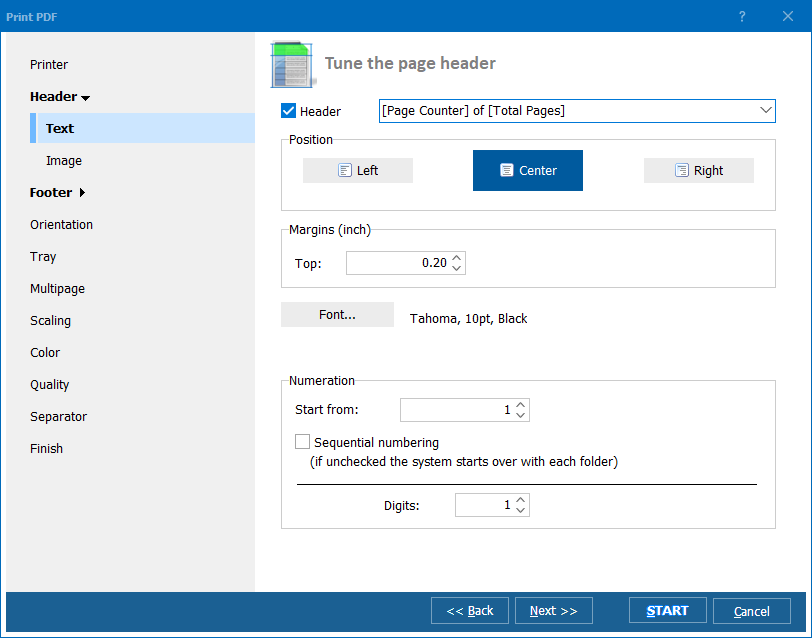
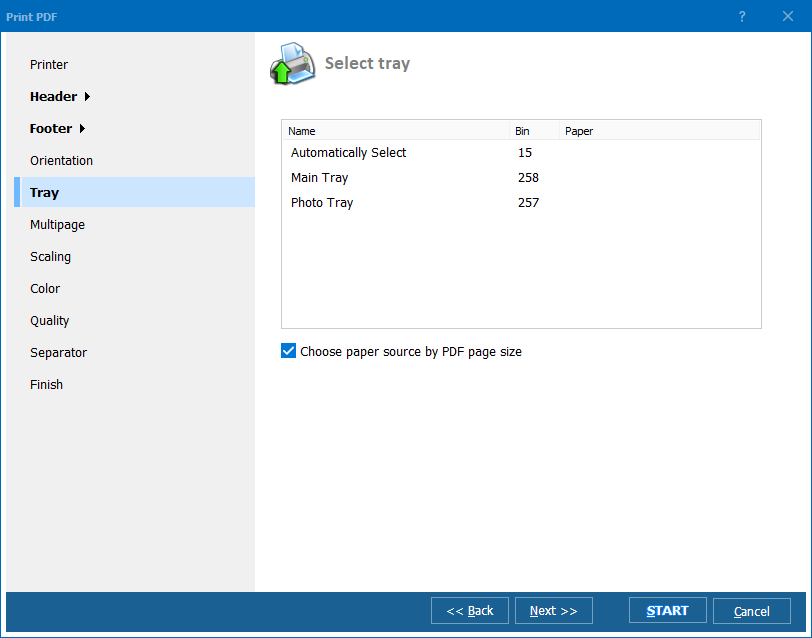
Point Total PDF Printer Pro at the folder, sort the files by name or date, pick the printer and set tray, duplex mode and a separator sheet between documents, then press Print. The whole queue prints unattended — no pop-ups, no opening files one by one — and you can add page counters or Bates numbers for legal and compliance work. The same job runs from the command line for scheduling on a server.
(includes 30 day FREE trial)
(only $119.00)

"Thank you for your inquiry about our usage of TotalPDFPrinterPro. I use it to print a full folder of system generated .pdf files. A software vendor I suggest this program. The software we use for our business generates monthly statements in pdf format and exports them to a file. I found it too cumbersome to print a few at a time. Your app allows me to do it all at once. A big time saver."
 Travis Roy www.roydentallab.com
"Your Total PDF Printer tool works really and over all I'm very pleased, my only thought would be the ability to pass parms in the text file so we could have that same flexibility in a batch file. Hope this helps."
Mike Benningfield
Teams that batch-print PDF, DOC, XLS, TIFF, and image files from mixed-format folders
Print entire folders of mixed-format files in one click
Office administrators print folders containing PDF, DOC, XLS, TIFF, and image files all at once instead of opening each file individually. Smart scaling and auto orientation handle different page sizes automatically, and separator sheets mark where one document ends and the next begins.
Print case files with bates stamps and page counters
Law firms print large case files spanning multiple formats — PDF contracts, Word briefs, Excel exhibits, and scanned TIFF images — in a single batch job. Add bates numbering and page counters automatically to every printed page, and use separator sheets to divide documents for physical filing.
Batch-print packing slips, labels, and order documents
Warehouses and fulfillment centers print daily batches of packing slips, shipping labels, and order confirmations received in PDF, HTML, and image formats. Total PDF Printer Pro handles all formats from a single queue, routes output to the correct printer tray, and supports draft mode to save ink on internal documents.
Print multi-format patient records and claim files
Healthcare providers and insurance companies print patient records and claims that arrive as a mix of PDF reports, Word forms, scanned TIFF images, and Excel summaries. Batch-print everything from one folder, with high-resolution mode for medical images and draft mode for internal review copies.
Schedule unattended printing via command line
IT departments automate recurring print jobs using the command line version. Reports, invoices, and documents deposited into hot folders are printed automatically on schedule — no user interaction required. Configure printer trays, print quality, and page layout once, then let the system run hands-free.
Updated Wed, 07 Oct 2026
(only $119.00)
Updated Wed, 07 Oct 2026
(only $119.00)
Download free trial and convert your files in minutes.
No credit card or email required.



