Need help? Reach us at 

 +1 (855) 418-2323
Need help? Reach us at
+1 (855) 418-2323

 File Converters TIFF and PDF apps Forensic Freeware
New TiffTeller will return the page count of PDF and Tiff files

Windows
2000/2003/Vista
7/8/10/11/Citrix
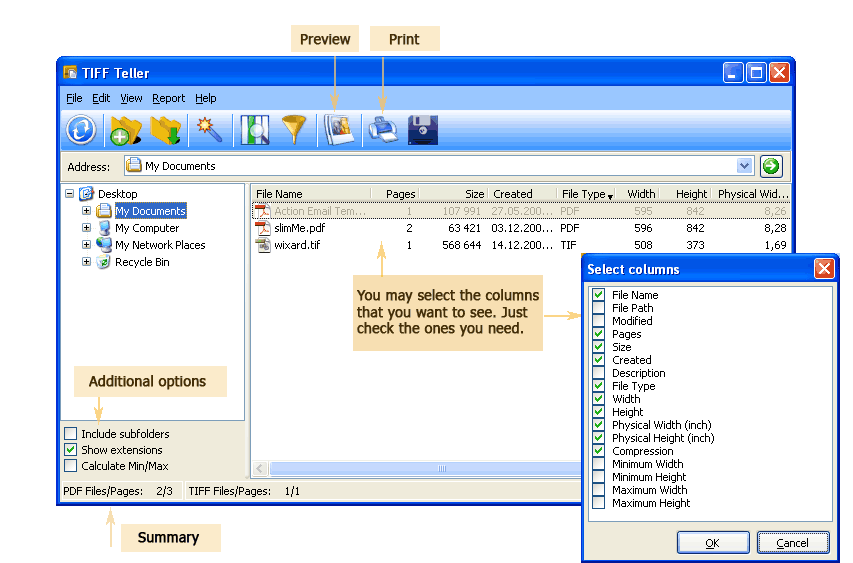
Tiff Teller shows the page count of PDF and TIFF files without opening them. It is a must-have tool for anyone who needs to count pages on the fly or on a scheduled basis. Standalone — does not depend on Adobe Acrobat or any image editor.
Quick answer: Tiff Teller counts the pages of PDF and TIFF files without opening them — point it at one or several folders and it scans every file at once, so you learn how many files and pages you have in seconds. Pick the fields you need, then print the report or export it to PDF, XLS, CSV, ODS or TXT.
Tiff Teller scans multiple directories with one click. You can even run it entirely from the command line without launching the GUI. Works on Windows 7/8/10/11. 30-day free trial, no credit card or email required. $49.90 lifetime license.
| Feature | Tiff Teller | Manual (open each file) |
|---|---|---|
| Count pages in 1,000+ files | Seconds | Hours |
| Scan multiple folders at once | Yes | One folder at a time |
| Export report (CSV, XLS, PDF) | Yes | Manual copy-paste |
| Detect corrupted files (0 pages) | Yes | Only when you try to open them |
| Show compression, DPI, color depth | Yes | Requires separate tools |
| Command-line automation | Yes | Not possible |
| No Adobe Acrobat needed | Yes | Usually requires Acrobat |
| Scheduled reports | Yes (via Task Scheduler) | Not possible |
| Pricing | $49.90 one-time | Free but time-consuming |
(includes 30 day FREE trial)
(only $49.90)

"We purchased TiffTeller because I needed a way to automate a daily count of images which we send late afternoon to a vendor that indexes them overnight and returns them before the start of business the next morning. Our window for sending files was outside of normal business hours and occasionally we had a discrepancy with the number of files which were sent in the evening versus the number of images indexed and returned the next business day.
Often times this was caused by one or two files being missed during the FTP transfer and the discrepancy caused a 24 hour delay in getting the indexed images into patients charts.
Timing is crucial so the physician can have access to the document remotely. And, of course, it is crucial the tiff images are indexed to the appropriate chart.
Our process worked pretty well, except for the days when we had a discrepancy. Tiff Teller has been able to resolve that problem. I am able to automate the entire process now that we have purchased Tiff Teller.
With the help of another tool we already use called Macro Express, I can now provide a report generated by Tiff Teller which gives an accurate count of the tiff files and images. Our vendor can use the report to verify all files were received.
Now, they can see immediately if they did not receive all files and can notify us right away. Tiff Teller is the safety net we were looking for to provide this double-check procedure."
 Jeremie Hughes
Graves-Gilbert Clinic
www.gravesgilbert.com
Teams that need accurate page counts and file reports for TIFF and PDF archives
Count pages across folders to quote printing costs
Print shops and copy centers use Tiff Teller to instantly count pages in client-submitted TIFF and PDF files. Scan entire job folders with one click, export page counts to Excel or CSV, and generate accurate cost estimates without opening every file manually.
Generate detailed reports on document archives
Records managers run Tiff Teller across archive directories to produce full inventory reports with page counts, file sizes, dates, and compression types. Export to XLS or PDF for audits, storage planning, or migration assessments without any third-party software.
Detect corrupted files and verify scan settings
QA teams use Tiff Teller to find corrupted PDFs with zero pages and verify that scanned TIFF files meet required specifications for DPI, compression, and color depth. Batch analysis across directories catches problems before files enter production workflows.
Automate page-based billing for document services
Law firms, scanning bureaus, and outsourcing companies bill clients per page. Tiff Teller counts pages across all client folders and exports reports to CSV or Excel for direct import into billing systems. Command line mode enables scheduled, hands-free reporting.
Run page counting via command line in batch pipelines
IT departments integrate Tiff Teller into automated document pipelines using its command line interface. Schedule nightly page counts, feed results into databases or monitoring dashboards, and flag anomalies like empty or oversized files — all without launching the GUI.
| Full Software Name | Coolutils Tiff Teller |
| Description | Coolutils Tiff Teller shows you how many pages are in your TIFF and PDF files. Instantly scan folders and get detailed page counts without opening the files. Perfect for estimating project volumes, checking scanning quality, or managing document archives. |
| Processor | At least 2.4 GHz |
| RAM | 4 GB |
| Minimum Hard Drive Space | 48.2 MB |
| Operating System | Windows 2000 / 2003 / 7 / 8 / 10 / 11 |
| Trial version | Download Tiff Teller and try it free for 30 days. Instantly get page counts and file stats for entire folders of TIFF and PDF documents. |
Updated Tue, 15 Sep 2026
(only $49.90)
 Nicolene Viljoen
CAB Holdings - JHB
Nicolene Viljoen
CAB Holdings - JHB
Arthur Lorek
www.yesprint.co.uk
Updated Tue, 15 Sep 2026
(only $49.90)
Download free trial and convert your files in minutes.
No credit card or email required.



