Need help? Reach us at 

 +1 (855) 418-2323
Need help? Reach us at
+1 (855) 418-2323

 TIFF and PDF apps
All of us sometimes need to deal with multi-page PDF files. We all realize that it is much easier to find the information we need in short rather than 100-pages long documents. CoolUtils understands consumers' needs and presents TIFF PDF Cleaner, a unique tool designed to split TIFF and PDF documents and delete empty pages from them.
Quick answer: To split a PDF by blank pages and remove those blanks, install Tiff PDF Cleaner, select the folder and check the PDF files, click the PDF button, choose Split by blank page in the Destination section, select Remove blank pages in the Options section, and click Start. The split and cleanup run automatically, turning one long PDF into shorter, blank-free documents.

Today we'll learn how to split PDF files by blank pages and delete these blank pages with TIFF PDF Cleaner.
The first thing that you should do is to download TIFF PDF Cleaner. CoolUtils is happy to offer a 30-day free trial version of this program so that you can see whether it works for you or not. Simply download the trial version and enjoy quick and efficient conversion and splitting of TIFF and PDF documents.
Follow the simple instructions of the setup wizard and install the app. To use GUI (user interface), please, double-click on the program's icon or select it from the start menu.
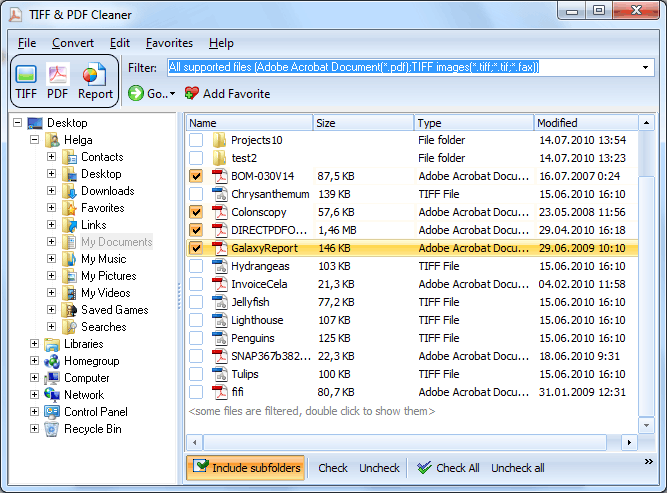
In the program's window, locate the tree of folders and files. It is in the left-side column. When you choose a proper folder, TIFF PDF Cleaner will show you the supported formats available in this folder.
Select the folder where your file(s) are located in, and then tick off the files you want to split.
Then choose PDF as the target format by clicking on the "PDF" button on the top bar of the program.
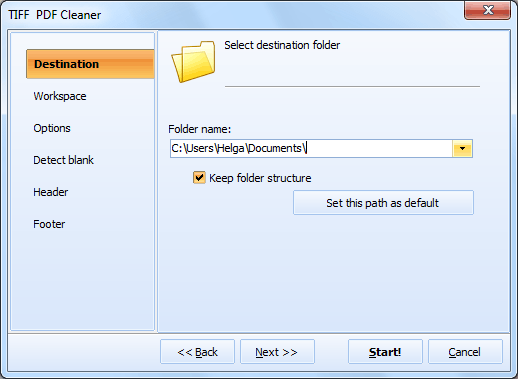
A new window will appear. In the "Destination" section, select "Split by blank page" option.
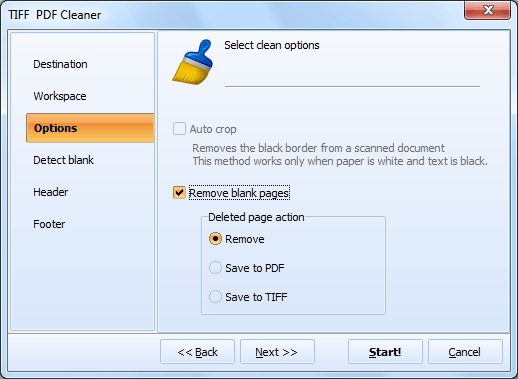
Then, in the "Options" section select "Remove blank pages".
And finally click "Start!" to begin the process! It is 100% automatic.
"Our front desk scans patient paperwork in one big batch with blank sheets between each patient's forms. Tiff PDF Cleaner splits them into individual PDFs automatically. We used to do this manually — now it takes 2 minutes instead of an hour."
 Karen Wright Office Manager, Lexington Family Practice
"We scan mixed correspondence with blank page separators. Tiff PDF Cleaner splits by blanks and produces clean individual PDFs. Integrated into our scanning workflow via command line. Handles 500+ pages daily without intervention."
Peter Johansson Workflow Engineer, Scandinavian Insurance Group
"Discovery documents arrive as one massive scanned PDF with blank separators between exhibits. Tiff PDF Cleaner splits them into individual exhibit files, each properly cleaned. Saves our paralegals significant prep time before review."
 Rachel Adams Litigation Support Specialist, Clark & Reid LLP
Download free trial and convert your files in minutes.
No credit card or email required.