Need help? Reach us at 

 +1 (855) 418-2323
Need help? Reach us at
+1 (855) 418-2323

When optimizing the memory storage on computer, users often feel hard to find this or that folder or file due to a complex folder structure. In order not to get lost in you folders, you can simply create a report that will show the entire structure of your memory disk or some specific parent folder. In this way you will see the full picture of where your items are located.
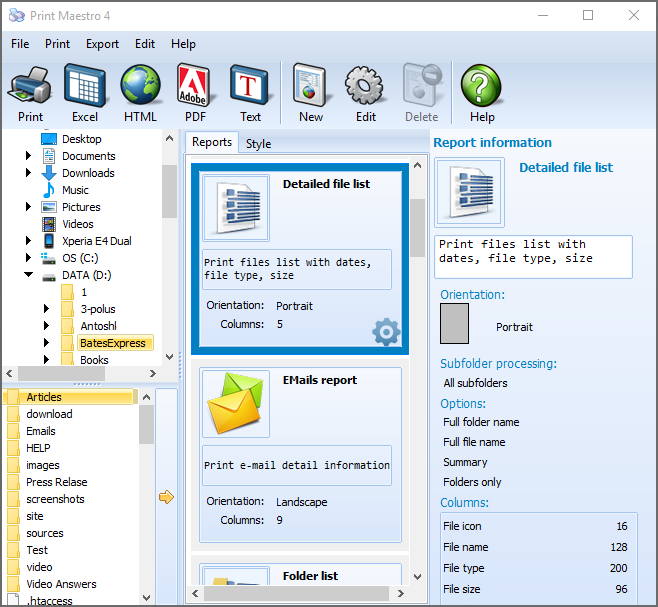
Quick answer: To export a directory list to Word or Excel, open Print Maestro, select the folder in the left panel, choose Folder List as the report type, set any file filters and subfolder levels, click the Export icon, then pick Excel (or Word, PDF, HTML, RTF, XML) and save. The report opens automatically so you can check the result.
Sure enough you don't have to do that manually. Here is a special program called Print Maestro that will do the job for you. It will provide you with a full report about your files and folders. For more convenience you can export directory lists to MS Word or Excel document. Moreover, in Print Maestro reports are available in PDF, HTML, RTF and XML file types as well.
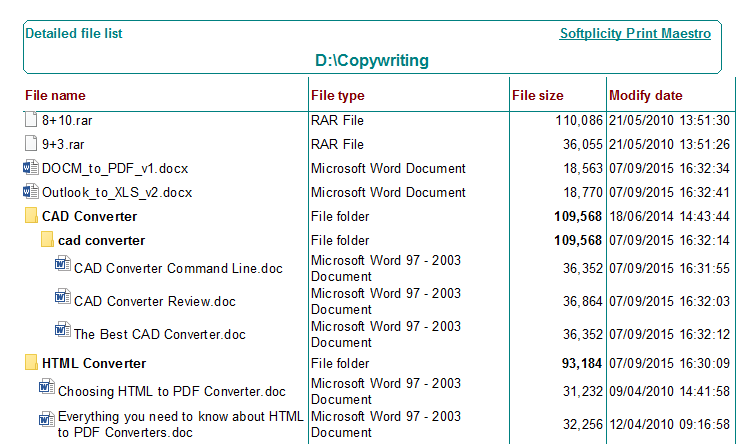
Also you can use Print Maestro as a directory printer for printing the list of subdirectories or file tree with different additional information. For audio files it can be bit rate, sample rate, album, artist. For photos the fields can include all EXIF info including image type, width, height, orientation, exposure, etc.
When generating report, you can setup files or folder filters in order to display only the items you need, skipping the rest. You can setup the number of subfolder levels. For instance, if you set it as 1, the report will contain only one level: folder/subfolder. If you set more levels, you will get more detailed report of what subfolders are stored in the catalog you selected. In order to export directory lists to Excel format you need to do the following:
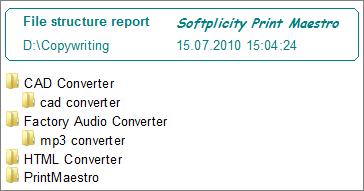
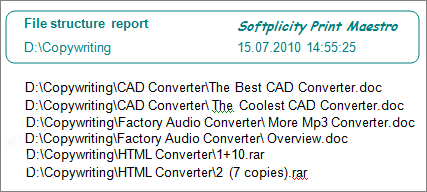
After export is completed, the report file will be automatically opened, so you can check the results immediately. Try it now, download a free trial here.
Windows XP/2003/Vista/7/8/10/11
Download free trial and convert your files in minutes.
No credit card or email required.


 Forensic