Need help? Reach us at 

 +1 (855) 418-2323
Need help? Reach us at
+1 (855) 418-2323

 TIFF and PDF apps
You have a folder with 500 TIFF and PDF files and need to know the total page count. Opening each file in a viewer and counting manually is not an option. Tiff Teller scans entire folders of multi-page TIFF and PDF files, reads the page count from every file in seconds, and exports the results as a structured report in XLS, DOC, PDF, TXT, or five other formats.
Quick answer: To count pages across many TIFF and PDF files, open the folder in Tiff Teller, let it scan the files, read the per-file count in the Pages column and the combined total in the status bar, then click Export to save the report as XLS, DOC, PDF, or TXT. It reads thousands of files in seconds, fully offline.
Multi-page TIFF and PDF files store page information differently from simple image formats. A JPEG is always one page. A TIFF file can contain hundreds of pages (frames) chained through IFD (Image File Directory) entries. A PDF file stores its page count in a Page Tree structure buried inside the binary. Neither Windows Explorer nor macOS Finder shows page counts. You need specialized software that reads the internal structure of both formats.
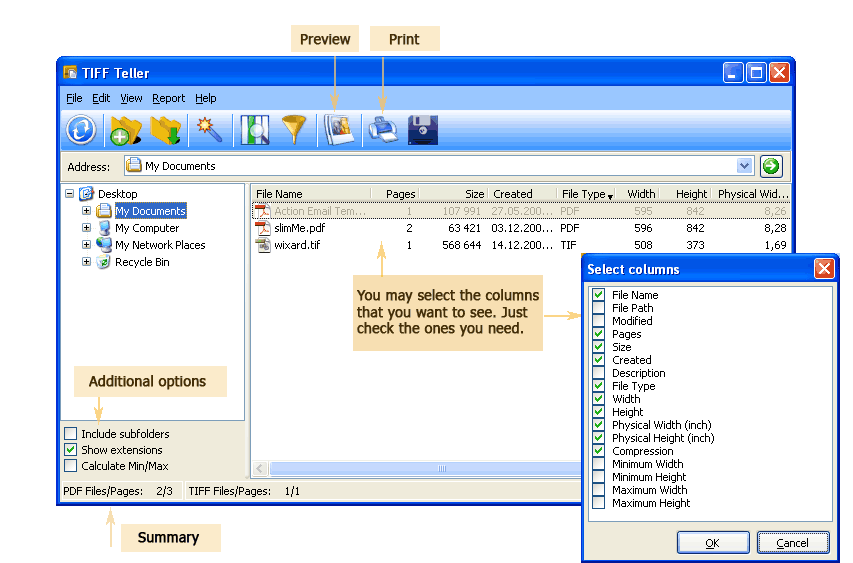
Tiff Teller reads every TIFF and PDF file in the selected folder and displays a detailed table with configurable columns:
The status bar at the bottom shows two numbers: total files in the folder and total page count across all files. Select specific files and the status bar updates to show only the selected totals.

| Aspect | TIFF | |
|---|---|---|
| Page structure | Each page is an IFD (Image File Directory) entry. Pages are chained — each IFD points to the next one. | Pages are defined in a Page Tree (catalog object). Each page is a separate object with its own content stream. |
| How pages are counted | Follow the IFD chain from the file header to the last entry. Each IFD = one page. | Read the /Count entry in the root Pages dictionary. |
| Typical page counts | Scanned documents: 1–500 pages. Fax archives: up to thousands. | Office documents: 1–100 pages. Merged reports: up to thousands. |
| Compression types | CCITT Group 3/4, LZW, ZIP (Deflate), JPEG, PackBits, None | Flate, DCTDecode (JPEG), JBIG2, CCITTFax, LZW, RunLength |
| Metadata access | TIFF tags in each IFD (width, height, DPI, compression, date) | Info dictionary and XMP metadata stream |
Launch Tiff Teller. The folder tree on the left shows your drives and directories. Navigate to the folder that contains your TIFF and PDF files. The file list on the right populates immediately — every TIFF and PDF in the folder appears with its page count and metadata.
The Pages column shows the number of pages in each file. Multi-page TIFFs show the frame count; PDFs show the page count from the document catalog. Single-page files show 1. The status bar at the bottom displays the total: for example, “127 files, 4,583 pages.”
Right-click the column header row to open the column selector. Check the fields you need: Pages, File Name, Size, Width, Height, Compression, Date. Uncheck columns you do not need. The table adjusts instantly.
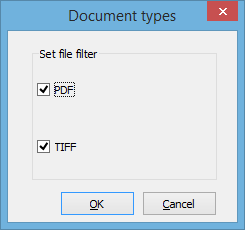
Click any column header to sort. Click Pages to sort by page count — find the largest documents instantly. Click Size to find the heaviest files. Use the file type filter to show only TIFF files, only PDF files, or both.
Click the Export button on the toolbar. Choose the format: XLS, DOC, PDF, TXT, ODS, SQL, or LaTeX. The exported report contains every visible column for every file in the list. Open the XLS in Excel for further analysis — pivot tables, charts, or subtotals by folder.
Tiff Teller includes a command-line interface for automated batch processing:
TiffTeller.exe "C:\Scans\" -oXLS -f "C:\Reports\page-count.xls"
Parameters: folder path to scan, -oXLS sets the report format, -f specifies the output file. Schedule this command with Windows Task Scheduler to generate page-count reports automatically — daily, weekly, or after each scan batch.
Other report formats: -oDOC, -oPDF, -oTXT, -oODS, -oSQL, -oLATEX.
| Format | Best For | Details |
|---|---|---|
| XLS | Data analysis | Open in Excel or LibreOffice Calc. Add formulas, pivot tables, charts. Filter by page count, size, or date. |
| DOC | Printed reports | Formatted table ready for printing or including in project documentation. |
| Archival and sharing | Read-only report that looks the same on any computer. Attach to emails or store in DMS. | |
| TXT | Scripting and parsing | Tab-delimited text. Easy to parse with PowerShell, Python, or any text processing tool. |
| ODS | Open-source workflows | OpenDocument Spreadsheet for LibreOffice or Google Sheets. |
| SQL | Database import | INSERT statements ready to load into MySQL, PostgreSQL, or SQL Server. |
| LaTeX | Academic and technical publishing | LaTeX table markup for inclusion in research papers or technical manuals. |
No need for separate utilities. Tiff Teller scans folders containing mixed TIFF and PDF files and reports page counts for both formats in a single table. One tool, one report, all your multi-page documents covered.
Tiff Teller reads page counts without rendering the files. It parses the TIFF IFD chain and PDF page tree directly, which makes it fast even for folders with thousands of files. A folder with 10,000 files is scanned in seconds, not minutes.
Display only the data you need. A print shop may want pages, dimensions, and compression. An accounting department may want pages, file name, and date. Right-click the header and check only the relevant columns.
Export the report to XLS for analysis, DOC for documentation, PDF for archival, TXT for scripting, ODS for open-source tools, SQL for database loading, or LaTeX for academic papers. Every format includes all visible columns.
Run Tiff Teller from the command line in scripts, batch files, or scheduled tasks. Generate page-count reports automatically after each scanning session or at the end of every business day.
Tiff Teller handles files of any size — 50 MB scanned TIFF bundles, 200 MB merged PDFs, or folders with tens of thousands of mixed files. It reads metadata without loading the entire file into memory.
Download the free 30-day trial — no email or credit card required. A personal license costs $49.90 and includes one year of free upgrades. Works on Windows 7/8/10/11.
Download Free Trial Buy License — $49.90
Download free trial and convert your files in minutes.
No credit card or email required.