Need help? Reach us at 

 +1 (855) 418-2323
Need help? Reach us at
+1 (855) 418-2323

 TIFF and PDF apps
You have 200 PDF files in a folder and need to know the total page count before sending them to print. Opening each file and checking is not an option. Tiff Teller scans a folder of PDF and TIFF files, reads the page count of every document in seconds, shows the results in a table, and exports the data to Excel, CSV, Word, HTML, or 15 other report formats.
Quick answer: To count pages across multiple PDF files, launch Tiff Teller, open the folder with your PDFs, and read the Pages column for every file at once. The status bar totals the page count automatically, and one click exports a report to Excel, CSV, Word, or 15 other formats for billing, printing, or audits.
| Column | Description |
|---|---|
| File Name | Name and extension of each PDF or TIFF file |
| File Path | Full directory path |
| Pages | Number of pages (frames) in the file |
| Size | File size in bytes |
| Created / Modified | File creation and last-modified timestamps |
| File Type | PDF or TIF |
| Width / Height | Page dimensions in pixels |
| Physical Width / Height (inch) | Physical page size based on DPI |
| Compression | Compression method used inside the file |
| Min/Max Width / Height | Smallest and largest page dimensions (multi-page files) |
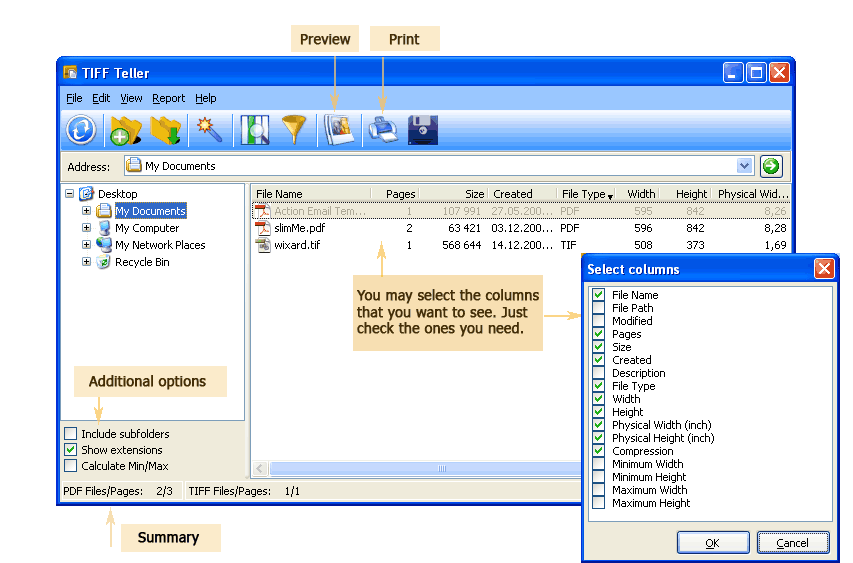
You choose which columns to display. The status bar at the bottom shows the total file count and total page count for the current folder.
Launch Tiff Teller. The folder tree on the left shows your drives. Navigate to the directory with your PDF files. The file table populates instantly — each row shows a file with its page count, size, date, dimensions, and other properties. Enable Include subfolders to scan nested directories.
The Pages column shows the page count for every file. The status bar at the bottom reads "PDF Files/Pages: 200/4,350" — 200 files containing 4,350 pages total. If you only need a quick count, you are done.
Go to View → Select Columns. Tick the fields you want in the report: File Name, Pages, Size, Created, File Type, Width, Height, Compression, or any combination. Untick columns you do not need to keep the report clean.
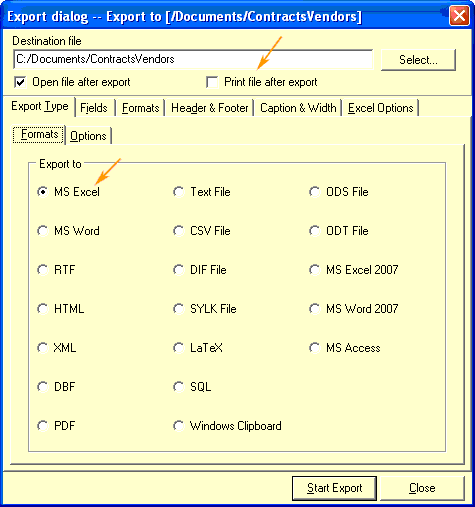
Click the Export button on the toolbar. The export wizard opens:
The report is ready. Open it in Excel to sort, filter, or create pivot tables by page count, file size, or date.

Tiff Teller includes a command-line interface for automated reporting:
TiffTeller.exe /s "C:\Archive\*.pdf" /o "C:\Reports\PageCount.csv" /f CSV /cols "FileName,Pages,Size"
Parameters: /s — source files (wildcards supported), /o — output report file, /f — export format, /cols — columns to include. Save this in a .bat file and run it via Windows Task Scheduler. A nightly script scans the incoming-documents folder and drops a fresh page-count report on the shared drive every morning.
| Format | Best For | Editable? | Notes |
|---|---|---|---|
| MS Excel / XLSX | Sorting, filtering, pivot tables | Yes | Most popular for spreadsheet analysis |
| CSV | Database import, scripting | Yes | Universal plain-text format, opens anywhere |
| Sharing read-only reports | No | Professional look for clients and auditors | |
| HTML | Intranet publishing | Yes | Open in any browser, embed on internal pages |
| Word / DOCX | Including in written reports | Yes | Add custom text around the table |
| XML / SQL / DBF | Direct database import | Yes | Structured data for ERP and DMS systems |
| Feature | Manual (open each PDF) | Tiff Teller |
|---|---|---|
| Speed (500 files) | 1–2 hours | Under 10 seconds |
| Total page count | Calculate by hand or in a spreadsheet | Shown automatically in the status bar |
| File metadata (size, date, dimensions) | Check Properties per file | All columns visible at once |
| Export to Excel/CSV | Type manually | One-click export to 15+ formats |
| Subfolders | Open each subfolder separately | Tick "Include subfolders" — recursive scan |
| Automation | Not possible | Command-line interface, .bat scheduling |
| TIFF support | Need a separate tool | PDF and TIFF in the same scan |
Point Tiff Teller at a folder and get a page count for every PDF and TIFF file in seconds. No file-by-file opening, no Adobe Reader, no waiting for large documents to render. The status bar shows the grand total immediately.
Export the page-count table to Excel, CSV, PDF, Word, HTML, XML, SQL, or any of 15+ formats. Choose exactly which columns appear in the report. Add headers and footers for professional output. The exported file is ready to attach to an email, import into a database, or print on paper.
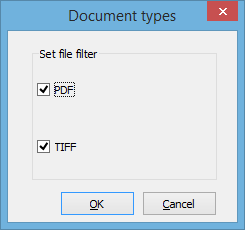
Tiff Teller handles both formats in the same scan. Mixed folders with PDFs and multi-page TIFFs are analyzed together. The File Type column shows which format each file belongs to.
Besides pages, Tiff Teller reports file size, creation date, modification date, pixel dimensions, physical dimensions in inches, and compression type. One scan gives you a complete inventory of every document property.
Schedule a nightly .bat script that scans a shared folder and produces a CSV report. Accounting, compliance, and print departments get an updated document inventory every morning without manual effort.
Download the free 30-day trial — no email or credit card required. A personal license costs $49.90 and includes one year of free upgrades. Works on Windows 7/8/10/11.
Download Free Trial Buy License — $49.90
Download free trial and convert your files in minutes.
No credit card or email required.

Related Topics
How to View the Number of Pages in Multiple PDF Files
