Need help? Reach us at 

 +1 (855) 418-2323
Need help? Reach us at
+1 (855) 418-2323

 TIFF and PDF apps
(includes 30 day FREE trial)
(only $49.90)
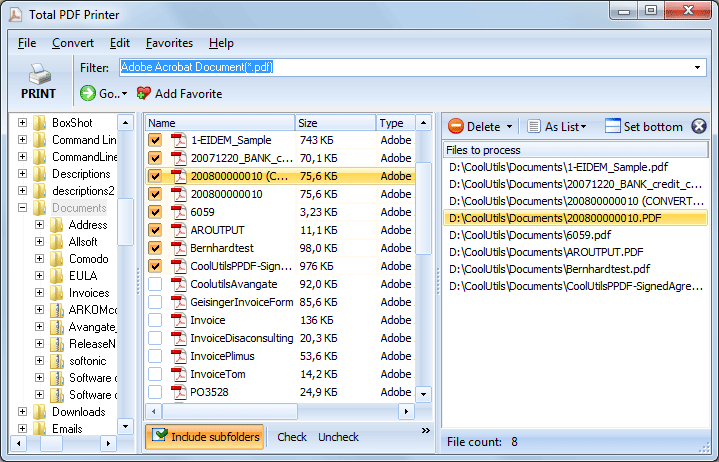
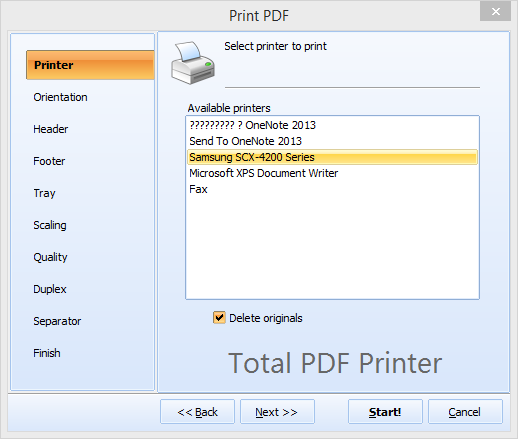
Quick answer: To print a PDF fit-to-page, install Total PDF Printer, select the PDF files or a whole folder, click Print, open the Scaling tab, choose Fit to page, then pick your printer and paper size and press Start. Every page is scaled proportionally to your paper in one batch, so nothing is cropped and no margins are wasted.
PDF files store a fixed page size defined by the document creator. A drawing made on A3 stays A3 inside the PDF. An American invoice created on Letter format (8.5 x 11 inches) stays Letter. When you print an A3 PDF on A4 paper without scaling, the printer crops the edges. Content is lost.
The opposite problem is just as common. A small PDF printed on large paper leaves wide white margins, wasting space and looking unprofessional. If you print 200 files from different sources, each with its own page size, adjusting scale settings for every file takes hours.
Standard PDF viewers offer a fit-to-page option, but it applies to one file at a time. There is no way to batch-print 200 mixed-size PDFs with automatic scaling in Adobe Reader. You open each file, set fit-to-page, print, close, repeat.
Total PDF Printer solves this. Set fit-to-page once, select your files, and print. Every page in every file is scaled to match your loaded paper — A3 drawings shrink to A4, Letter invoices adjust to A4, and small pages scale up to fill the sheet.
The settings apply to all files in the batch. A folder with 200 PDFs of different page sizes prints with consistent scaling — nothing gets cropped, nothing overflows.
Total PDF Printer includes a command-line interface for unattended print jobs:
PDFPrinter.exe C:\Invoices\*.pdf -p "HP LaserJet" -FitToPage -AutoRotate
The -FitToPage flag enables automatic scaling; -AutoRotate adjusts orientation per page. Schedule this in Windows Task Scheduler to print incoming PDFs automatically. The command-line version runs without a GUI and integrates into document management pipelines where files arrive continuously.
 Automatic fit-to-page. One setting scales every PDF to your paper. A3 drawings, Letter invoices, custom-size forms — all print correctly on whatever paper is loaded. No per-file adjustment.
Auto-rotate. Mixed batches with portrait and landscape pages print correctly without manual rotation. The program detects each page's orientation and rotates it to minimize scaling while fitting the paper.
Batch printing. Select a folder with 500 PDFs and send them all to the printer in one run. Set the printer, tray, quality, and scaling once. The program handles the rest.
Printer and tray selection. Choose any installed printer and specific paper tray for each batch. Print invoices to the office laser on tray 1, and large drawings to the wide-format plotter on tray 2 — all from the same interface.
Quality control. Adjust print resolution from high (photo-quality) to draft (fast, low ink). Add separator pages between documents to keep printed stacks organized. Set duplex mode if your printer supports it.
One-time purchase. A single license at $49.90 covers the software for life. Free upgrades for 12 months. No subscriptions, no per-file charges.
| Task | Manual (Adobe Reader) | Total PDF Printer |
|---|---|---|
| Print 200 mixed-size PDFs | Open each, set fit-to-page, print | Select folder, one click |
| Fit-to-page scaling | Per-file setting only | One setting for entire batch |
| Auto-rotate pages | Not available | Automatic per page |
| Select printer per batch | Use system default | Choose any installed printer |
| Separator pages | Not available | Built-in |
| Automation | Not possible | Command-line + Task Scheduler |
| Software cost | Free (Reader) / $240/yr (Acrobat) | Total PDF Printer ($49.90 once) |

(includes 30 day FREE trial)
(only $49.90)
Download free trial and convert your files in minutes.
No credit card or email required.