Need help? Reach us at 

 +1 (855) 418-2323
Need help? Reach us at
+1 (855) 418-2323

 TIFF and PDF apps
You have a folder of PDF files — some in portrait, some in landscape, some mixing both orientations within the same document. Printing them manually means checking each file, adjusting the orientation setting, and hoping the output matches the paper. Total PDF Printer eliminates this step entirely: its auto-rotate option detects the orientation of every page and rotates it to fit your paper automatically.
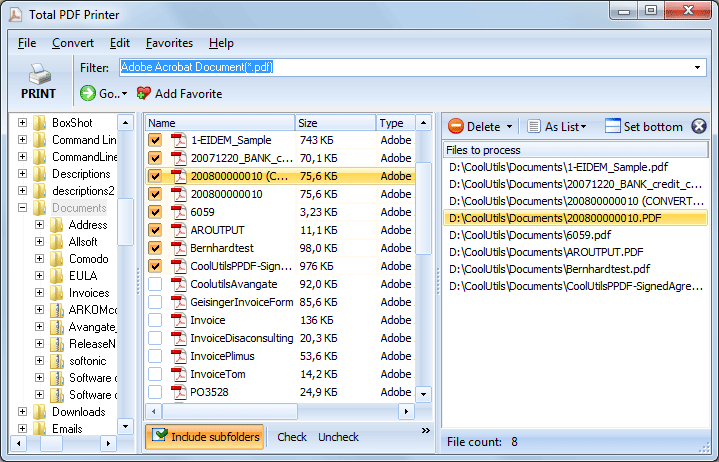
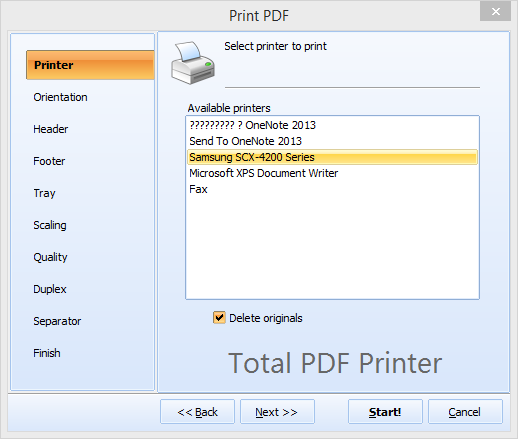
Quick answer: To auto-rotate PDFs when printing, open Total PDF Printer, check the PDF files or a whole folder, click Print, go to the Orientation tab and select Auto Rotate, then set your printer and paper and click Start. The program reads each page's dimensions and rotates portrait or landscape pages to fit the paper, so the whole batch prints correctly with no manual checks.
Total PDF Printer includes a command-line interface for scripted and scheduled printing. To auto-rotate pages:
PDFPrinter.exe "C:\Reports\*.pdf" -p "HP LaserJet" -orient Auto -log "C:\Logs\print.log"
Put this in a .bat file to auto-print a folder of mixed-orientation PDFs every evening or after a scheduled scan. The command line supports all GUI options: tray selection, duplex, scaling, separator pages, and page ranges.
| Feature | Total PDF Printer (Auto-Rotate) | Manual Printing |
|---|---|---|
| Detect page orientation | Automatic, per page | You check each file |
| Mixed-orientation PDFs | Each page rotated individually | One setting per file |
| Batch of 100+ files | One click, unattended | Open-check-print-close for each |
| Command-line support | Yes (-orient Auto) | No |
| Works with fit-to-page | Yes, combined automatically | Depends on PDF viewer |
| Duplex with auto-rotate | Yes, with blank page insert | Varies by viewer |
Auto-rotate combines with the rest of Total PDF Printer's settings:
For unattended server-side printing, Total PDF Printer X runs as a Windows service with ActiveX support. It processes print jobs silently without displaying any UI — ideal for web servers, ERP integrations, and automated document workflows. Auto-rotate works the same way in the server edition.
Total PDF Printer licenses start at $49.90. Download the free 30-day trial — no email or credit card — and test auto-rotate with your own files.
Download free trial and convert your files in minutes.
No credit card or email required.

Related Topics
How to Print PDF Fit-to-Page — Scale Any PDF to Your Paper Size
