Logo
Home Products Support Contact About Us
arrow1 Forensic

Outlook Search Not Working? Here Is a Reliable Alternative


You type a keyword into Outlook's search bar. Nothing comes back — or worse, you get a handful of results when you know there are hundreds. Outlook search breaks regularly, and Microsoft's own troubleshooting guides rarely fix it for good. If your work depends on finding old emails fast, you need a tool that actually works.

Mail Terrier reads PST, OST, EML, MSG, MBOX, and EMLX files directly from your hard drive. It builds its own search index, ignores Windows Search entirely, and finds every match — every time. No Outlook required.

Why Outlook Search Fails

Outlook search depends on Windows Search Indexer, a background service that catalogs your mailbox. When that chain breaks at any point, search stops returning correct results. Here are the most common causes:

  • Corrupted search index. Windows Search builds an index database for Outlook data files. Power failures, forced shutdowns, or Windows updates can corrupt this index silently. Outlook shows no error — it just stops finding emails.
  • Windows Search service disabled or crashing. Some system optimizers and corporate Group Policies disable the Windows Search service. Without it, Outlook search returns nothing at all. The service can also crash repeatedly on machines with large mailboxes.
  • Large PST/OST files. Mailboxes over 10 GB slow down indexing dramatically. The indexer falls behind, and recent emails never appear in search results. Outlook imposes a 50 GB limit on PST files, but performance degrades long before that.
  • Cached Exchange Mode conflicts. When Outlook runs in Cached Exchange Mode, it maintains a local copy of the mailbox. If the local cache is incomplete — set to only 3 months or 12 months — search cannot find older emails that exist on the server but not locally.
  • Outlook version bugs. Microsoft acknowledges recurring search bugs in Outlook 2016, 2019, and Microsoft 365. Patches fix one issue and introduce another. The November 2024 update broke search for shared mailboxes across multiple tenants.

Common Fixes for Outlook Search

Microsoft recommends these troubleshooting steps:

  1. Open Indexing Options in Windows Settings and click Rebuild to recreate the search index from scratch.
  2. Run the Inbox Repair Tool (ScanPST.exe) to fix structural damage in your PST or OST file.
  3. Open services.msc and restart the Windows Search service. Set it to Automatic startup.
  4. Run Repair on your Office installation from Apps & Features in Windows Settings.
  5. Create a new Outlook profile and re-add your email account.

These steps work sometimes. But the underlying problem remains: Outlook search depends on Windows Search Indexer, and that indexer was not designed for mailboxes with tens of thousands of messages and attachments. Even after rebuilding, the index can fall out of sync within weeks. If you search email files frequently, you need a dedicated tool.

A Better Solution: Search PST Files with Mail Terrier

Mail Terrier is a desktop search tool built specifically for email files. It does not use Windows Search. It does not require Outlook. It reads PST, OST, EML, MSG, MBOX, and EMLX files directly and builds its own full-text index.

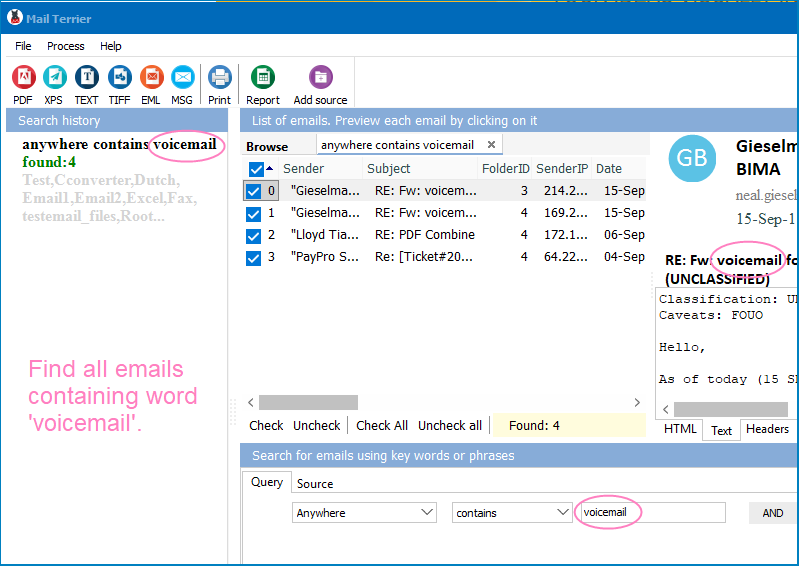
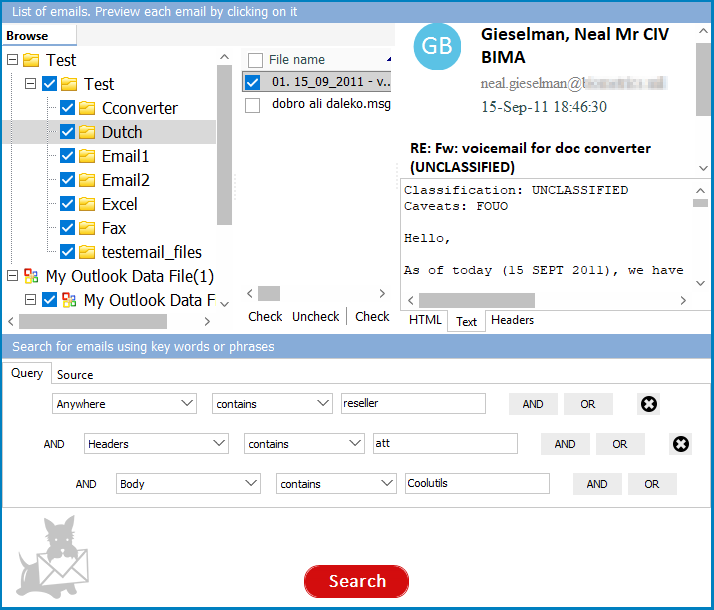
Point Mail Terrier at a folder containing your email archives. It scans every file, indexes message bodies, headers, and attachment names, and gives you a search interface with operators that Outlook does not support: AND, OR, NOT, proximity search, date ranges, and sender/recipient filtering. Search results appear in seconds, even across mailboxes with 100,000+ messages.

Found what you need? Export the matching emails to PDF, DOC, XLS, TIFF, EML, or MSG directly from the results list. No copy-pasting, no manual forwarding.

How to Search Outlook Emails Without Outlook Search

  • Step 1: Download and install Mail Terrier. The installer is under 30 MB. No Outlook or Office installation needed. Works on Windows 7, 8, 10, and 11.
  • Step 2: Add your email files. Click Add Folder and point to the directory containing your PST, OST, EML, MSG, MBOX, or EMLX files. Mail Terrier scans the folder recursively — subfolders are included automatically.
  • Step 3: Search. Type your keywords in the search bar. Use AND, OR, NOT operators to narrow results. Filter by date range, sender, or recipient. Use proximity search to find words that appear near each other in the message body.
  • Step 4: Export results. Select the emails you need and choose an export format: PDF, DOC, XLS, TIFF, EML, or MSG. Mail Terrier saves the files to a folder of your choice with original headers, body text, and attachments preserved.


Download Now!

(includes 30 day FREE trial)

Buy License

(only $199.00)

Outlook Search vs Mail Terrier

FeatureOutlook SearchMail Terrier
Search indexWindows Search Indexer (shared with OS, frequently corrupts)Own built-in index (independent, stable)
Requires OutlookYesNo
File formatsPST, OST (only current profile)PST, OST, EML, MSG, MBOX, EMLX
Search operatorsBasic keywords, from:, to:, subject:AND, OR, NOT, proximity, date range, sender/recipient
Large mailboxes (50 GB+)Slows down, incomplete resultsHandles large archives reliably
Export resultsForward or drag-and-drop onlyPDF, DOC, XLS, TIFF, EML, MSG
Searches archived/detached PSTsOnly if connected to Outlook profileYes — any PST on disk
CostIncluded with Microsoft 365 subscription$199 commercial / free for personal home use

When to Use Mail Terrier Instead of Outlook Search

Your Outlook search returns incomplete results. You rebuilt the index, repaired Office, restarted Windows Search — and it still misses emails you know are there. Mail Terrier reads the PST file byte by byte. If the email exists in the file, Mail Terrier finds it.

You need to search old PST backups. IT handed you a 30 GB PST from a former employee's mailbox. Outlook takes 20 minutes to import it, then the search index needs hours to build. Mail Terrier opens the file directly and searches it immediately.

You work with multiple email formats. Your archive includes PST files from Outlook, MBOX exports from Thunderbird, and EML files from webmail backups. Outlook cannot search MBOX or standalone EML files. Mail Terrier searches all of them in one place.

You need to export search results. A compliance officer asks for every email containing a specific keyword, exported as PDF. In Outlook, that means opening each email and printing to PDF individually. Mail Terrier exports all matching emails to PDF in one batch.


Mail Terrier runs on Windows 7, 8, 10, and 11. Free for personal home use. Commercial license: $199. The 30-day trial includes full functionality — no credit card required.


quote

Mail Terrier Customer Reviews 2026

Rate It
Rated 4.8/5 based on customer reviews
5 Star

"We had 40 users complaining that Outlook search was missing emails. Rebuilt the index on every machine, twice. It kept breaking. I installed Mail Terrier on a shared workstation and pointed it at our PST archive — 200 GB across 50 files. Within minutes people were finding emails that Outlook had not surfaced in months. The AND/OR operators and date filtering save us hours during audits."

5 Star Brian Kowalski IT Systems Administrator, Manufacturing Company

"Attorneys need to pull specific email threads for case prep, and Outlook search was unreliable — sometimes it found the email, sometimes it did not. Mail Terrier searches all our archived PST files at once and exports results straight to PDF. No more opening emails one by one and printing. It paid for itself the first week."

5 Star Patricia Engel Office Manager, Law Firm

"I keep years of client correspondence in EML and MSG files. Outlook search could not touch them — it only searches its own mailbox. Mail Terrier indexes everything in one folder and finds receipts, invoices, and contracts by keyword in seconds. The free personal license is a bonus. Only wish it had a Mac version."

4 Star Daniel Frey Freelance Accountant

FAQ ▼

Outlook search relies on the Windows Search Indexer service to catalog your mailbox. If the index becomes corrupted, the service is disabled, or your PST/OST file is too large for the indexer to keep up, Outlook returns incomplete results or nothing at all. Rebuilding the index helps temporarily, but the problem often returns.
Start by rebuilding the search index: open Indexing Options in Windows Settings and click Rebuild. If that fails, run ScanPST.exe to repair your data file, restart the Windows Search service, and repair your Office installation. These steps resolve the issue in some cases, but the fix may not last on large or complex mailboxes.
Yes. Mail Terrier opens PST and OST files directly without Outlook installed. It builds its own search index and supports keyword search with AND, OR, NOT operators, date ranges, and sender/recipient filters. Results can be exported to PDF, DOC, XLS, TIFF, EML, or MSG.
Mail Terrier searches PST, OST, EML, MSG, MBOX, and EMLX files. You can point it at a folder containing mixed formats and search across all of them at once.
Mail Terrier is free for personal home use. A commercial license costs $199. The 30-day trial includes full functionality with no limitations — no credit card or email registration required.
Yes. Mail Terrier runs on Windows 7, 8, 10, and 11. It does not depend on Windows Search or any other system service, so it works reliably regardless of your Windows version or configuration.
Yes. Select the matching emails in the results list and export them to PDF, DOC, XLS, TIFF, EML, or MSG. Headers, body text, and attachments are preserved in the exported files. Batch export is supported — you can export hundreds of emails at once.


Start working now!

Download free trial and convert your files in minutes.
No credit card or email required.

⬇ Download Free Trial Windows 7/8/10/11 • 89 MB

Support
Mail Terrier Preview1
Mail Terrier Preview2

Latest News

Newsletter Subscribe

No worries, we don't spam.


© 2026. All rights reserved. CoolUtils File Converters

Cards