Logo
Home Products Support Contact About Us
arrow1 TIFF and PDF apps

How to Add Bates Stamps to PDF Documents


A discovery production is due, and the export from your document system is one continuous PDF: thousands of pages, dozens of documents, and every page must carry a unique identifier before it goes to opposing counsel. Adobe Acrobat will stamp it — for a subscription. PDF Splitter Pro adds Bates numbers to every page while it splits the production into individual exhibit files — one run, fully offline, $99 one-time.

What Is Bates Numbering?

Bates numbering (also called Bates stamping) is a sequential identifier printed on every page of a legal document set — typically a party prefix followed by a zero-padded number: SMITH-000001, SMITH-000002, and so on. The name comes from the Bates Automatic Numbering-Machine, a hand stamp patented in the 1890s; the device is gone, the convention stayed.

In US litigation, produced documents are expected to carry unique page identifiers so that attorneys, courts, and experts can cite an exact page — “see SMITH-000214” — without ambiguity. The same numbering is used for exhibit sets, medical record productions, and claim files.

How to Add Bates Stamps to a PDF: Step by Step

  1. Download and install — get the free 30-day trial of PDF Splitter Pro (Windows 7/8/10/11). No email or credit card required.
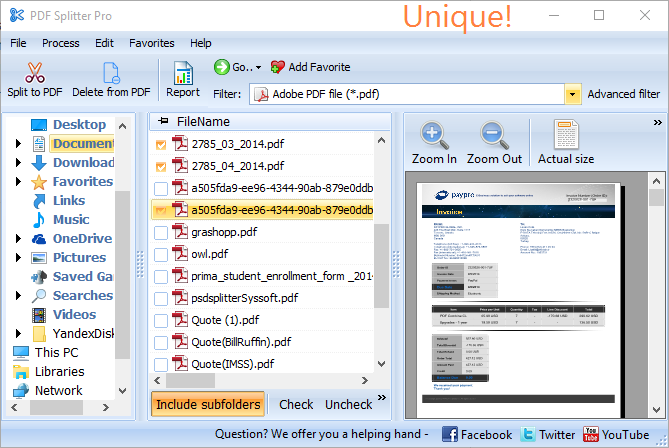
  2. Add your PDF files — a single combined production PDF or an entire folder. PDF Splitter Pro processes files in batch.
  3. Choose the split mode — by a text line that starts each document (a document title, invoice number, or patient name), by barcode separator sheets, by bookmarks, by blank pages, or by page ranges.
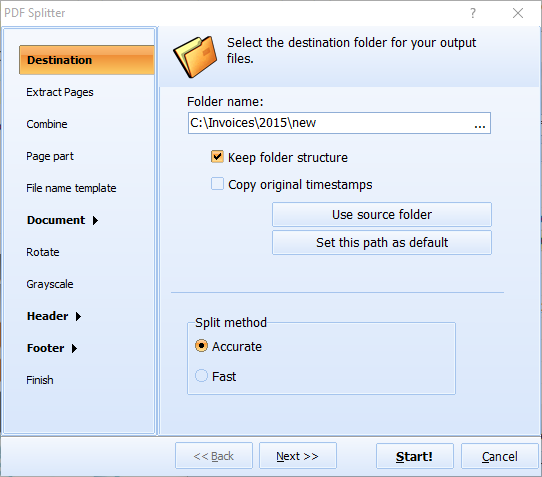
  4. Enable Bates stamping — switch on Bates numbering in the output options. The counter runs sequentially across every page of the output. You can also add page counters, a logo, or any image to each page.
  5. Click Start — the production comes out as separate, stamped PDF files. The built-in renamer names each file by the separator text, so exhibits arrive pre-labeled.

Split, Stamp, and Rename in One Pass

The usual workflow takes three tools: split the PDF, stamp the pages, rename the files by hand. PDF Splitter Pro collapses it into one run — the text separator defines the documents, Bates numbers go onto every page, and the renamer writes the document identifier into each file name. A 2,000-page production becomes a folder of numbered, named exhibit files in minutes.

Command-Line Automation

Set the job up once in the GUI and PDF Splitter Pro generates a ready-to-use .BAT file. Schedule it to process recurring productions — weekly claim file exports, monthly record batches — without opening the program. For web servers and document pipelines, PDF Splitter X provides the same engine as an ActiveX component with no GUI.

PDF Splitter Pro vs. Adobe Acrobat vs. Online Tools

FeaturePDF Splitter ProAcrobat ProOnline Tools
Price$99 one-timeSubscription, about $240/yearFree with limits
Bates numberingYesYesRarely
Split by text content (document title, invoice #)YesNoNo
Split + stamp + rename in one runYesNoNo
Rename files by detected textYesNoNo
Command-line automationYesNoNo
Confidential files stay offlineYesYesNo — uploaded to a server

When Do You Need Bates Stamps?

  • Discovery productions — produce documents to opposing counsel with the unique page IDs both sides will cite for the rest of the case.
  • Exhibit preparation — turn a combined scan into separate exhibit files, stamped and named before the deposition.
  • Medical record productions — injury and malpractice cases reference records by page; Bates numbers make those citations stable.
  • Internal and HR investigations — fix the pagination of interview notes and evidence so later reports cite an unchangeable page ID.
  • Insurance claim files — adjusters and SIU teams hand over numbered claim documentation to counsel or regulators.

Privileged and confidential documents have no business on a free upload site. PDF Splitter Pro runs entirely on your machine — nothing leaves it.

A lifetime license is $99 — one payment, no subscription. Download the free 30-day trial and run it on a real production set; the trial is fully functional.


quote

PDF Splitter Pro Customer Reviews 2026

Rate It
Rated 4.8/5 based on customer reviews
5 Star

"Discovery productions used to take three steps: split in Acrobat, run Bates, rename by hand. PDF Splitter Pro does all of it in one pass — the production comes out as numbered exhibit files named by document title. We process productions the same afternoon they are approved."

5 Star Margaret Olsen Litigation Support Manager, Whitfield & Banks LLP

"Claim files arrive as combined scans with barcode separator sheets. PDF Splitter Pro splits at each barcode and stamps sequential Bates numbers across the whole set. The numbering never restarts mid-batch, which our prior tool kept getting wrong."

5 Star Daniel Reyes Paralegal, Insurance Defense Practice

"We produce medical records for litigation requests. PDF Splitter Pro splits charts by patient and applies Bates numbering for the attorneys in one run, offline — records never touch a web service. The .BAT automation handles our recurring weekly requests."

4.5 Star Susan Hartley Health Information Management, St. Luke's Regional

FAQ: Bates Stamping PDF Files ▼

Bates numbering is a sequential identifier stamped on every page of a document set, usually a prefix plus a zero-padded counter (for example, SMITH-000001). It originated with the Bates Automatic Numbering-Machine in the 1890s and remains the standard way to give legal documents stable, citable page IDs.
No rule names it, but unique page identifiers on produced documents are standard practice in US litigation, and parties routinely agree on a Bates format in their discovery plan. Once a production is stamped, every later filing, deposition, and expert report cites those numbers — which is why they must be applied before the documents go out.
PDF Splitter Pro is a standalone Windows application — no Acrobat required. Add the PDF, enable Bates stamping in the output options, and every page of the output receives a sequential number. A lifetime license is $99, compared to a recurring Acrobat subscription.
Yes. PDF Splitter Pro works in batch: add a folder of PDFs and the stamping applies across the whole job in one run. Set the job up in the GUI once and the generated .BAT file repeats it from the command line for recurring productions.
Yes, and that is the point of doing it in PDF Splitter Pro: the same run splits a combined production into separate documents — by a text line, barcode, bookmarks, or blank pages — stamps every page, and names each output file by the separator text. No second tool, no manual renaming.
A typical Bates number is a party or matter prefix followed by a fixed-width number: ACME-000001, JONES000457. The prefix identifies who produced the document; the zero-padding keeps files sorting correctly and citations unambiguous.
Uploading privileged or HIPAA-protected documents to a free web service is a confidentiality risk most firms will not accept. PDF Splitter Pro processes everything locally on your computer — files never leave your machine, which is the appropriate handling for discovery material, medical records, and investigation files.


Start working now!

Download free trial and convert your files in minutes.
No credit card or email required.

⬇ Download Free Trial Windows 7/8/10/11 • 117 MB

Support
PDF Splitter Pro Preview1
PDF Splitter Pro Preview2

Latest News

Newsletter Subscribe

No worries, we don't spam.


© 2026. All rights reserved. CoolUtils File Converters

Cards