Need help? Reach us at 

 +1 (855) 418-2323
Need help? Reach us at
+1 (855) 418-2323

 TIFF and PDF apps
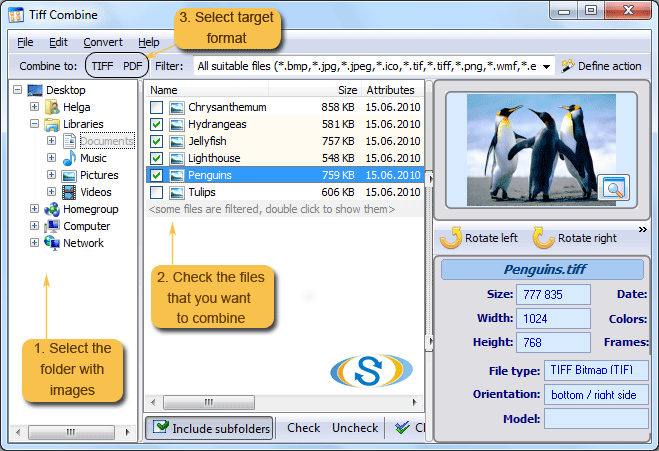
TIFF is the go-to format for high-resolution scans and graphics, but managing dozens of separate .tif files across multiple folders quickly becomes a headache. TIFF Combine lets you combine TIFF files by folders in just a few clicks — no manual opening and closing of individual images.
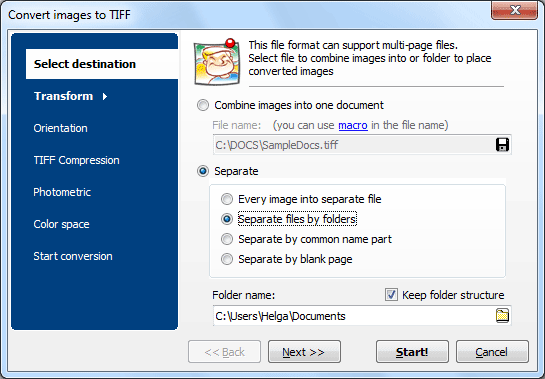
Quick answer: To combine TIFF files by folders, install Tiff Combine, add the folders that hold your .tif files, choose multi-page TIFF or PDF as the output, set compression and color space, then click Combine. The app processes whole folder trees at once and produces one merged file per folder, all offline.
When you work with scanned documents, architectural drawings, or medical images, each page is often saved as a separate TIFF. Combining them into a single multi-page TIFF or PDF makes files easier to share, archive, and print. Key benefits:
TIFF Combine processes entire folder trees at once. For example, if you have two project folders with five TIFF files each, the app generates two multi-page TIFFs — one per folder. This batch approach saves hours compared to manual merging.
During the merge you can adjust compression type (LZW, JPEG, ZIP, CCITT), color space, resolution, and page order. This means the output files are optimized for your exact workflow — whether it's web delivery, print, or long-term archiving.
Use the visual interface for quick one-off jobs, or automate batch processing via the command line. Both modes support the same full set of options.
Need to combine TIFFs on a web server or inside a custom application? TiffCombineX is an ActiveX-enabled edition designed for programmatic use and server-side deployment.
For additional TIFF processing tools — splitting, converting, watermarking — see the CoolUtils TIFF Bundle.
Download free trial and convert your files in minutes.
No credit card or email required.