Need help? Reach us at 

 +1 (855) 418-2323
Need help? Reach us at
+1 (855) 418-2323

 TIFF and PDF apps
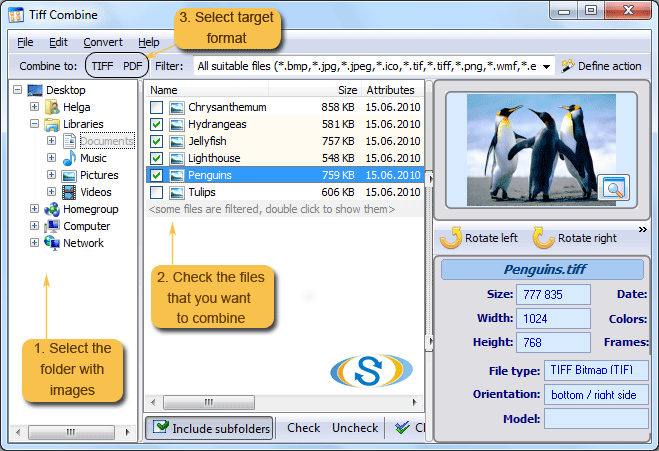
Scanners, fax machines, and document management systems often produce dozens of single-page TIFF files for what is logically one document. Reassembling them by hand — opening each file, copy-pasting pages, adjusting settings — takes too long once you pass five or ten files. TIFF Combine merges any number of .tif files into a single multi-page TIFF or PDF in seconds.
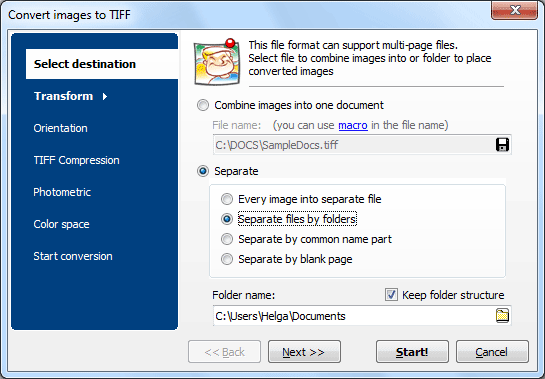
Quick answer: To merge TIFF files into one multi-page image, install Tiff Combine, click Add Files or Add Folder to load your .tif files, choose multi-page TIFF or PDF as the output, set compression and color, then click Combine. Any number of TIFFs is joined locally into a single file in seconds.
When a folder contains TIFFs from different documents mixed together, TIFF Combine can group files by a common part of the filename. For example, files named invoice_001_p1.tif, invoice_001_p2.tif, invoice_002_p1.tif can be merged into two separate multi-page TIFFs — one per invoice — automatically.
TIFF Combine includes a command-line interface for automation. Example:
TiffCombine.exe /S "C:\Scans\*.tif" /T "C:\Output\merged.tif" /COMPRESS LZW
Wrap the command in a .bat file to run it on a schedule or integrate with a document workflow. The command line supports the same options as the GUI: compression, color space, page order, resize, and rotation.
| Feature | TIFF Combine | Online Tools |
|---|---|---|
| File size limit | No limit | Usually 50–100 MB |
| Batch merge (folders) | Yes, unlimited | One merge at a time |
| Compression control | LZW, JPEG, ZIP, CCITT | None or limited |
| Page resize / rotate / crop | Yes | Rarely |
| Command-line automation | Yes | No |
| Privacy | Files stay on your PC | Uploaded to a server |
| Speed on 500+ pages | Under 1 minute | Minutes or timeouts |
For server-side or programmatic use, TiffCombineX provides an ActiveX interface. Integrate TIFF merging into web applications, Windows services, or custom software without a GUI dependency.
For more TIFF processing tools — splitting, converting, watermarking — see the CoolUtils TIFF Bundle.
Download free trial and convert your files in minutes.
No credit card or email required.