Need help? Reach us at 

 +1 (855) 418-2323
Need help? Reach us at
+1 (855) 418-2323

 TIFF and PDF apps
TIFFs have been around as a file format for a very long time for a few solid reasons: they are a great format for working with high-res source graphics, they are an industry standard in many fields such as publishing and their support for multi-page files is incredibly handy.
They are often not the best file format when it comes to sharing work with colleagues or passing files on to clients however. You simply cannot be sure the recipient will be able to open the file.
PDFs, on the other hand, are pretty much universal these days so the solution you will often end up looking for is a way to combine TIFF to PDF. Ideally, this would be in the form of a simple, dedicated tool you can fire up as needed to fly through the job.
That is where our Tiff Combine software comes into its own. It is a powerful, full-featured tool that will let you combine several TIFF images into one multi-page PDF with ease. Rather than having to open several applications and export as PDF by hand, you will be able to get the job done quickly from one place and get back to your work.
The software comes with a range of impressive options for handling files in bulk and sophisticated folder processing options.
Users will also appreciate the full range of PDF options that are fully under your control. You are free to add security settings such as specific user permissions and password protection. The addition of digital signatures is also supported.
All of this functionality is available through Tiff Combine's intuitive graphical user interface where a couple of clicks is all that's needed to generate any number of PDF files. Power users can also combine TIFF to PDF via command line with just a few keystrokes from the comfort of an interface where they may be more comfortable.
A server-based version of the software with ActiveX support is also available in the form of TiffCombineX.
Don not simply take our word for it on Tiff Combine's incredible value for money. Download a free, fully functional, thirty-day free trial of the software today and discover how much time it can save you and your team!
Quick answer: To combine several TIFF files into one PDF, install Tiff Combine, select the TIFF files in the list, click the PDF button, make sure Combine images into one document is selected, set compression and page options if needed, then click Start. The whole batch is merged offline into a single multi-page PDF.

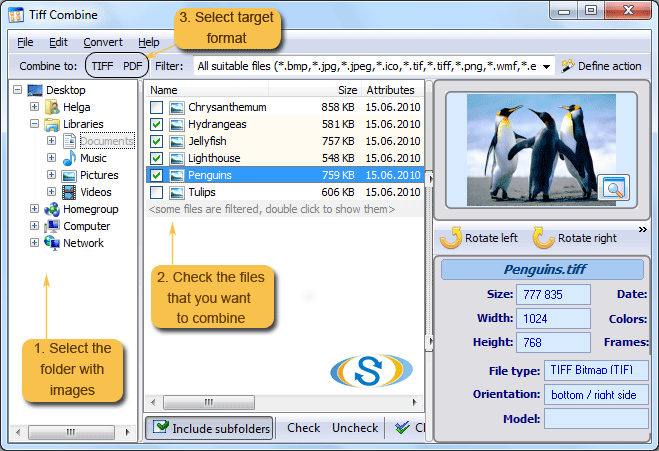
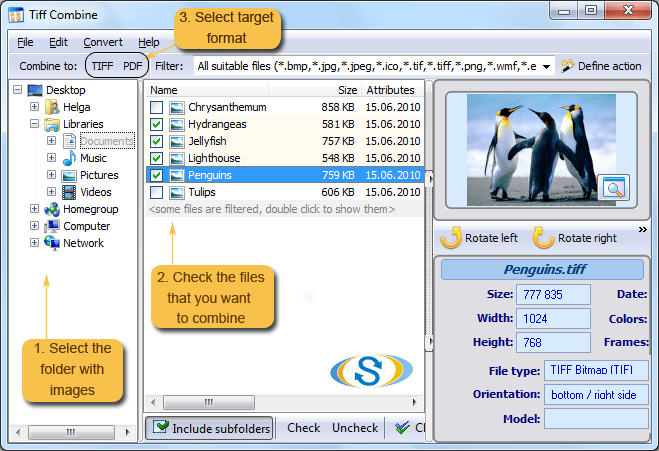
CoolUtils is pleased to introduce TIFF Combine – a unique tool designed to combine several files in TIFF into multi-page TIFF or PDF document. Unlike many other programs for image merging, TIFF Combine has transparent and intuitive interface, making it easy to use even for beginners. You can combine TIFF files into one multipage PDF document in a matter of 5 clicks.
Here's our "How-to" guide for beginning users who have never before had to combine TIFF into PDF:
 Download and install TIFF Combine. We recommend you check out a free evaluation version first and then make a competent choice!

Launch TIFF Combine. We suggest that beginning users take advantage of intuitive user interface (GUI), and advanced users quickly access the converter via command line.
Select the files you want to merge TIFF into PDF. A list of all the files supported by TIFF Combine is generated automatically by the program, so you do not need to spend your precious time on uploading.
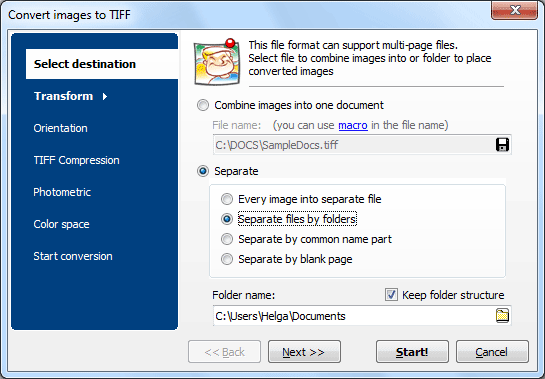
Set PDF as the target format by clicking on the button that says "PDF". In the new window, make sure that the "Combine images into one document" option is selected. Use the default file name or enter the desired one manually.
You can add headers, footers, crop files, select desired compression rate, choose paper size and orientation, or leave these and other settings as set by default and begin conversion. Simply click "Start!" and relax while the program does all the work for you!
Try TIFF Combine for free today! Simply click here and use the program for free for 30 days - no limitations, no adware, no spyware or viruses, no registration! Make sure that TIFF Combine is worth every penny!
Explore our TIFF Bundle for more advanced TIFF processing and editing tools at CoolUtils TIFF Bundle.
Download free trial and convert your files in minutes.
No credit card or email required.