Logo
Home Products Support Contact About Us
arrow1 TIFF and PDF apps

How to Batch Print PDF Files on Windows


Printing one PDF is simple — open it and press Ctrl+P. Printing 200 PDFs from a project folder is a different story. Opening each file in a viewer, waiting for it to render, clicking Print, closing it, repeating — this eats hours out of your workday. Total PDF Printer sends any number of PDF files to any printer in one batch, with no manual file-by-file handling.

Why Use a Dedicated PDF Batch Printer?

  • Print entire folders at once — select a folder (or multiple folders) and click Print. Hundreds of PDFs go to the printer without interruption.
  • Separator pages between documents — insert a blank page, a custom PDF, or a specific page range between each document so printed stacks are easy to sort.
  • Auto-rotate pages — mix landscape and portrait PDFs in one batch; Total PDF Printer auto-rotates each page to match the paper orientation.
  • Fit-to-page scaling — print files in their original size or scale them to fit the selected paper format automatically.
  • Tray and duplex controlchoose the tray, enable duplex (double-sided) printing, and set print quality from one place.
  • Print by date/time order — automatically sort files by creation or modification date before printing.

How to Batch Print PDFs: Step by Step

  1. Download and install — get the free 30-day trial (15 MB, Windows 7/8/10/11). No email or credit card required.
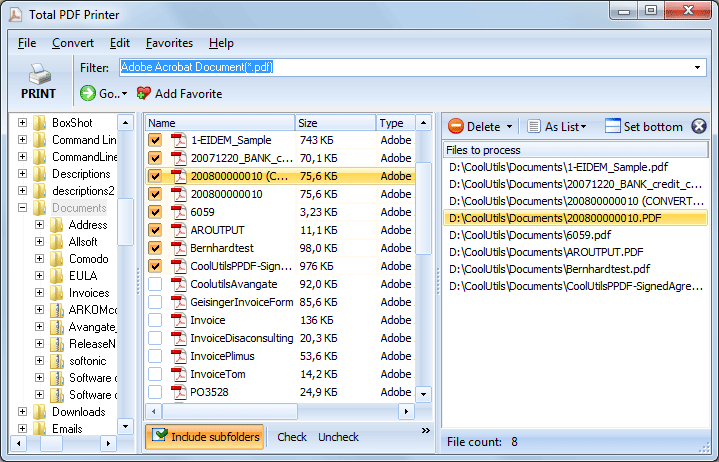
  2. Select files — browse to a folder in the left panel. Check the files you want to print, or click Check All to select everything.
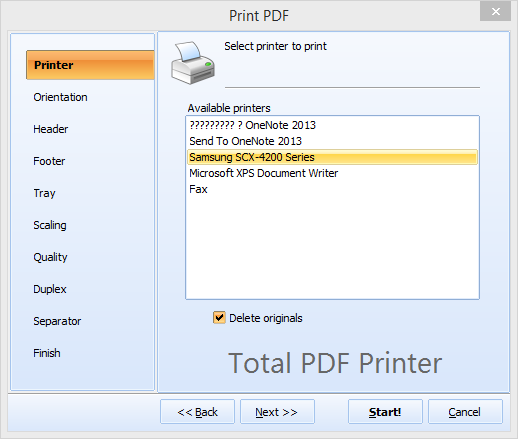
  3. Choose the printer — pick any installed printer from the dropdown, including virtual printers (like Microsoft Print to PDF).
  4. Set options — configure paper size, orientation, scaling, tray, duplex mode, separator pages, and print quality.
  5. Click Print — Total PDF Printer processes the entire batch silently. A progress bar shows the current file and overall status.

Command-Line Batch Printing

Total PDF Printer includes a full command-line interface for automation. Example:

PDFPrinter.exe "C:\Invoices\*.pdf" -p "HP LaserJet" -log "C:\Logs\print.log"

Wrap the command in a .bat file to print a folder of PDFs every evening, after a scheduled scan, or as part of an ERP workflow. The command line supports all the same options as the GUI: tray, duplex, scaling, orientation, separators, and page ranges.

Print Only Specific Pages

You do not have to print every page. Total PDF Printer can print only landscape pages, only portrait pages, odd pages, even pages, or a custom page range from each file in the batch.


Total PDF Printer vs. Manual Printing

FeatureTotal PDF PrinterOpening Each PDF Manually
Print 200 filesOne click, unattended200 open-print-close cycles
Separator pagesBlank, custom PDF, or page rangeNot available
Auto-rotate mixed orientationYesManual per file
Fit-to-pageAutomaticDepends on viewer
Duplex controlYes, with auto blank page insertVaries by viewer
Command-line automationYesNo
Print by date orderYesManual sorting

Server Edition

For unattended server-side printing, Total PDF Printer X runs as a Windows service with ActiveX support. It processes print jobs silently without displaying any UI or message boxes — ideal for web servers, ERP integrations, and automated document workflows.

When Do You Need Batch PDF Printing?

  • Warehouses and logistics — print hundreds of pick lists, shipping labels, or work orders generated daily by an ERP system.
  • Law firms — print case file PDFs with separator pages and Bates-numbered footers for court filings.
  • Accounting departments — batch-print monthly invoices or statements for mailing.
  • Schools and universities — print exam papers, transcripts, or certificates in bulk before deadlines.
  • Government offices — produce printed copies of permits, applications, or public records from scanned PDF archives.

Total PDF Printer is part of CoolUtils' printing tools. Licenses start at $49.90. Download the free 30-day trial and test it with your own files.


quote

Total PDF Printer Customer Reviews 2026

Rate It
Rated 4.7/5 based on customer reviews
5 Star

"The application is working great. We print 300+ work orders a day and it has performed flawlessly. I especially like the command line interface — I was able to create a batch file our end users click on, which makes things much easier."

5 Star Tony Aguila Auto Warehousing Company

"We print case files for court every morning — sometimes 150 PDFs in one go. Before Total PDF Printer, an assistant spent two hours opening and printing each file. Now the whole batch goes to the printer in minutes with separator pages between cases. Huge time saver."

5 Star Linda Sorensen Office Administrator, Law Firm

"We integrated Total PDF Printer into our ERP workflow via the command line. Shipping labels and pick lists print automatically every evening. The duplex and tray selection features work reliably across our three different printer models. Solid tool for the price."

4 Star Robert Engström IT Manager, Logistics Company

FAQ ▼

Install Total PDF Printer, select a folder with your PDFs, choose a printer, and click Print. The program sends every file to the printer in one batch — no need to open individual files.
Yes. You can insert a blank page, a custom PDF file, or a specific page range as a separator between each document in the batch.
Yes. Enable duplex in the print settings. For documents with an odd page count, the program can automatically add a blank page so the next document starts on a fresh sheet.
Yes. Total PDF Printer includes a full command-line interface. You can schedule batch print jobs via .bat scripts or integrate printing into automated workflows.
All standard paper sizes (A4, Letter, Legal, A3, etc.) are supported. You can also auto-rotate pages so landscape and portrait PDFs print correctly in the same batch.
Yes. Total PDF Printer X is a server edition that runs as a Windows service with ActiveX support. It prints silently without any UI — ideal for web servers and ERP integrations.
Yes. The free trial lasts 30 days with full functionality. No email address or credit card is required. Licenses start at $49.90.


Start working now!

Download free trial and convert your files in minutes.
No credit card or email required.

⬇ Download Free Trial Windows 7/8/10/11 • 25 MB

Support
Total PDF Printer Preview1
Total PDF Printer Preview2

Latest News

Newsletter Subscribe

No worries, we don't spam.


© 2026. All rights reserved. CoolUtils File Converters

Cards