Need help? Reach us at 

 +1 (855) 418-2323
Need help? Reach us at
+1 (855) 418-2323

 File Converters
An OST file is the offline cache that Microsoft Outlook creates for an Exchange or Office 365 mailbox. The problem: you cannot simply open an OST file on another computer, import it into a different Outlook profile, or read it after the Exchange account has been deleted. The file is locked to the original profile. OST to PST Converter by CoolUtils reads any OST file — even orphaned or disconnected ones — and exports it to a standard PST that opens in any copy of Outlook without Exchange Server.
Quick answer: An OST file is locked to the Outlook profile that made it, so you cannot open it on another PC or after the Exchange account is gone. With OST to PST Converter, select the source OST, set the destination, pick the folders to export, and click Start to get a portable PST that opens in any copy of Outlook without Exchange Server.
Outlook creates an OST file automatically when you connect to an Exchange Server or Office 365. It stores a local copy of your mailbox — emails, contacts, calendar events, tasks, and notes. The file syncs with the server whenever you go online. If the server is down or you are offline, Outlook works from the OST cache.
The catch: OST files are encrypted and bound to the Windows user profile and the Exchange account that created them. You cannot copy an OST to another machine and double-click to open it. Outlook will refuse it.
A PST file is portable. It stores the same types of data — emails, contacts, calendars — but it is not tied to any server or profile. Any copy of Outlook on any computer can open a PST via File → Open → Outlook Data File. PSTs are the standard format for email backup, migration, and archiving.
Converting an OST to PST removes the Exchange binding and gives you a file you can open, import, back up, or share freely.
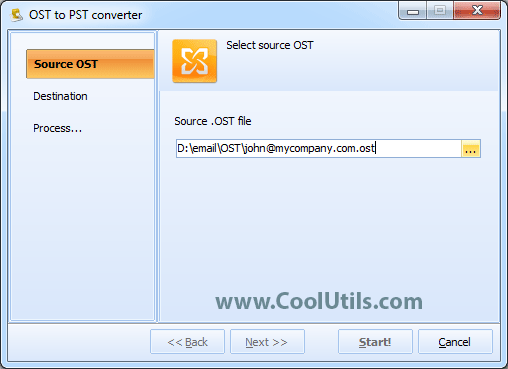
Launch OST to PST Converter. On the Source OST tab, click Browse and navigate to the OST file. The default Outlook location is:
C:\Users\<username>\AppData\Local\Microsoft\Outlook\
The converter reads the file and shows its size and structure.
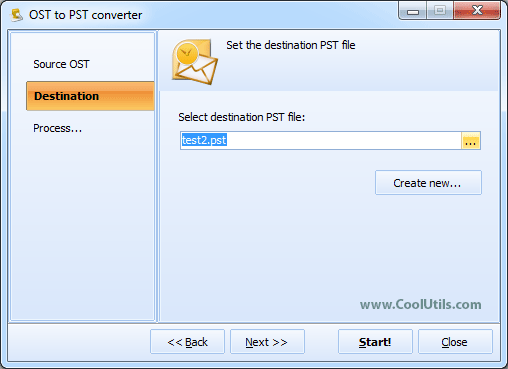
Switch to the Destination tab. Choose the output folder and file name for the new PST. You can save it anywhere — a local drive, a USB stick, or a network share.
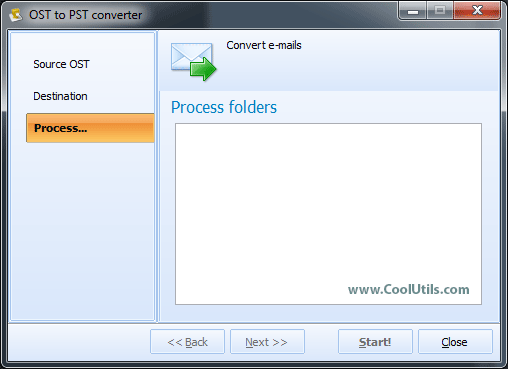
On the Process tab, the converter displays the folder tree from the OST file: Inbox, Sent Items, Drafts, Calendar, Contacts, and any custom folders. Check the folders you need. To export everything, leave all boxes checked.
Press Start. The converter processes the OST file, preserves the original folder hierarchy with all emails, attachments, contacts, and calendar events, and writes a clean PST file. When finished, open the PST in Outlook via File → Open → Outlook Data File.


| Data Type | Preserved? | Details |
|---|---|---|
| Emails (body, subject, headers) | Yes | HTML and plain-text bodies, all header fields |
| Attachments | Yes | All file types, embedded images included |
| Folder structure | Yes | Inbox, Sent, Drafts, custom folders — full hierarchy |
| Contacts | Yes | Names, emails, phone numbers, addresses, photos |
| Calendar events | Yes | Meetings, appointments, recurrence rules |
| Tasks and notes | Yes | Due dates, priorities, note text |
| Read/unread status | Yes | Message flags preserved |
| Metadata (dates, sender, recipient) | Yes | Original timestamps and routing information |
| Feature | Outlook Export / Archive | OST to PST Converter |
|---|---|---|
| Works without Exchange connection | No — requires active profile | Yes — reads orphaned OST files |
| Opens OST from another PC | No | Yes |
| Handles corrupted OST files | No — Outlook may refuse to load | Yes — reads data even from damaged files |
| Preserves folder hierarchy | Partial — depends on export options | Full — exact replica of original structure |
| Selective folder export | Limited | Yes — pick any combination of folders |
| Speed on large OST files (10+ GB) | Slow, often crashes | Optimized for large files |
| Requires Outlook installed | Yes | No — standalone tool |
The converter reads OST files created by Outlook 2003, 2007, 2010, 2013, 2016, 2019, 2021, and Microsoft 365. Even if the Exchange account no longer exists or the Outlook profile is corrupted, the tool opens the file and extracts every piece of data.
The converter works as a standalone Windows application. You do not need an active Exchange Server connection, and you do not even need Outlook installed on the same machine.
Every email, attachment, contact, calendar event, task, and note is exported to PST without data loss. The original folder hierarchy is preserved exactly — Inbox, Sent Items, Drafts, custom folders — so you see the same structure when you open the PST in Outlook.
OST files from corporate mailboxes can exceed 10 GB. The converter is optimized for large-file processing and handles multi-gigabyte OST files without crashing or running out of memory.
Download the free 30-day trial — no email or credit card required. A license costs $39.90 and includes one year of free upgrades. Works on Windows Vista/7/8/10/11.
Download Free Trial Buy License — $39.90
"Our Exchange Server crashed over a weekend and the backup was two days old. I collected OST files from 40 workstations and converted them all to PST with this tool. Every email and attachment came through intact, including the folder structure. We had people back in Outlook by Monday morning with almost no data loss."
 David Henriksson System Administrator, Financial Services Firm
"When employees leave, their Exchange accounts are disabled within 24 hours. I use OST to PST Converter to archive their mailboxes from the workstation OST before the machines are wiped. The PST files go into our compliance archive. Simple three-click process — source, destination, start."
Laura Chen HR Compliance Manager, Healthcare Company
"I help small offices migrate from Exchange to Google Workspace. The first step is always converting OST files to PST so the migration tool can import them. This converter handles 5-10 GB OST files without a problem. I have used it on about 200 mailboxes over the past year. Reliable and fast."
 Mark Okonkwo IT Consultant, Small Business Services
Download free trial and convert your files in minutes.
No credit card or email required.