Logo
Home 产品 支持 联系 关于我们
arrow1 File Converters
arrow1 TIFF and PDF apps
arrow1 Forensic
arrow1 Freeware

Tiff 分页

Tiff 分页:管理 TIFF 文件的所有任务

Tiff Paging: 分割、合并、从 TIFF 提取页面

Windows
2000/2003/Vista/7/8/10/11/Citrix

一种新的独特一体化解决方案,适合那些想要重新排列多页TIFF文件中的页面的人。

Tiff Paging可以提取您想要的tiff文件中的页面,例如前10页或每个奇数\偶数页。提取的页面可以获得新名称,便于排序。

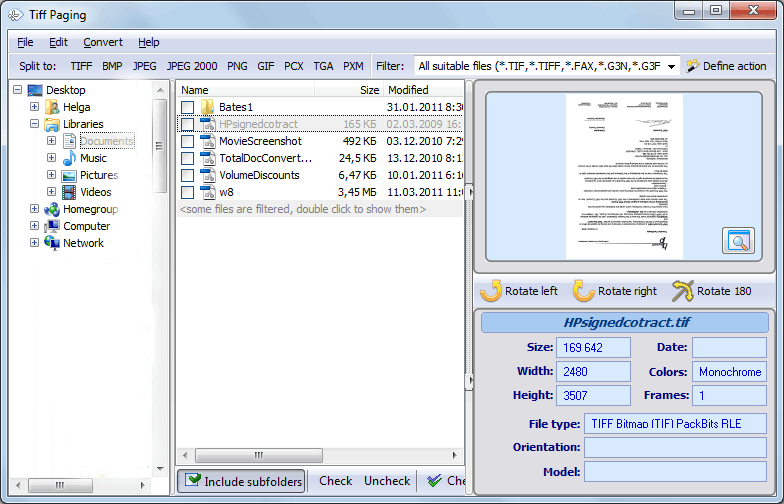
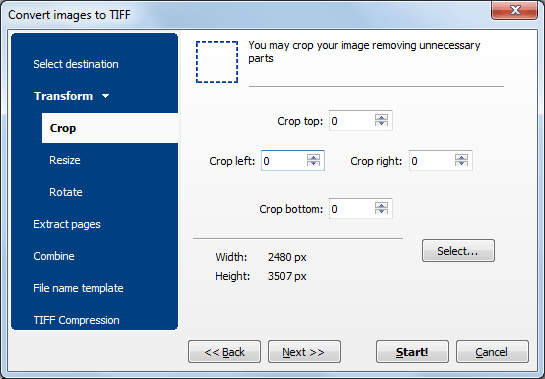
Tiff Paging允许您拆分多页TIFF,无论页面数量(例如,可以在第5页之后将40页的TIFF拆分为两个文件)。此外,Tiff Paging可以合并多个拆分文件为一个。同时,您可以调整大小旋转页面。这是最灵活的应用程序,可以重新排列TIFF文件中的页面。

TIFF文件有两种标准:tif和tiff。选择您需要的一种,并在Tiff Paging的主菜单中将其设置为默认扩展名(文件-选项)。

用户可以为输出的TIFF文件设置摄影解释和压缩级别,以使其体积更小。除了TIFF,该应用程序还能保存您的文档为BMP,PNG,JPEG,JPEG2000,GIF和PXM格式。

Tiff Paging非常易于使用。经过深思熟虑的界面甚至可以帮助初学者在几秒钟内完成工作。高级用户会欣赏命令行支持。免费试用(30天试用期,无限制)并发现它确实物超所值。

这里有一个服务器版本
立即下载!

(包括30天免费试用)

购买许可证

(仅 $39.50)


quote

Tiff 分页 客户评价 2026

评价
基于客户评价评分4.7/5
5 Star

"恭喜你们的精心支持和非常实用的应用程序。我一定会向我行业中的同事推荐你们的产品和服务。"

4.5 Star 安迪·麦克雷尔

"你们的软件太棒了!我以前用一个程序提取页面,用另一个程序合并tiff页面。现在我有了TiffPaging——一个集成的实用程序,也是如此方便易用。谢谢!"

5 Star 劳拉·德威斯 Landmark Engr. & Surveying Corp.


谁在使用 Tiff Paging?

Teams that split, merge, extract, and rearrange pages in multi-page TIFF files

Document Management

TIFF Page Reorganization

Split, merge, and rearrange pages in scanned TIFF archives

Records managers reorganize multi-page TIFF files from scanning departments. Split a 40-page TIFF into separate documents at any page boundary, merge related files into one, or extract specific pages — like the first 10, or every odd page — with automatic renaming for easy sorting.

Legal & eDiscovery

Legal Document Separation

Extract specific pages from multi-page TIFF evidence files

Law firms extract relevant pages from large multi-page TIFF files received during discovery. Pull out specific page ranges for exhibits, split combined scans into individual documents per case, and resize or rotate pages as needed — all while controlling compression and photometric settings for court requirements.

Scanning & Imaging

Post-Scan Page Processing

Fix and reorganize scanned batches after scanning

Scanning operators fix multi-page TIFF files after batch scanning. Remove misfeeds by extracting good pages, merge split scan batches into one file, rotate upside-down pages, and resize to standard dimensions. Set compression level and photometric interpretation to optimize file size for archival storage.

Healthcare & Insurance

Medical Record Page Management

Split and merge patient TIFF files for records systems

Healthcare providers and insurers split combined patient scans into individual documents per visit or claim, and merge related pages from different scan batches into unified records. Export to BMP, PNG, JPEG, or JPEG2000 when image formats other than TIFF are required by partner systems.

IT & Automation

Automated TIFF Processing

Split and merge TIFF files via command line

IT departments automate TIFF page operations using the command line interface. Incoming multi-page scans are split into individual documents, odd and even pages are separated for duplex workflows, and files are merged on schedule — all hands-free. A server version (TiffPagingX) is available for web server deployments.

立即下载!

更新 Sat, 10 Jan 2026

购买许可证

(仅 $39.50)


屏幕截图


 Preview1
 Preview2

FAQ ▼

要拆分多页TIFF文件,打开TIFF Paging,添加您的TIFF图像,选择“拆分页”选项,选择输出文件夹并开始处理。程序会为每一页创建一个单独的TIFF文件。
可以,TIFF Paging可以将多页TIFF文件转换为单页TIFF图像。每一页都会被提取并保存为独立的TIFF文件,同时保持图像质量。
支持,TIFF Paging支持批处理,允许您一次性拆分或合并多个TIFF文件。只需添加多个TIFF图像并一起处理即可节省时间。
可以,TIFF Paging允许您将多个单页TIFF文件合并成一个多页TIFF文档,只需几次点击即可完成。
当然。TIFF Paging会保留原始图像分辨率、色深和压缩设置,以确保处理过程中图像质量不受损失。
TIFF Paging支持常见的TIFF压缩格式,包括LZW、CCITT Group 3、CCITT Group 4、PackBits以及未压缩的TIFF图像。
可以,TIFF Paging非常适合处理扫描文档。它支持文档扫描仪常见生成的黑白、灰度和彩色TIFF扫描件。
是的,TIFF Paging完全兼容Windows 11、Windows 10、Windows 8及更早版本的Windows系统。
不需要,TIFF Paging是独立应用程序,无需Adobe Acrobat或任何第三方图像软件。
输出的TIFF文件会保存到您在程序设置中指定的文件夹。您可以随时更改目标路径。
有,CoolUtils提供TIFF Paging的免费试用版,您可以在购买许可证之前测试所有功能。
要购买TIFF Paging,请点击产品页面上的“立即购买”按钮,选择适合的许可证类型,完成结账流程,并通过电子邮件收到您的许可证密钥。

立刻开始工作!

下载试用版,只需几分钟即可转换文件。
无需信用卡或电子邮件。

⬇ 下载试用版 Windows 7/8/10/11 • 4 MB
Pro Suite

完整注册版的主要特点

  • 拆分多页TIFF文件
  • 提取奇数或偶数页
  • 灵活的模板系统
  • 合并TIFF文件中的页面
  • 调整TIFF页面大小
  • 旋转TIFF页面
  • 光度解释
  • 所有级别的压缩
  • 易于使用

Copyright 2003-2026 CoolUtils Development. 版权所有.