需要帮助?联系我们 

 +1 (855) 418-2323
需要帮助?联系我们
+1 (855) 418-2323

 File Converters TIFF and PDF apps Forensic Freeware
按关键词搜索 PST、EML、MBOX、MSG 和 OST 电子邮件文件,适用于法律、取证及个人用途。

Windows
2000/2003/Vista/7/8/10/11/Citrix
您的计算机上保存着数千封电子邮件,格式为 PST、OST、EML、MSG、MBOX 或 EMLX 文件。您需要找到提及特定关键词、日期或发件人的那封邮件。Mail Terrier 扫描您的硬盘,对找到的每个邮件文件建立索引,让您在几秒钟内完成搜索。
Mail Terrier 支持存储在硬盘上的所有主流电子邮件文件格式:
无需安装 Outlook 或任何其他电子邮件客户端。Mail Terrier 直接从磁盘读取邮件文件。
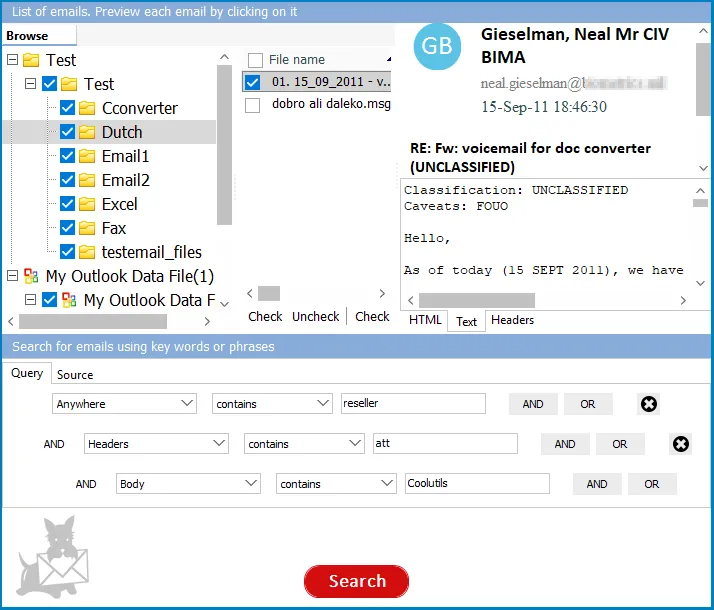
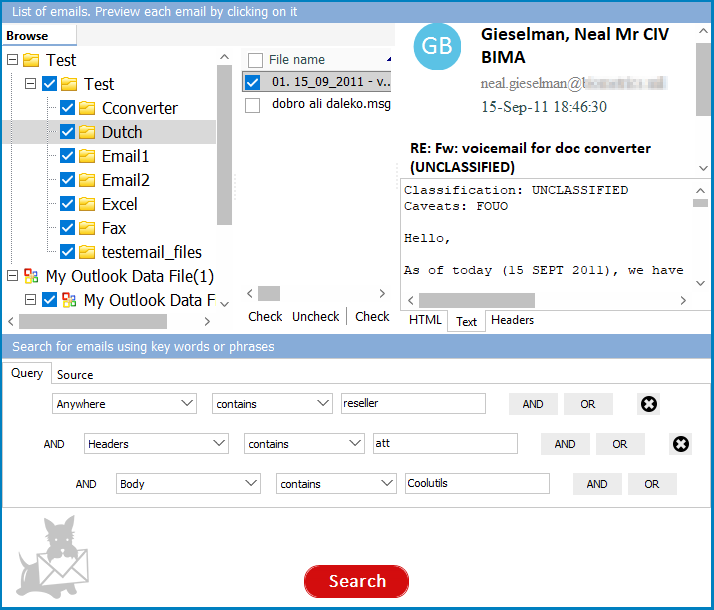
可按单个关键词、短语搜索,也可使用 AND、OR、NOT 运算符构建高级规则。按发件人、收件人、主题行、日期范围或正文内容过滤。设置邻近规则,查找两个词在彼此特定距离范围内出现的邮件。例如:查找正文同时包含"合同"和"续签"、两词相距 3 个词以内,但主题中不含"垃圾邮件"的邮件。
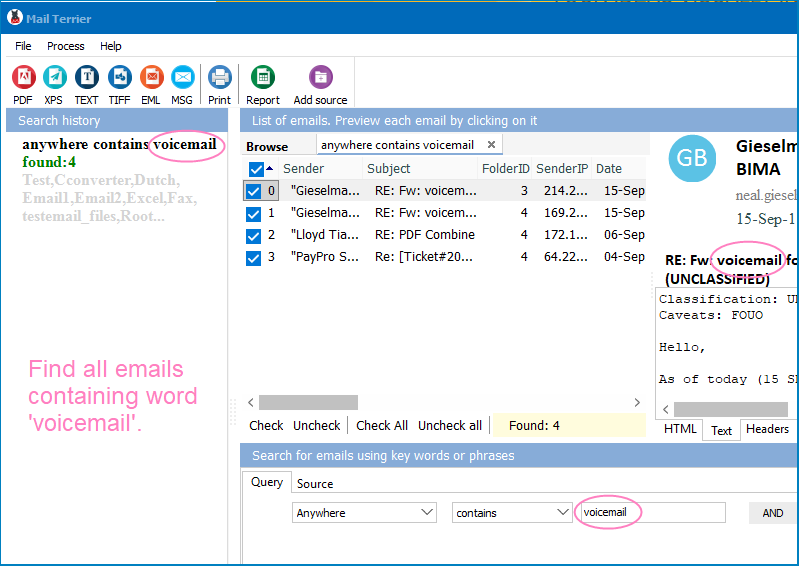
Mail Terrier 显示匹配邮件列表,包含完整元数据:发件人、收件人、主题、日期和文件路径。双击任意邮件即可预览 — 查看 HTML、纯文本或邮件头。将选中的邮件导出为 PDF、TEXT、TIFF、EML 或 MSG。将结果列表导出为 PDF、XLS 或 DOC,附带所有属性,便于报告和存档。
Mail Terrier 对硬盘上的所有邮件文件建立索引。初始扫描所需时间取决于数据量,通常只需几分钟。之后,每次搜索在几秒内返回结果 — 即使是数吉字节的归档邮件也不例外。搜索历史会被保存,方便您即时重复任意之前的搜索。
个人家用完全免费。在法律、取证、合规或商业环境中用于商业用途,许可证费用为 $199。支持 Windows 7/8/10/11。
| 功能 | Mail Terrier | 手动搜索 (Outlook / grep) |
|---|---|---|
| 无需 Outlook 即可搜索 PST | 支持 | PST 需要 Outlook |
| 搜索 EML、MBOX、MSG、OST | 一个工具支持所有格式 | 每种格式需要不同工具 |
| 高级规则 (AND、OR、NOT、邻近搜索) | 支持 | 有限或不支持 |
| 按发件人、日期、主题筛选 | 支持 | 仅 Outlook 提供基本功能 |
| 数秒内搜索数 GB 数据 | 支持(已索引) | 需要数分钟到数小时 |
| 将结果导出为 PDF、XLS、DOC | 支持 | 不支持 |
| 将匹配邮件导出为 EML/MSG/PDF | 支持 | 仅能手动复制 |
| 无需打开邮件客户端即可预览邮件 | 支持 | 需要邮件客户端 |
| 电子发现和法律用途 | 专为此设计 | 非法律用途设计 |
| 价格 | 免费(家庭)/ $199(商业) | Outlook 许可证($150+/年) |
"我们一直在使用Mail Terrier来解决法律问题,通过关键字搜索Outlook电子邮件,并且对结果感到满意。它运行速度快,足够强大以处理复杂的宏任务。强烈推荐此应用用于关键字搜索。"
 威尔夫·施莱伯
律师
威尔夫·施莱伯
律师
"我必须为法官和对方律师找到与特定案件相关的所有电子邮件。如果没有Mail Terrier,我无法做到这一点。手动通过关键字搜索电子邮件需要几个小时。它扫描了我的1Gb PST文件,并在几分钟内生成了所需电子邮件的列表!非常感谢你们。"
朝
东设计,泰国
适合所有需要在海量邮件中快速找到目标邮件的用户
跨 PST、MSG 和 EML 归档搜索关键邮件
律所和诉讼团队使用 Mail Terrier 在海量邮件归档中搜索特定往来记录。通过关键词、日期范围和发件人的组合规则构建复杂搜索条件,快速定位关键证据,然后将结果导出为 PDF 或 Excel,用于案件准备。
跨多种邮箱格式查找邮件
IT 部门通过搜索孤立邮箱、备份 PST 文件和导出的 MBOX 归档来帮用户找回丢失的邮件。Mail Terrier 可自动扫描整个硬盘中的邮件文件,无论最初由哪款邮件客户端创建。
搜索员工往来记录中的违规内容
合规人员在归档邮件中搜索特定词语、短语或可能违反政策的沟通模式。以 XLS 或 DOC 格式导出结构化报告,附带完整元数据,用于审计文档存档。
几秒内找到电脑中的旧邮件
拥有多年邮件积累的个人用户和专业人士,使用 Mail Terrier 即时找到埋藏在数千个文件中的发票、收据、合同或个人往来邮件。个人使用免费,无试用限制。
扫描硬盘中的所有邮件文件并在其中搜索
取证调查员将 Mail Terrier 指向扣押的硬盘,发现所有 MSG、EML、EMLX、PST 和 MBOX 格式的邮件相关文件。然后利用高级规则在找到的文件中搜索,筛选出相关通信内容并导出证据。
想在电脑上存储的电子邮件文件中搜索关键词?Mail Terrier 让这一过程只需三步即可完成。
第一步 — 选择邮件文件夹。设置包含电子邮件文件的文件夹。对于 Outlook 邮件,指向您的 PST 或 OST 文件。对于 Thunderbird 或 Google Takeout,选择包含 MBOX 或 EML 文件的文件夹。Mail Terrier 将扫描所选文件夹,并为找到的每封邮件创建索引。如果您需要搜索 Gmail 邮件,请先通过 Google Takeout 导出,然后将 Mail Terrier 指向下载的 MBOX 文件。
第二步 — 设置搜索规则。输入关键词、短语或规则组合。选择搜索范围:整封邮件、仅主题、仅正文或邮件头。设置日期范围或按发件人过滤。使用 AND、OR、NOT 运算符构建精确查询。
第三步 — 点击搜索。Mail Terrier 显示匹配邮件列表,包含发件人、主题、日期和文件路径。双击任意邮件即可预览。将结果导出为 PDF、XLS 或 DOC。索引构建完成后,即使面对数吉字节的数据,搜索也只需几秒钟。