Need help? Reach us at 

 +1 (855) 418-2323
Need help? Reach us at
+1 (855) 418-2323

 TIFF and PDF apps
Duplex scanners produce blank pages every time a sheet has content on one side only. A batch of 200 scanned TIFF files can easily contain 50–80 unnecessary blank pages. Leaving them in wastes storage, slows down printing, and makes document review harder. Removing them by hand — opening each multi-page TIFF, finding blank pages, deleting them one by one — takes hours.
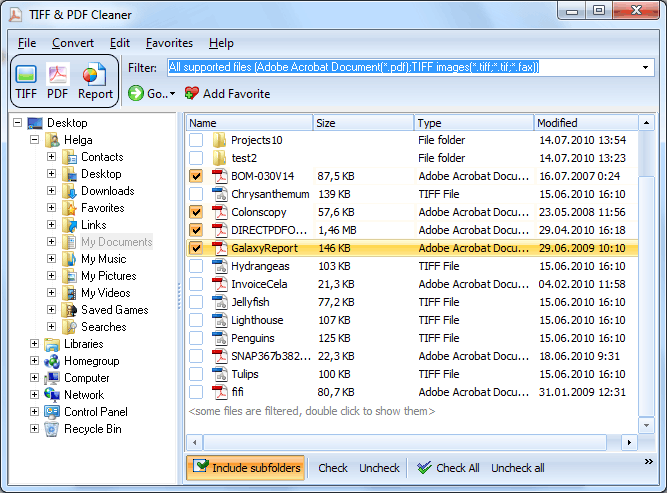
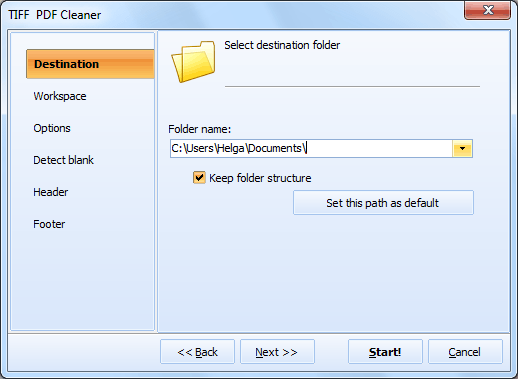
Tiff PDF Cleaner detects blank pages in TIFF files automatically and removes them in batch. Point the program at a folder, set the detection tolerance, and click Start. Every TIFF file in the folder is scanned, blank pages are detected and deleted, and the cleaned files are saved to the output location.
Quick answer: To detect and remove blank pages in scanned TIFF files, install Tiff PDF Cleaner, point it at the source folder, set an output folder, adjust the detection tolerance so noisy pages still count as blank, set the workspace to ignore headers and footers, then click Start. Every TIFF in the folder is scanned and its blank pages deleted in one batch.
A scanned "blank" page is almost never pure white. Scanners pick up paper texture, dust specks, and slight color variations. If the detection threshold is set to zero, the program will treat every page with a single noisy pixel as non-blank and skip it.
Tiff PDF Cleaner lets you set tolerance as a percentage. A higher value means the program ignores more noise and treats slightly dirty pages as blank. Start with the default value and increase it if you notice that some blank pages are not being detected. If the tolerance is too high, the program may delete pages with sparse content — which is why the "save blanks to separate file" option exists for review.
Some blank pages still have printed headers, footers, or fax confirmation lines. Tiff PDF Cleaner lets you define the workspace — the rectangle of the page that should be analyzed for content. Set the workspace to exclude the top and bottom margins, and the program will only check the main body of the page. If the body is blank, the page is removed regardless of what's in the header or footer.
Not sure if the program correctly identifies all blank pages? Enable the option to save detected blank pages to a separate TIFF file instead of deleting them permanently. After processing, open the separate file and verify that every page in it is truly blank. Once you're satisfied, run the cleaner again with the delete option enabled.
| Feature | Description |
|---|---|
| Blank page removal | Detect and delete blank pages in multi-page TIFF and PDF files |
| Black border removal | Crop black scanner borders from scanned pages automatically |
| TIFF compression | Recompress TIFF files (LZW, CCITT Group 4, ZIP) to reduce file size |
| Header & footer | Add page numbers, file names, dates, or custom logos to page headers/footers |
| TIFF tags | Add or edit TIFF metadata tags |
| Batch processing | Process entire folders with subfolders in one operation |
| Command line | Run from .bat scripts for automated nightly cleanup |
| Task | Manual (image editor) | Tiff PDF Cleaner |
|---|---|---|
| Detect blank pages | Open each file, scroll through pages visually | Automatic detection with adjustable tolerance |
| Delete blank pages | Delete page, save, repeat for every file | Batch deletion across all files in a folder |
| 100 multi-page TIFFs | 2–4 hours of manual work | Under 1 minute |
| Nearly-blank pages (noise) | Hard to tell visually if a page is truly blank | Tolerance setting handles noisy scans |
| Fax pages with headers | Must decide individually for each page | Workspace setting ignores header/footer zones |
| Verification | No undo — deleted pages are gone | Save blanks to separate file for review |
| Automation | Not possible | Command-line mode + Windows Task Scheduler |
After a bulk duplex scanning job, half the pages may be blank reverses. Tiff PDF Cleaner removes them in batch, cutting file sizes and page counts in half.
Archives require clean documents without filler pages. Running Tiff PDF Cleaner on incoming scans before archiving ensures that stored files contain only meaningful content.
Sending TIFF files to a printer that charges per page? Blank pages add to the cost. Remove them before printing to avoid paying for empty sheets.
Incoming fax files often contain blank confirmation pages or blank separator pages. Tiff PDF Cleaner detects and removes these automatically, leaving only the content pages.
A scanning operator processes 1,000 sheets per day. Tiff PDF Cleaner runs as a nightly .bat script, cleaning every TIFF in the output folder. By morning, all files are free of blank pages without any manual intervention.
The tolerance and workspace settings let you fine-tune blank page detection for any type of scanned document — from clean office sheets to noisy fax transmissions.
Save detected blanks to a separate file for manual review before committing to deletion. No data is lost unless you explicitly confirm it.
Process entire folder trees in one operation. Set source and output folders, enable subfolder scanning, and let the program handle thousands of files.
Crop black scanner borders, compress TIFF files, add headers and footers, and edit TIFF tags — all in the same tool. Clean and optimize your scanned documents in one pass.
Run Tiff PDF Cleaner from a .bat script or via Windows Task Scheduler. The program auto-generates the command line with your current settings — copy it from the Command Line tab and paste into your script.
TiffPDFCleaner.exe /s "C:\Scans\*.tif" /o "C:\Cleaned\" /tolerance 5 /delete_blanks
Add this command to a scheduled task for automated nightly cleanup of incoming scans.
Download the free 30-day trial — no email or credit card required. A personal license costs $59.90 and includes one year of free upgrades.
Download free trial and convert your files in minutes.
No credit card or email required.

Related Topics
How to Stamp Bates Numbers on PDF and TIFF Files
