Need help? Reach us at 

 +1 (855) 418-2323
Need help? Reach us at
+1 (855) 418-2323

 TIFF and PDF apps
A print shop needs the total page count from 400 client PDFs before quoting a price. A scanning bureau must verify that billed pages match actual pages. An archive administrator inventories thousands of digitized records. In every case, the task is the same: count the number of pages in each PDF quickly and accurately.
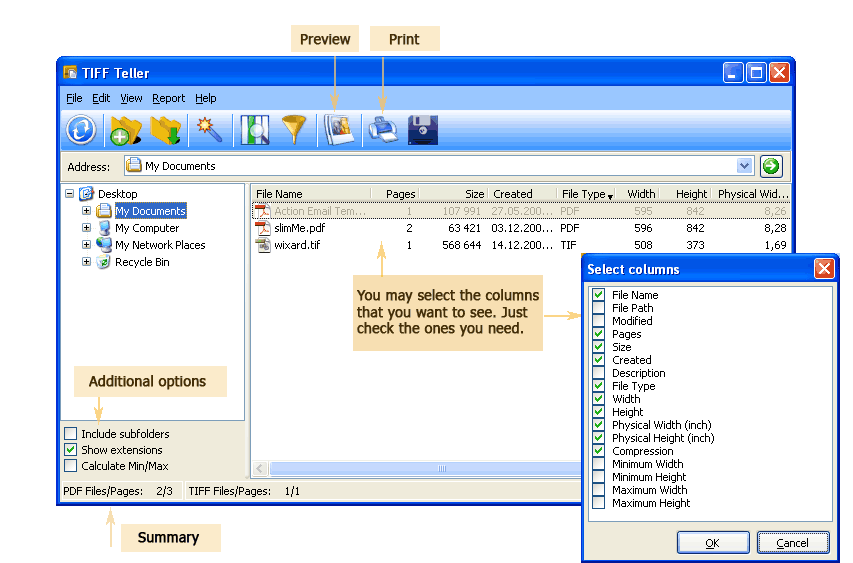
Tiff Teller counts pages in PDF files automatically. Point it at a folder, and it reads the page count of every PDF inside — without opening the files. The results appear in a table, and you can export a page count report to Excel, CSV, or any of 15 other formats.
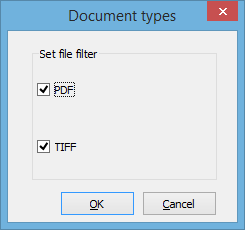
Quick answer: To count pages in PDF files, launch Tiff Teller, select the folder with your PDFs, apply the PDF filter, and read the Pages column. The status bar shows the combined page count for the whole folder, and you can export a clean File Name plus Pages report to Excel or CSV with one click.
Print shops charge per page. Before quoting a price for a batch of PDFs, you need the exact total. Tiff Teller reads 500 files in seconds and shows the combined page count in the status bar — ready for your cost formula.
A scanning service sends 200 PDFs and an invoice for 5,000 pages. Is the invoice correct? Tiff Teller counts every page across all files so you can compare the actual total against the billed amount.
Regulated industries require document inventories with page counts. Exporting a CSV from Tiff Teller gives auditors a sortable, verifiable list without manual data entry.
A 50-page paper document should produce a 50-page PDF. If the scan only has 48 pages, two pages were missed. Tiff Teller catches these discrepancies instantly.
Before migrating documents to a new system, you need to know total volume. Tiff Teller provides the file count, page count, and total size for any folder structure.
Page count is just one of many fields Tiff Teller reads from PDF files. The full list of available columns:
| Column | Description |
|---|---|
| File Name | Document name and extension |
| Location | Full path to the file |
| Pages | Number of pages in the PDF |
| Size | File size in bytes, KB, or MB |
| Width × Height | Page dimensions in pixels |
| Physical Size | Page dimensions in inches (based on DPI) |
| DPI | Resolution — dots per inch |
| Compression | Compression method inside the PDF |
| Created / Modified | File creation and last modification dates |
Select which columns appear in the table and in the exported report. For a simple page count report, you only need File Name and Pages.
Tiff Teller includes a command-line interface for automated page counting. Generate a page count report without opening the GUI:
TiffTeller.exe /s "C:\PDFs\*.pdf" /o "C:\Reports\page_count.csv" /f CSV /cols "FileName,Pages"
Parameters:
/s — source path with wildcard (e.g., *.pdf for all PDFs in a folder)/o — output report file/f — format (CSV, XLS, PDF, DOC, XML, HTML, TXT, etc.)/cols — columns to includeSave this in a .bat file and run it with Windows Task Scheduler. A nightly script can count pages across all incoming folders and drop the report on a shared drive automatically.
| Method | Speed (200 files) | Total Count | Export | Automation |
|---|---|---|---|---|
| Open each PDF in Reader | 1–2 hours | Manual addition | Type into spreadsheet | No |
| PowerShell / Python script | Minutes | Requires coding | Custom output | Yes (with dev effort) |
| Online page counter | Slow (upload each file) | Usually one file at a time | No | No |
| Tiff Teller | Under 10 seconds | Automatic (status bar) | 15+ formats, one click | Yes (command line) |
A corrupted PDF cannot be parsed, so Tiff Teller reports its page count as 0. This makes broken files easy to spot: sort the table by the Pages column and any file showing 0 pages is either empty or damaged. You can re-download or re-scan those files before they cause problems.
Tiff Teller reads PDF structure directly. It does not require Adobe Acrobat, Adobe Reader, or any other third-party application.
From a single file to hundreds of thousands — Tiff Teller scans folders of any size. Enable "Include subfolders" for recursive scanning across directory trees.
Choose your columns, click Export, pick a format. The report is ready to email, import into a database, or attach to an invoice. No manual data entry.
Tiff Teller never modifies your files. It reads metadata from the PDF header without touching content, compression, or any other property.
Besides PDF, Tiff Teller counts pages (frames) in multi-page TIFF files. Both formats are handled in the same folder scan.
Download the free 30-day trial — no email or credit card required. A personal license costs $49.90 and includes one year of free upgrades.
Download free trial and convert your files in minutes.
No credit card or email required.