Need help? Reach us at 

 +1 (855) 418-2323
Need help? Reach us at
+1 (855) 418-2323

 TIFF and PDF apps
A multi-page TIFF looks like a single file on disk, but it can contain anywhere from 1 to 1,000 pages inside. You cannot see the page count in Windows Explorer. Opening each TIFF in an image viewer to count frames manually takes hours when you have hundreds of files. Tiff Teller scans a folder of TIFF files, reads the page count of every document instantly, shows the results in a customizable table, and exports the data to Excel, CSV, or 20+ other report formats.
Quick answer: To count pages in multi-page TIFF files, launch Tiff Teller, open the folder with your TIFFs, and read the Pages column — it shows the frame count read straight from each file’s internal directory. The status bar totals all pages, and one click exports the report to Excel, CSV, or 20+ other formats.
Unlike JPEG or PNG, the TIFF format supports multiple images (called frames or pages) in a single file. Scanners, fax machines, and document-management systems write one frame per scanned page. A 40-page contract scan is stored as one .tif file with 40 frames inside. Windows Explorer shows the file size but not the frame count.
You need the page count to estimate printing costs, verify scanner output, bill per page, or create an archive inventory. Opening every TIFF in a viewer and clicking through pages is impractical. A folder of 500 multi-page TIFFs could contain anywhere from 500 to 50,000 pages total — the only way to know is to read the internal TIFF directory of every file.
| Column | Description |
|---|---|
| File Name | Name and extension of each TIFF file |
| File Path | Full directory path |
| Pages | Number of frames (pages) inside the TIFF |
| Size | File size in bytes |
| Created / Modified | File creation and last-modified timestamps |
| File Type | TIF (also shows PDF if the folder contains both) |
| Width / Height | Page dimensions in pixels |
| Physical Width / Height (inch) | Physical page size calculated from DPI |
| Compression | LZW, JPEG, CCITT Fax 3, CCITT Fax 4, ZIP, None, etc. |
| Min/Max Width / Height | Smallest and largest page dimensions across frames |
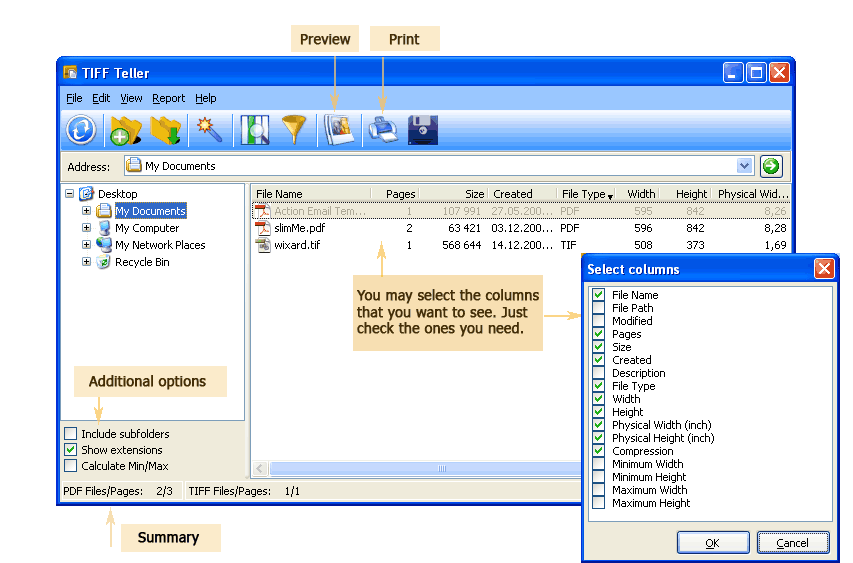
You choose which columns to display. The status bar at the bottom shows the total file count and total page count for all TIFFs in the current folder.
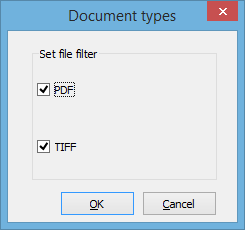
Launch Tiff Teller. The folder tree on the left shows your drives. Navigate to the directory with your TIFF files. The file table populates instantly — each row shows a file with its page count, size, compression type, dimensions, and other properties. Enable Include subfolders to scan nested directories. Use Set Filter to show only TIFF files if the folder contains mixed formats.
The Pages column shows the frame count for every TIFF. The status bar reads something like "TIFF Files/Pages: 350/12,400" — 350 files containing 12,400 pages total. Click a column header to sort by page count, size, or date. If you only need a quick number, you are done.
Go to View → Select Columns. Tick the fields you want in the report: File Name, Pages, Size, Compression, Created, Width, Height, or any combination. Untick columns you do not need.
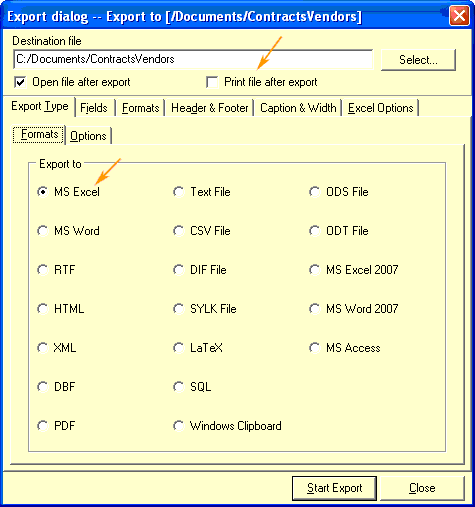
Click the Export button on the toolbar. The export wizard opens:

Tiff Teller includes a command-line interface for automated reporting:
TiffTeller.exe /s "C:\Scans\*.tif" /o "C:\Reports\TiffPages.csv" /f CSV /cols "FileName,Pages,Size,Compression"
Parameters: /s — source path (wildcards supported), /o — output report file, /f — export format, /cols — columns to include. Save this in a .bat file and run it via Windows Task Scheduler. A scheduled script scans the scan archive nightly and produces an updated page-count report for the operations team.
Tiff Teller reports the compression method used in each file. This matters because compression affects file size, compatibility, and print quality:
| Compression | Best For | Typical File Size |
|---|---|---|
| CCITT Fax 3 | Black-and-white faxes (single-strip) | Very small |
| CCITT Fax 4 | Black-and-white document scans | Very small — the most efficient B&W compression |
| LZW | General-purpose lossless compression | Medium |
| ZIP (Deflate) | Lossless, similar to LZW but often smaller | Medium to small |
| JPEG | Color photographs inside TIFF | Small — lossy compression |
| None (Uncompressed) | Maximum quality, no processing overhead | Very large |
| Feature | Manual (open each TIFF) | Tiff Teller |
|---|---|---|
| Speed (500 files) | 2–4 hours | Under 10 seconds |
| Total page count | Must add up manually | Shown automatically in the status bar |
| Compression info | Not visible in most viewers | Displayed for every file |
| File dimensions (pixels, inches) | Check Properties per file | All columns visible at once |
| Export to Excel/CSV | Type manually into a spreadsheet | One-click export to 20+ formats |
| Subfolder scanning | Navigate each subfolder manually | Tick "Include subfolders" — recursive scan |
| Command-line automation | Not possible | Full CLI with scheduling support |
| Mixed PDF + TIFF folders | Need separate tools | Both formats in the same scan |
Tiff Teller does not render each page — it reads the TIFF IFD (Image File Directory) structure directly. This is why a folder of 500 multi-page TIFFs is scanned in seconds. Even damaged files that crash image viewers are read correctly if the directory metadata is intact.
The page-count table exports to MS Excel, CSV, PDF, Word, HTML, RTF, XML, SQL, DBF, ODS, LaTeX, MS Access, SYLK, DIF, and more. Pick the format that fits your workflow: Excel for analysis, CSV for database import, PDF for read-only distribution.
Beyond page counts, Tiff Teller shows the compression type, pixel dimensions, physical size in inches, and DPI. Identify files that use inefficient compression (uncompressed TIFFs in a large archive), oversized scans (11 × 17 where letter-size was intended), or mixed resolutions that may cause print issues.
Double-click a TIFF to preview it without leaving the application. Right-click for file actions: copy, move, delete, or open in an external editor. Manage your TIFF archive directly from the page-count view.
If a folder contains both TIFF and PDF files, Tiff Teller scans both. The File Type column distinguishes them. One tool covers both document formats — no need for a separate PDF page counter.
Download the free 30-day trial — no email or credit card required. A personal license costs $49.90 and includes one year of free upgrades. Works on Windows 7/8/10/11.
Download Free Trial Buy License — $49.90
Download free trial and convert your files in minutes.
No credit card or email required.

Related Topics
How to View the Number of Pages in Multiple PDF Files
