Need help? Reach us at 

 +1 (855) 418-2323
Need help? Reach us at
+1 (855) 418-2323

 File Converters TIFF and PDF apps Forensic Freeware
You have inherited a folder of Quattro Pro spreadsheets — .WQ1 files from the DOS era, .WB1 files from early Windows versions, or .QPW files from Corel WordPerfect Office. None of them open in Excel. Total Excel Converter reads all Quattro Pro formats (WQ1, WB1, WB2, QPW), converts them to XLSX in batch, and preserves cell data, formulas, and formatting so you can work with them in modern Excel or any spreadsheet application that supports the Open XML standard.
Quick answer: To convert Quattro Pro to XLSX, launch Total Excel Converter, open the folder with your WQ1, WB1, or QPW files, check them (or use Check All), click the XLSX button, set the destination folder, then click Start. Total Excel Converter reads every Quattro Pro format and converts whole legacy archives in one offline batch, preserving cell data and formulas.
Quattro Pro is a spreadsheet application originally developed by Borland in 1989, later acquired by Novell and then Corel. Over its history, it has used several file formats:
All three formats are proprietary and not supported by Microsoft Excel, Google Sheets, or LibreOffice Calc.
XLSX is the default format for Microsoft Excel since 2007. It is based on the Open XML standard (ECMA-376) and supported by virtually every modern spreadsheet application: Excel, Google Sheets, LibreOffice, Numbers, and hundreds of third-party tools.
| Feature | Quattro Pro (WQ1/WB1/QPW) | XLSX |
|---|---|---|
| Developer | Borland → Novell → Corel | Microsoft (Open XML standard) |
| Current status | Legacy. Corel discontinued Quattro Pro in 2021. | Active. Industry standard since 2007. |
| Supported by | Corel WordPerfect Office (discontinued) | Excel, Google Sheets, LibreOffice, Numbers, etc. |
| Max rows | WQ1: 8,192. WB1: 65,536. QPW: 1,000,000. | 1,048,576 rows per sheet |
| Max columns | WQ1: 256. QPW: 18,276. | 16,384 columns per sheet |
| File structure | Proprietary binary | ZIP archive with XML files (open standard) |
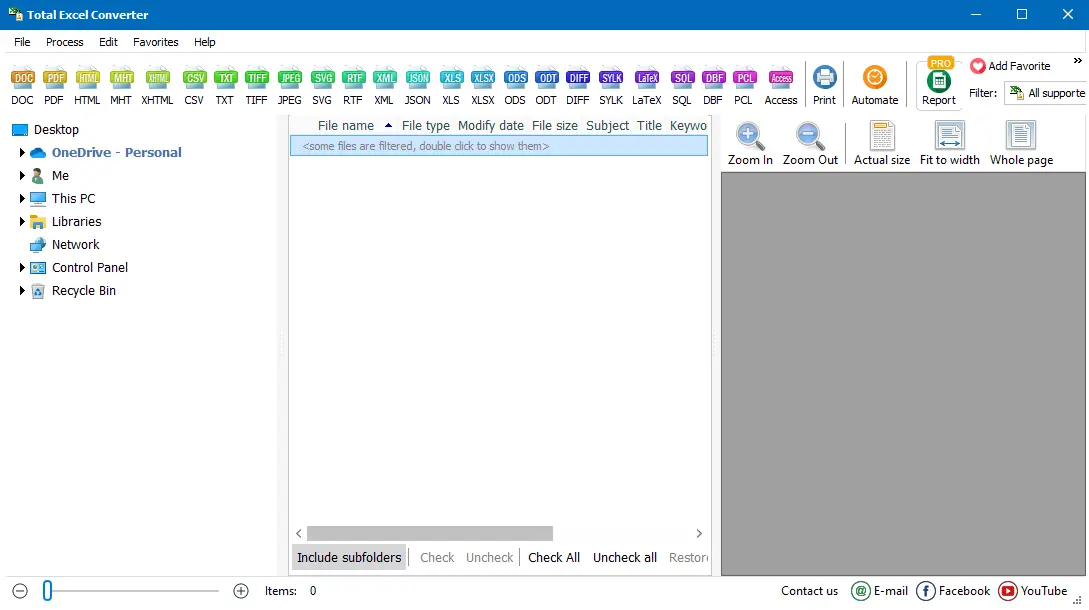
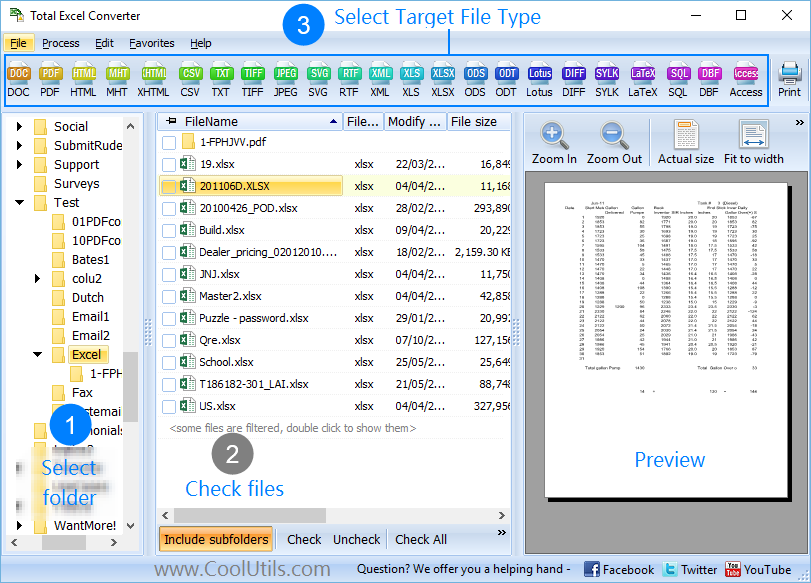
Launch Total Excel Converter. The folder tree on the left shows your drives and directories. Navigate to the folder containing your Quattro Pro files. The file list on the right shows every supported spreadsheet — WQ1, WB1, WB2, QPW files appear alongside XLS, ODS, CSV, and other formats.
Tick the Quattro Pro files you want to convert. Use Check All to select every file in the folder, or filter by extension to show only WQ1 or QPW files.
Click the XLSX button on the toolbar. The settings wizard opens.
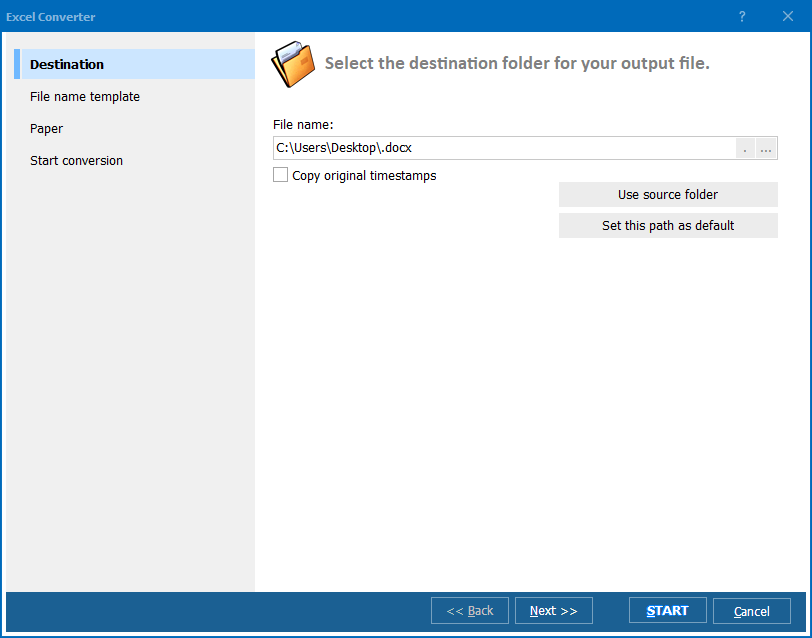
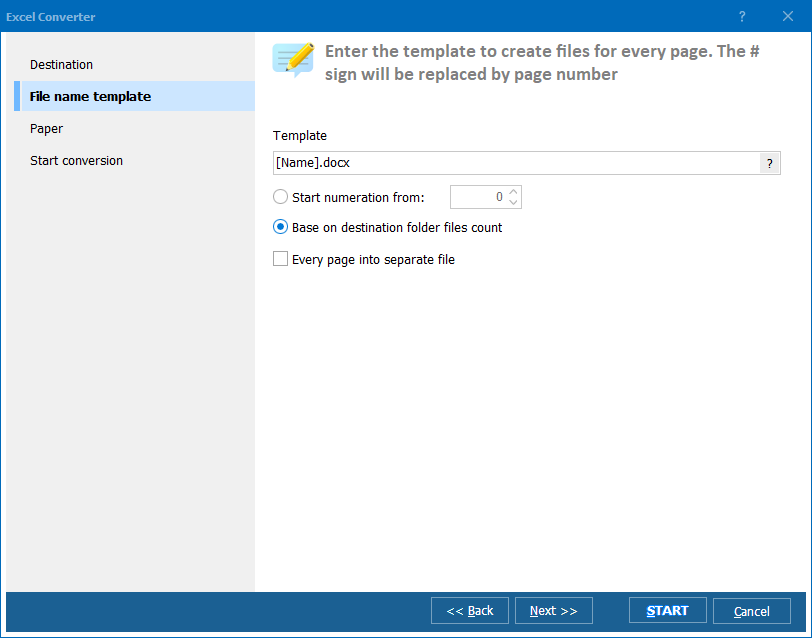
Set the destination folder. Choose whether to keep the original file names (with .xlsx extension) or apply a naming pattern. Adjust formatting options: sheet names, column widths, cell alignment.
Click Start. Total Excel Converter reads each Quattro Pro file, extracts the spreadsheet data, and saves it as XLSX. A progress bar tracks the operation. The log lists every file with its conversion status.
Total Excel Converter includes a command-line interface for scripted and automated workflows:
ExcelConverter.exe "C:\Legacy\*.wq1" -oXLSX -d "C:\Converted\"
Parameters: source files (wildcards supported), -oXLSX sets the output format, -d specifies the destination folder. Convert an entire folder of Quattro Pro files with a single command. Add this to a .bat script for one-click migration of legacy archives.
Additional flags: -SubFolders processes subfolders recursively, -log "C:\log.txt" writes a detailed conversion log.
| Extension | Format Name | Era | Details |
|---|---|---|---|
| .WQ1 | Quattro Pro for DOS | 1989–1993 | Original Borland format. 8,192 rows, 256 columns. Common in legacy DOS archives. |
| .WQ2 | Quattro Pro for DOS (extended) | 1990–1993 | Extended version with additional functions. Same row/column limits as WQ1. |
| .WB1 / .WB2 | Quattro Pro for Windows | 1993–2002 | Borland/Novell Windows format. 65,536 rows. Multiple sheets supported. |
| .QPW | Quattro Pro (Corel) | 2006–2021 | Corel WordPerfect Office format. Up to 1,000,000 rows. Most feature-rich variant. |
Total Excel Converter reads all four format families and converts them to XLSX, XLS, PDF, CSV, HTML, ODS, and 15+ other formats.
| Feature | Online Quattro Pro Converters | Total Excel Converter |
|---|---|---|
| Quattro Pro support | Most online tools do not recognize WQ1, WB1, or QPW at all. | Full support for all Quattro Pro formats (WQ1, WQ2, WB1, WB2, QPW). |
| Batch mode | One file at a time, with manual uploads. | Process hundreds of files in one batch. |
| Privacy | You upload proprietary company data to a third-party server. | Runs locally. No data leaves your computer. |
| File size | Strict limits (typically 10–50 MB). | No file size limit. |
| Automation | Not available. | Command-line with scripting and scheduling. |
| Cost | Free for small files (if the format is even supported). | One-time purchase: $49.90. Free 30-day trial. |
WQ1 from 1989, WB1 from 1996, QPW from 2015 — Total Excel Converter opens them all. No need to hunt for old versions of Corel software. One converter handles every generation of Quattro Pro files.
A file server with 500 legacy Quattro Pro spreadsheets is a common scenario after a company acquires another business or migrates from Corel to Microsoft. Total Excel Converter processes the entire folder in one operation. No manual file-by-file conversion.
Numeric values, text strings, dates, and formulas are extracted from the Quattro Pro file and mapped to the closest XLSX equivalents. Multi-sheet workbooks (WB1, QPW) retain their sheet structure.
XLSX is the most common target, but Total Excel Converter also supports XLS, PDF, CSV, HTML, ODS, TXT, TIFF, JPEG, and more. Convert Quattro Pro to any format your workflow requires.
Preview any Quattro Pro file before conversion. Check the data, verify the sheet count, and confirm that the content looks correct — all without installing Corel software.
Migrate entire archives from the command line. Use wildcards to process all WQ1 files in a folder tree. Schedule nightly conversions to keep legacy files in sync with modern formats.
Download the free 30-day trial — no email or credit card required. A personal license costs $49.90 and includes one year of free upgrades. Works on Windows 7/8/10/11.
Download Free Trial Buy License — $49.90
Download free trial and convert your files in minutes.
No credit card or email required.

Related Topics
Convert XLSX to TIFF in Batch