Need help? Reach us at 

 +1 (855) 418-2323
Need help? Reach us at
+1 (855) 418-2323

 TIFF and PDF apps
A folder holds three hundred invoices, and every one has to reach the printer today. Opening each PDF and pressing Ctrl+P burns an afternoon and still risks a skipped file. Two Windows tools print the whole folder unattended: Print Conductor and Total PDF Printer. They overlap, but they are built for different jobs — here is the honest comparison.
Quick answer: Print Conductor wins when you must print many different file types — Office, images, AutoCAD drawings, labels — from one queue, thanks to 90+ supported formats. Total PDF Printer is the specialized PDF batch printer: it sorts print order by name or date, sets duplex per job, adds separator sheets, runs from a built-in command line, and ships a server edition — $49.90 one-time with a free trial.
| Total PDF Printer | Print Conductor | |
|---|---|---|
| Batch print a folder of PDFs | Yes — whole folder in one silent job | Yes — this is its core job |
| Print-order / sorting control | Sort by file name, modification date, or numbers in the filename | Sorted single-job mode and reverse order |
| Duplex per job | Yes — none, vertical, or horizontal | Yes — duplex and simplex modes |
| Separator sheets | Between every document — blank page or a custom PDF | Cover page to separate a batch |
| Formats beyond PDF | PDF only; the Pro edition adds DOC, XLS, TIFF and images | 90+ types — Office, images, AutoCAD, Visio, ZPL labels, archives |
| Command line | Built in — PDFPrinter.exe, .bat friendly | No built-in CLI; needs the separate 2Printer tool |
| Server / unattended | Total PDF Printer X — ActiveX, DLL, command line | Enterprise licensing for terminal and server use |
| Price model | $49.90 one-time, 30-day free trial | Free for non-commercial; commercial from $149 one-time |
Print Conductor is a mature, well-known batch printer, and its headline strength is reach: it prints over 90 file types from a single list — PDF, Word, Excel, PowerPoint, images, AutoCAD DWG/DXF, Visio, Zebra ZPL labels, even files inside ZIP archives. If your queue mixes formats, one Print Conductor list handles all of them, where Total PDF Printer would need its Pro edition just to reach DOC, XLS and TIFF.
It is also free for non-commercial use, so a home user pays nothing — the free run simply adds a report page at the end of each session. It offers duplex, automatic tray selection by paper size, several pages per sheet, collation, and a print-completion report. For a mixed-format library on a home PC, it is a strong and honest choice.
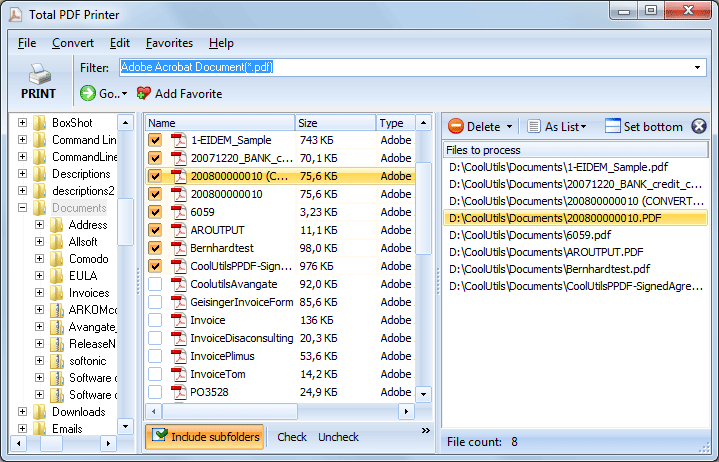
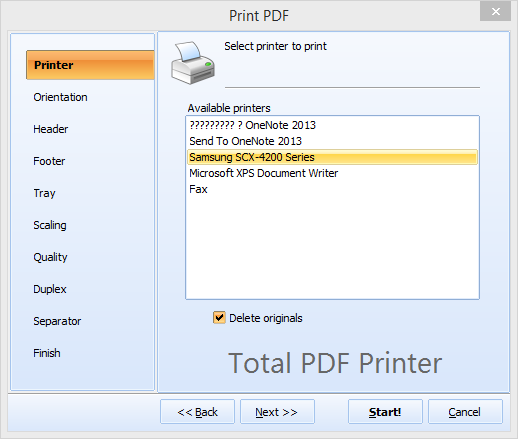
Install Total PDF Printer, click Add Folder and point it at the directory, choose your printer, then set paper size, tray, duplex, scaling and separator sheets. Click Print and every PDF goes to the printer silently, in the sort order you picked, with no file-by-file opening and no Adobe Acrobat. Subfolders are included on request, so a whole archive tree prints in one pass. See the step-by-step batch print guide for the full walkthrough.
Yes — Total PDF Printer has a documented command line built in, so no companion product is required:
PDFPrinter.exe "C:\Invoices\*.pdf" -p "HP LaserJet" -sort date -d vertical -sep blank -Recurse
-p picks the printer, -sort date orders files by date, -d vertical sets duplex, -sep blank inserts a blank separator between documents, and -Recurse includes subfolders. The full switch list also covers tray, paper size, scaling, copies and headers. With Print Conductor you would script fCoder's separate 2Printer utility instead.
Use separator pages. Total PDF Printer can insert a blank sheet or a chosen PDF between every printed document, so when the stack comes off the printer each client's set is already divided — no hand-sorting a 300-page pile. Command-line jobs get the same with -sep blank or -sep document plus -sepdoc for a custom divider page.
Total PDF Printer costs $49.90 for a lifetime license. The 30-day trial is free and needs no email or credit card — run it on a real folder and watch the whole stack print unattended. For the GUI walkthrough, see how to batch print PDF files.
Download free trial and convert your files in minutes.
No credit card or email required.