Print PDF files in batches via command line.
Windows
2000/2003/Vista
7/8/10/11/Citrix
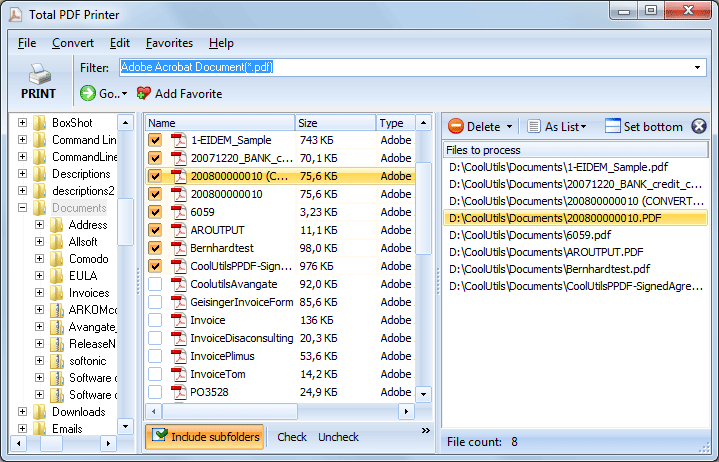
Total PDF Printer is invaluable to print many PDF files in batches. Imagine you have a folder with PDF files and you need to print each of them. Without PDF Printer you will have to open each file and click Print button. That's a boring and time taking process. Instead launch Total PDF Printer, select the folder and click Print just once. The program will print hundreds of PDF files without interruption (silent printing).
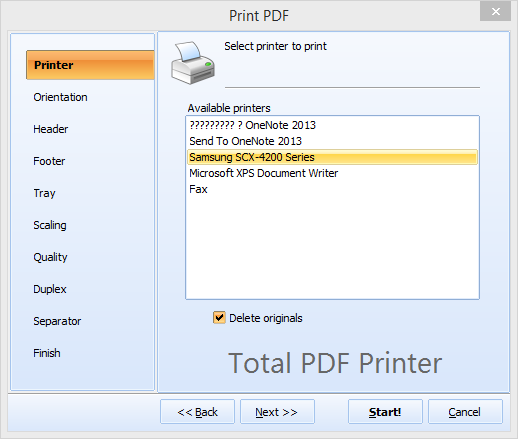
Total PDF Printer can be handled via user-friendly GUI (see screenshots) and command line. There is a special server version for web-servers or services - Total PDF PrinterX (with Active X).
(includes 30 day FREE trial)
(only $49.90)
Teams that batch-print PDF files without opening each one
Print entire folders of PDF files in one click
Office staff print hundreds of PDF reports, memos, and forms from shared folders without opening each file. Select the folder, click Print, and Total PDF Printer handles the rest silently — with fit-to-page and auto orientation for mixed page sizes.
Batch-print invoices sorted by date or time
Accounting teams print daily batches of PDF invoices and financial statements in date order. Add page numbers and separator sheets between documents so the printed stack stays organized for distribution, filing, or mailing.
Print case files with pagination and separators
Law firms print PDF briefs, contracts, and evidence files in bulk. Separator sheets keep documents divided in the output stack, pagination adds page numbers for easy reference, and duplex mode saves paper on lengthy case files.
Batch-print research papers, syllabi, and handouts
Universities and research departments print stacks of PDF articles, course materials, and administrative forms. Sort by filename or date, choose the right paper tray for each job, and let Total PDF Printer process the entire queue unattended.
Schedule hands-free printing via command line
IT departments automate recurring print jobs by calling Total PDF Printer from scripts and scheduled tasks. PDF reports deposited into hot folders are printed automatically — no GUI interaction needed. For web server integration, upgrade to Total PDF PrinterX with ActiveX.
| Full Software Name | Coolutils Total PDF Printer |
| Description | Total PDF Printer is a professional tool for batch printing PDF files with advanced control over tray selection, duplex mode, scaling, and more. Easily print hundreds of PDFs from folders or command line with full automation. Ideal for legal, logistics, and office document workflows. |
| Processor | At least 2.4 GHz |
| RAM | 4 GB |
| Minimum Hard Drive Space | 17.8 MB |
| Operating System | Windows 2000 / 2003 / 7 / 8 / 10 / 11 |
| Trial version | Download Total PDF Printer and test it free for 30 days. Experience fast and flexible printing of PDF files with full control over settings like printer trays, orientation, and scaling. |
Updated Tue, 25 Nov 2025
(only $49.90)
"Each semester we need to print hundreds of Statement of Exam Results for our students. Of this 4-6 pieces of papers belong to the same individual and is to be stapled together. Before we found Total PDF Printer, we spent lots of time with reinforced manpower to help sort out the papers. As the College grows, the time spent doing it could not justify.
Now we no longer need to worry about that. Total PDF Printer won our hearts in terms of its user-friendliness as well as a feature-pack PDF printer software."
Kong LA
Private College Kuala Lumpur
"I create invoices and reports that need to be sent to customers. For each invoice there are one or more reports. The reports are printed double sided (on duplex printer). Until recently I printed first all the invoices for all the customers (to one queue) and then all the reports (to another queue). Then it was needed to sort all this so in each envelop for each customer invoice will be together with reports. What I want is to print invoice then reports for it then next invoice and reports for it and so on. So now I print them to PDF files and then send them to a printer with your command line utility."
Baruch Skorohod
http://www.afik.co.il/
Just select the printing quality between high, medium, and draft.
But don't just take our word for it. Total PDF Printer has been useful for many of our customers who had to deal with complex printing tasks.
For example, one of our clients, an educational institution, used to spend a lot of time printing and sorting out exam results statements for students, as each student had 4 to 6 pages of their own. Total PDF Printer solved this problem by printing the statements in the correct order, making it easy to staple and compile them.


Configuring settings for printing several pages on one sheet


Updated Tue, 25 Nov 2025
(only $49.90)
Download free trial and convert your files in minutes.
No credit card or email required.