Need help? Reach us at 

 +1 (855) 418-2323
Need help? Reach us at
+1 (855) 418-2323

 TIFF and PDF apps
The job is simple to describe: merge a few hundred invoices, scans, or reports into clean, organized PDFs. The default advice is to get Adobe Acrobat — a subscription suite where combining files is one feature among hundreds and every batch is assembled by hand. Here is how Acrobat compares with CoolUtils PDF Combine, a Windows tool built around that one job.
Quick answer: Buy Adobe Acrobat if you need a full PDF editor: text editing, OCR, forms, e-signatures. For merging at scale, PDF Combine wins: hundreds of files per batch, one merged PDF per subfolder, automatic bookmarks and table of contents, offline and command-line operation, and a $59.90 one-time license instead of a subscription.
| PDF Combine | Adobe Acrobat | |
|---|---|---|
| Merge hundreds of PDFs in batch | Yes — select whole folders in the file tree | Yes — interactive Combine Files dialog, filled by hand each run |
| Keep folder structure | Yes — one merged PDF per subfolder | No — each run produces a single combined PDF |
| Bookmarks and navigation | Bookmarks from file names or titles, clickable table of contents, cover page | Bookmarks from file names; no auto-generated TOC page or cover page |
| Edit PDF text, OCR, forms, e-sign | No — PDF Combine only merges | Yes — full PDF editor, the industry standard |
| Merge DOC, XLS, images, emails into one PDF | PDF Combine Pro: DOC, XLS, HTML, TIFF, JPEG, PNG, EML, MSG and more | Yes — Combine Files converts supported formats |
| Blank page handling | Deletes blank pages from scans; inserts blanks for double-sided printing | Manual page editing after combining |
| Command line | Yes — documented switches, .bat friendly; PDF Combine X for servers | No merge switches; automation requires the Acrobat SDK |
| Account and cloud | No account, no upload — fully local | Adobe ID sign-in; Document Cloud integration optional |
| Price model | $59.90 one-time license; Pro $129.90 | Subscription (Standard or Pro); current pricing on adobe.com |
| Operating system | Windows 7/8/10/11 | Windows and macOS, plus web and mobile apps |
Acrobat is the industry standard for a reason. It edits PDF text and images directly, runs OCR on scans, builds and fills forms, redacts confidential passages, and its e-signature workflow is accepted everywhere. The Combine Files tool merges PDFs together with Word, Excel, and image files, adding a bookmark for each source document. Desktop apps for Windows and macOS are backed by web and mobile versions.
If PDFs are your daily work — editing, commenting, signing, securing — Acrobat earns its subscription. The question is whether you need all of that when the task in front of you is merging files.
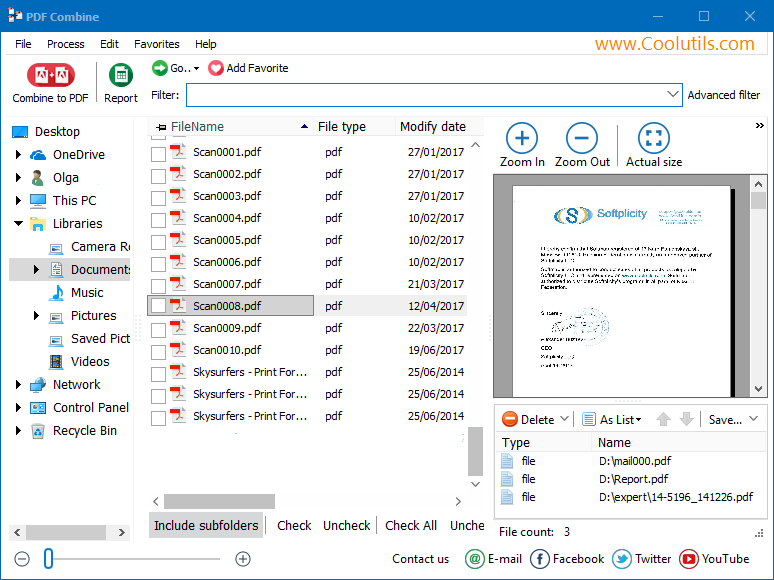
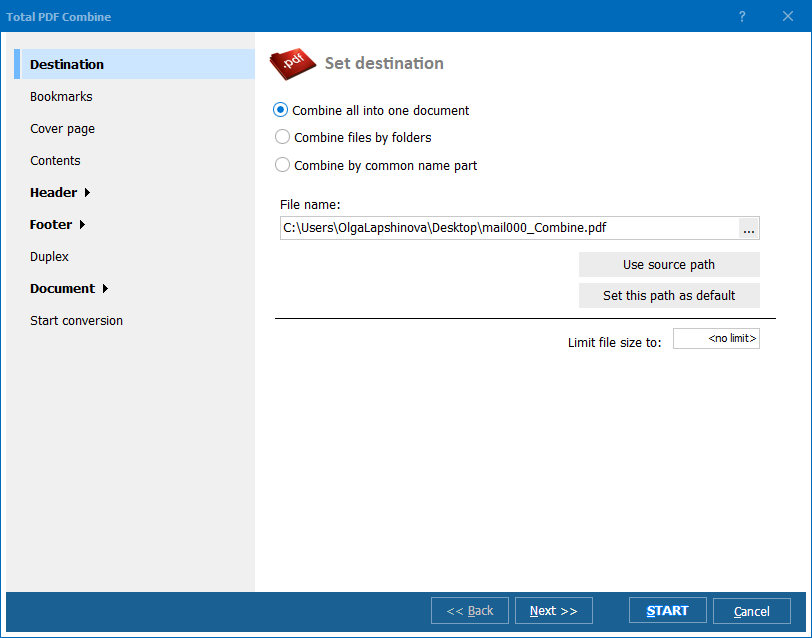
Install the free 30-day trial of PDF Combine, click the folder with your PDFs in the file tree, check the files (or hit Check All), press Combine to PDF, review bookmarks, contents, and header options in the wizard, and click Start. The same job runs from the command line:
PDFCombine.exe C:\Invoices\*.pdf C:\Output\combined.pdf -PN -TOC
This merges every PDF from the folder into one file with page numbers and a clickable table of contents. Put the line into a .bat script or Windows Task Scheduler and the merge runs unattended.
Yes — this is exactly what desktop batch software is for. PDF Combine processes entire folder trees in one pass and produces either one big document or one merged PDF per subfolder. It cleans blank pages out of scanned batches, inserts blank pages for double-sided printing, numbers pages across the whole set, and can encrypt the result. Accounting and legal teams merge a month of paperwork in one run instead of a week of dialogs.
If your company already pays for Acrobat, use it — merging works, just manually. Buying it only to combine files is harder to justify: you pay every month for an editor, OCR, and signatures you will not touch, while the merge workflow itself stays manual, with no folder-by-folder output and no command line. A focused tool costs $59.90 once and automates the job. See how Acrobat and seven other tools scored in our review of PDF combining software.
PDF Combine costs $59.90 as a one-time license, PDF Combine Pro $129.90. The 30-day trial is fully functional and requires no credit card or email — test it on the folder you actually need to merge.
Download free trial and convert your files in minutes.
No credit card or email required.