Need help? Reach us at 

 +1 (855) 418-2323
Need help? Reach us at
+1 (855) 418-2323

 TIFF and PDF apps
(includes 30 day FREE trial)
(only $59.90)
Quick answer: To split a PDF by bookmarks, launch PDF Splitter, select your files, click Split PDF, choose Split by Bookmarks and pick the bookmark level (1 for parts, 2 for chapters, 3 for sections), then choose a destination folder and press Start. Each bookmarked section becomes its own PDF, named after the bookmark title — no page counting, no manual renaming.
PDF bookmarks are a clickable table of contents embedded in the file. A technical manual might have top-level bookmarks for each part, second-level bookmarks for chapters, and third-level bookmarks for sections. This tree structure defines the logical divisions of the document.
Splitting by bookmarks means using this tree to create separate PDF files. Each bookmark becomes a cut point. The pages between one bookmark and the next are extracted into a new file, named after the bookmark title. A 20-chapter book produces 20 individual PDFs — automatically, without counting page numbers.
PDF Splitter goes further: you choose which bookmark level to split at. Split at level 1 to get one file per part. Split at level 2 to get one file per chapter. Split at level 3 for individual sections. This flexibility handles even complex documents with deep bookmark hierarchies.
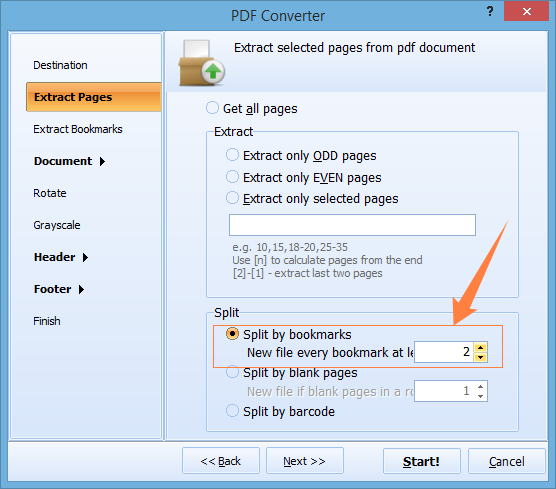
The entire process takes seconds, even for documents with hundreds of bookmarks. PDF Splitter preserves the formatting, fonts, and images of every page.
PDF Splitter includes a command-line interface. The easiest way to use it: configure your split settings in the GUI, then click Generate .bat file. The program creates a ready-to-run batch script with all parameters — no need to memorize command syntax.
PDFSplitter.exe C:\Manuals\*.pdf -SplitByBookmarks -Level:2 -o C:\Chapters\
Schedule this in Windows Task Scheduler to split incoming PDF files automatically. The command-line version runs without a GUI and fits into document processing pipelines.
 Bookmark level selection. Most PDF tools split at the first bookmark level only. PDF Splitter lets you choose any level in the hierarchy. A book with parts, chapters, and sections can be split at any of these levels — or all of them.
Selective extraction. Need only chapters 3 and 7? Specify bookmark names and extract just those sections. The rest of the document is skipped. No need to split everything and delete what you do not need.
Automatic file naming. Each output file is named after its bookmark title. A bookmark called "Chapter 5 - Installation" produces a file named "Chapter 5 - Installation.pdf". No manual renaming of split_001.pdf, split_002.pdf.
Batch processing. Drop a folder of 50 bookmarked PDFs and split them all in one run. Each document is split according to its own bookmark structure. No file-by-file handling.
More than bookmarks. PDF Splitter also splits by page count, by page ranges, by blank pages, and by barcode. One tool covers every splitting scenario.
One-time purchase. A single license at $59.90 covers the software for life. Free upgrades for 12 months. No subscriptions, no per-file charges.
| Task | Manual (Acrobat) | PDF Splitter |
|---|---|---|
| Split 500-page PDF by chapters | 30–60 minutes | Under 10 seconds |
| Choose bookmark level | Not supported | Any level in hierarchy |
| Extract specific bookmarks | Count pages manually | Specify bookmark names |
| Output file naming | Generic (pages_1-25.pdf) | Bookmark title as filename |
| Batch processing | One file at a time | Entire folders at once |
| Automation | Not possible | Command-line + .bat generator |
| Software cost | Adobe Acrobat ($240/yr) | PDF Splitter ($59.90 once) |

(includes 30 day FREE trial)
(only $59.90)
Download free trial and convert your files in minutes.
No credit card or email required.