Need help? Reach us at 

 +1 (855) 418-2323
Need help? Reach us at
+1 (855) 418-2323

 TIFF and PDF apps
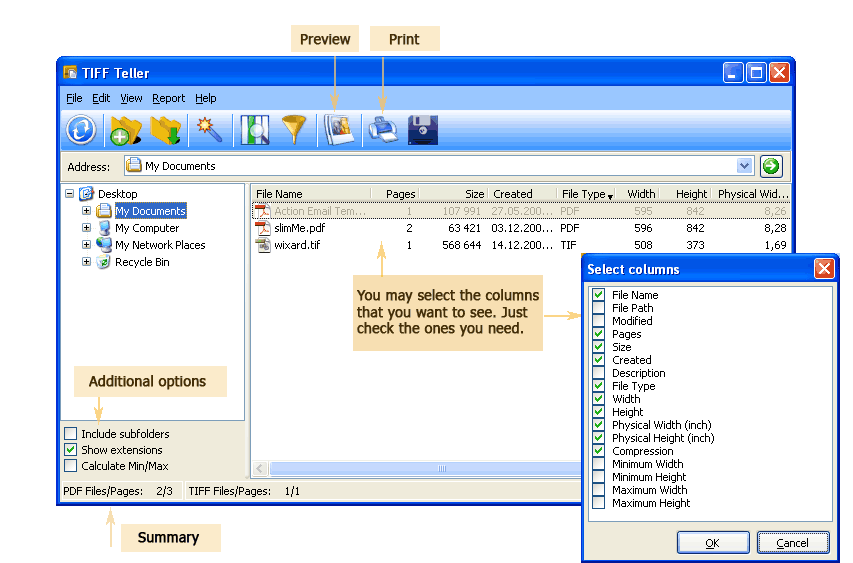
Multi-page PDF files may contain pages of different sizes, if they were combined from different sources. You can always find out what is the size of each page in PDF documents using Tiff Teller. Some users asked us to add an option to tell the size of the 1st page, now it's possible too.
Quick answer: To find the size of the first page in a multi-page PDF, open the folder with your PDFs in Tiff Teller and read the Width/Height columns for the size in pixels, or the Physical Width/Physical Height columns for the size in inches. If those columns are hidden, click Choose Columns, tick them, and press OK — no need to open the file.
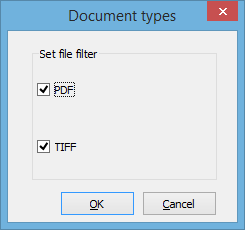
This program is created for quick review of PDF and TIFF files properties. It shows the table with PDF and TIFF files stored in selected folder. You can filter files by type for better comfort. You can set what columns to show, hiding the info you do not need. It is very convenient way to check the properties of a few files at once - no need to open each. This is how to know the size of the 1st page in the multi-page PDF without opening it:
If you do not see these columns in the table, go to the top menu and press the "Choose columns" icon. Check the missing columns in the popup and press "OK". You will see the report view in full.
In case you wish to export the information to CSV or PDF file, press the "Export" icon. In the popup window you will be offered to select location, report name, file type, fields, etc. Depending on the selected format, you can add a header and a footer, adjust the format of each column in the report table. When all adjustments are done, you simply need to click on "Start Export" on the bottom. It becomes active after all required parameters are setup.

Tiff Teller works with PDF and TIFF files, showing all possible information about them. Additionally, you can order these files properly by relocating them inside the program. This small add-on helps to sort your files correctly.
Buy Tiff Teller now ($49.90 only!) and see how much it knows about your PDF documents.
Windows XP/2003/Vista/7/8/10/11
Download free trial and convert your files in minutes.
No credit card or email required.