Need help? Reach us at 

 +1 (855) 418-2323
Need help? Reach us at
+1 (855) 418-2323

 File Converters TIFF and PDF apps Forensic Freeware
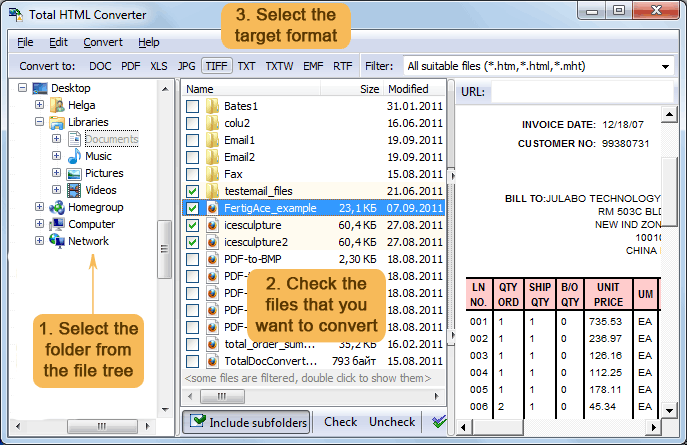
To convert an HTM file to a DOC file, you can use the CoolUtils converter. The CoolUtils converter is a free online HTM to DOC converter that can be used to convert HTM to DOC files without any limit. To use the CoolUtils converter, simply upload the HTM file you want to convert and select the output format as DOC. The converted file will be available for download immediately.
So, there you have it. A complete guide on how to convert HTM to DOC by CoolUtils. Give it a try and see how easy it is to use!
"Authors submit manuscripts as HTM files. We batch-convert them to DOC for our editorial workflow. Total HTML Converter preserves footnotes, tables, and styling accurately. Processes 100+ files per batch."
 David Morrison Publishing Coordinator, Oxford University Press
"Court documents downloaded as HTM need to be in DOC format for filing. Total HTML Converter converts them in batch with perfect formatting. The command-line option lets us automate the daily process."
Laura Bianchi Office Manager, Studio Legale Bianchi
"We convert internal knowledge base articles (HTM) to DOC for offline distribution to field engineers. Total HTML Converter handles our complex CSS layouts and produces clean, editable Word files."
 Kenji Yoshida Web Developer, Sony Interactive Entertainment
Download free trial and convert your files in minutes.
No credit card or email required.